Viewing Each Monitor Individually In A VNC Session

So right now I am using the free version of RDM and using VNC to remote access some computers. Whenever I open up a VNC session, it'll display both monitors and I would want the option to switch between the two. Is there a way I can do while using FreeVNC as my VNC method?
All Comments (16)
Hello
Thank you for the feedback. We're eager to expand the features available via freevnc and user feedback is a big driver of that.
I'll look into what's possible here - however, it's important to know which VNC server you are using? Multi-monitor support is not a part of the standard RFB protocol, but different vendors have implemented their own extensions so allow this capability.
Thanks and kind regards,
Richard Markievicz
I am currently using TightVNC, but am I unable to figure out how to view individual monitors on a multi-monitor system. I know in the Actions tab under Commands, there is an option for "Select Full Desktop / Switch Monitor", but it doesn't do anything while under FreeVNC.
Hello
Thanks for the update.
In a regular VNC connection in RDM, the "Switch Monitor" command currently only applies when connected to an UltraVNC server. It's also available when connecting to a macOS system using the Apple Remote Desktop connection.
To give some background: as I said, multi-monitor support is not a standard part of the RFB (VNC) protocol, and different vendors implement their own extensions for this. To my knowledge, UltraVNC and RealVNC both support something like this. Because UltraVNC is open-source, we're able to implement the same messages as them to drive this feature. RealVNC is closed-source, we don't currently have insight into how they implement this feature so we cannot support it when connecting to a RealVNC system.
For TightVNC, I did take a look at their documentation and sources but I couldn't see anything obvious that suggests they support multi-monitor in this fashion with their server. I'll keep investigating that but maybe you know if they have that feature in their own viewer?
Thanks and kind regards,
Richard Markievicz
Thank you for the information. At least in the meantime, I can zoom in for TightVNC which will make things more visible even though each monitor will still be side-to-side depending on Window's orientation.
Hello again
I assume that you're connecting to a Linux server? You might look at TigerVNC; it does seem to have an option to choose which displays are shared. Although it's a "connect-time" setting that's something we could incorporate into RDM (by using some kind of smart reconnect, probably).
Another idea for a workaround is to run a separate VNC server for each display (running on distinct ports). You could represent that in RDM by multiple connections entries.
Let me know if you have some questions or further feedback
Thanks and kind regards,
Richard Markievicz
Hi, are there any updates on this feature?
I'm currently using UltraVNC and was wondering if there's a way to view or control only the second monitor instead of the primary monitor or all displays at once.
If not yet available, could you please confirm whether per-monitor selection is planned for future releases?
Thanks!
Hello
I know that UltraVNC supports this and I think it should work with RDM, did you try this option to switch between the full desktop and individual monitors?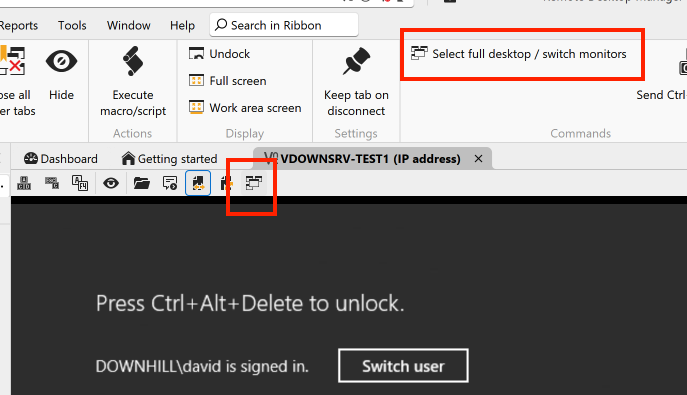
Let me know if it works for you.
Thanks and kind regards,
Richard Markievicz
Screenshot 2025-11-07 at 16.11.56.png
Hi, thanks for your help. I don't understand what I'm doing wrong, but my toolbar is different. The session type is: “Default (FreeVNC)”.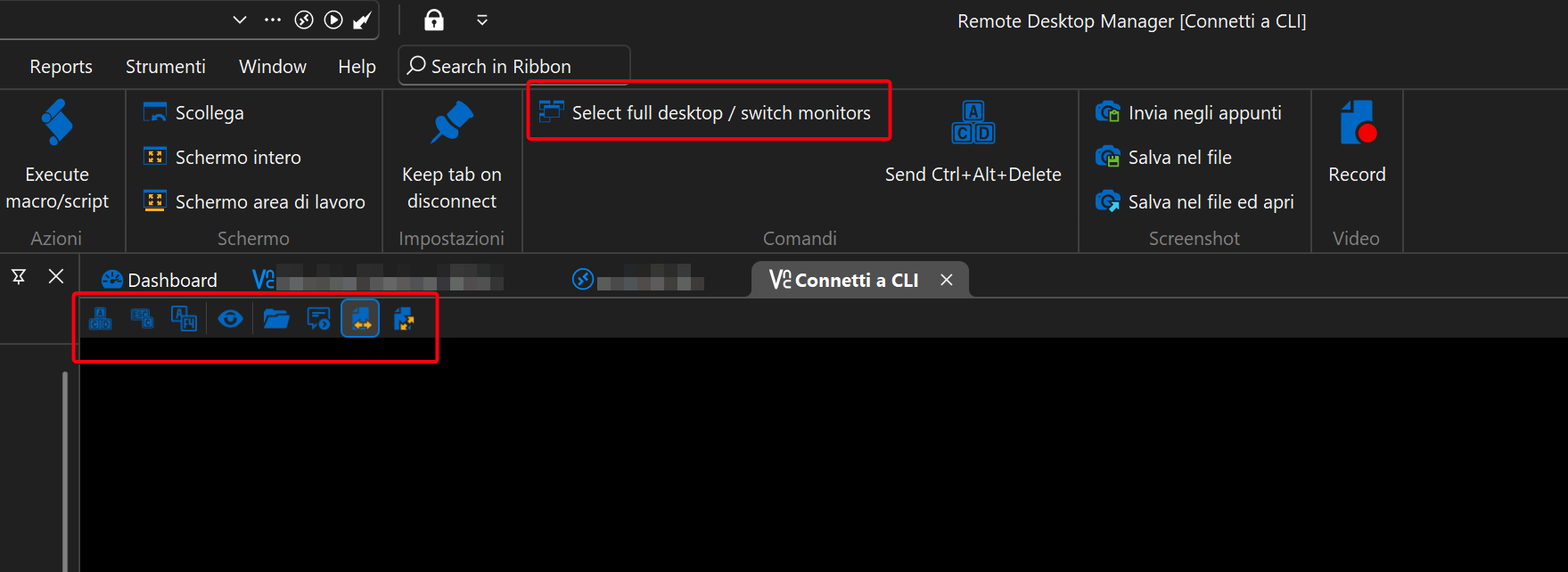
2853f36f-f68e-4491-9f18-f168b85607c0.png
Hello
I think the toolbar shortcut was only added recently, so if you have an older version of RDM it might not be there.
Does the button in the ribbon work as expected?
Thanks and kind regards,
Richard Markievicz
Thank you for your reply. After updating to 2025.3.21.0 64-bit (PreJlT), the button appeared in the toolbar, but I learned that it has the same functionality as the “Select full desktop / switch monitors” button, it switches between both monitors and the main monitor. There is no way to view only the second monitor in a readable manner. Unfortunately, viewing the monitors side by side makes the second monitor difficult to read. Thank you for your help!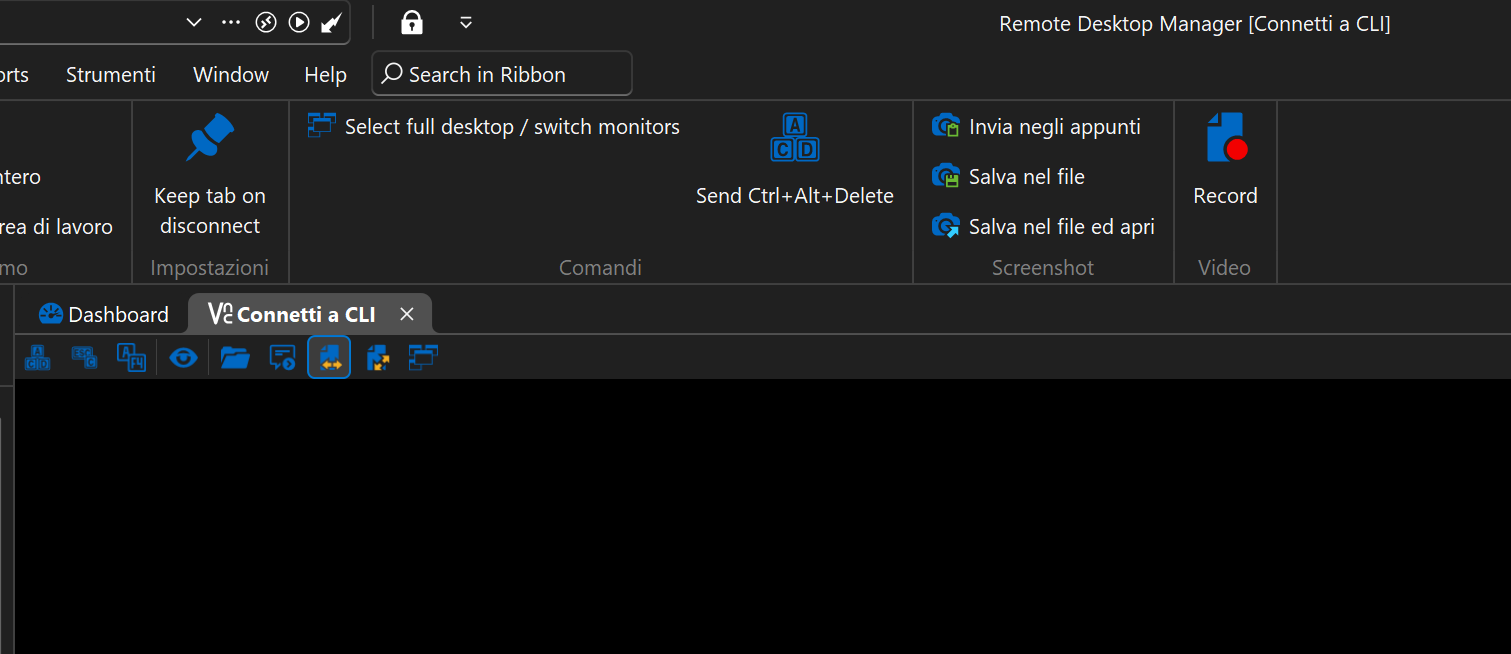
c8029790-2060-47c8-b6af-65b4d00abcbf.png
Hello
I need to investigate what information we are receiving from the VNC server in this case, but it sounds like a bug on our side. I'll post back here once I have some more information. Thanks for your patience!
Kind regards,
Richard Markievicz
Hello @dns2811
Sorry for the long delay, it took me some time to get an environment setup to test this.
I'm afraid I can't reproduce your results: I have a server running UltraVNC 1.6.4 with two monitors attached. When I connect from RDM, the "Select Full Desktop / Switch Monitors" button properly cycles between full desktop, monitor 1 and monitor 2.
Assuming you're still having a problem with this, can you let me know if it works as expected when you connect using the UltraVNC Viewer? I'd like to rule out an issue on the server side.
Thanks and kind regards,
Richard Markievicz
I tried it yesterday with rdm on another computer and it cycled between a single monitor (I don't know if it was the primary or secondary monitor) and both monitors. In fact, in order to be able to read, I activated the side-by-side monitor mode, moved the window to the other monitor, and then reactivated the single monitor view. However, if you say it works for you, I'll do some more testing with rdm and ultravnc viewer.
thanks!
Okay, I just tried it. Even on UltraVNC Viewer, the view switches from single monitor to side-by-side monitors, and it is not possible to view one of the two monitors individually. The UltraVNC Server version is 1.6.4.0, but at the moment I cannot determine the UltraVNC Viewer version that was used for the connection in this test. If necessary, I can retrieve it.
Hello
Since the issue also occurs with the UltraVNC Viewer, I'd suggest raising a question or issue on their side. I suspect that something is "off" in the server configuration, but I'm not an expert on UltraVNC internals and not sure what to suggest. It sounds like the feature fundamentally works since you can switch between full desktop and the first monitor, but for some reason it doesn't let you switch to the second monitor. UltraVNC has a lot of settings and configuration options and I'm just not sure what is relevant there.
If you can resolve the problem with UltraVNC Viewer but still have issues in RDM, please don't hesitate to reach back out.
Thanks and kind regards,
Richard Markievicz
Understood, thanks!