VNC - UltraVNC Display Scaling cutting off bottom of remote window
VNC - UltraVNC Display Scaling cutting off bottom of remote window

I use UltraVNC server to remote into my local systems and I've noticed a scaling issue with these connections. If I have the 'Scaled' box checked under Settings->Display it fills the embedded tab as expected but the bottom portion of the screen is cut off and I can't access the start menu or task bar. If I uncheck the scaled box then the connection display is very small and centered in the tab window but everything is visible.
Comparing the connection window to my UltraVNC client with 'Display -> Auto Scale screen' enabled I can see that RDM is slightly reducing the zoom factor but it's not enough to account for the ribbon and header bars at the top and the bottom of the screen ends up getting cut off.
Ideally it would take the top bars into account and size it correctly automatically, and as a workaround there should be a scroll bar presented in the tab that would allow you to scroll the display window and reach the bottom portion of the remote desktop.
Using Remote Desktop Manager Version 2022.1.27.0 64-bit on Windows 10
UltraVNC Client version: 1.3.4.2 (On same PC as RDM)
UltraVNC Server version: 1.3.4.2 (On target remote system)
All Comments (7)
Hello
Thank you for the detailed issue report. I apologize for the inconvenience.
I've done some testing on my side and I wasn't able to easily reproduce the problem. When connecting with the "Scaled" option checked, my session was properly scaled to the RDM window (and the taskbar etc were all visible).
I expect the behaviour you see might be caused by something environmental, or another setting inside RDM.
What's the operating system of the server? What kind of display resolution do you have configured?
Would you be able to upload a screenshot showing the issue? This might give me some additional clues.
Overall the UltraVNC integration is tricky from our side, since we have the wrap the viewer inside an ActiveX control and then embed that into RDM. It's possible that something is causing the embedded window to take the wrong dimensions. Out of curiosity, is there a specific feature you depend on in UltraVNC that's not supported by freevnc?
Thanks and kind regards,
Richard Markievicz
OS of the target VNC system is Windows Server 2008 R2 (I know it's old but it serves its purpose and isn't directly exposed to the internet). Resolution on the system is 1280 x 960.
I use UltraVNC's file transfer feature a fair amount and that's why I chose that particular VNC application in the configuration. However since you mentioned that I decided to try the integrated / default FreeVNC and it seems to resize and fit itself properly and as expected. With FreeVNC I see none of the sizing and placement oddities illustrated in my screenshots.
I've attached a few screenshots that show some oddness with how RDM deals with position and sizing. If I had to guess, the logic that is handling the ActiveX resize and placement isn't working as intended and is doing some wonky things math wise.
Issue1 PNG: Shows RDM maximized on the left and an UltraVNC window on the right set to 'Auto scale screen'. You can see the content that RDM is clipping from the bottom of the window.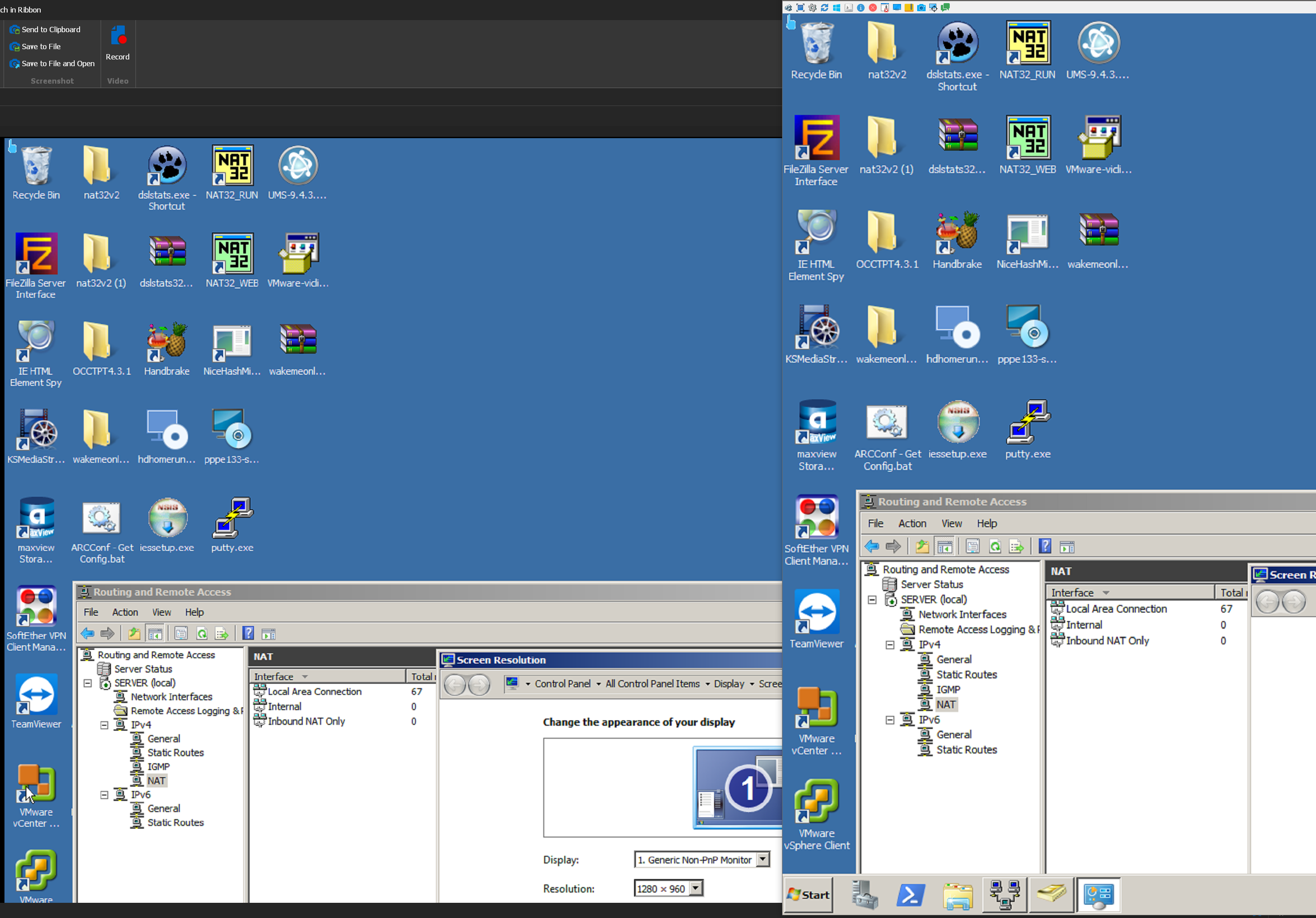
Issue2 PNG: Shows RDM shrunk down to a very wide but short window. This shows even more of the bottom half of the viewer window being cut off from the remote screen.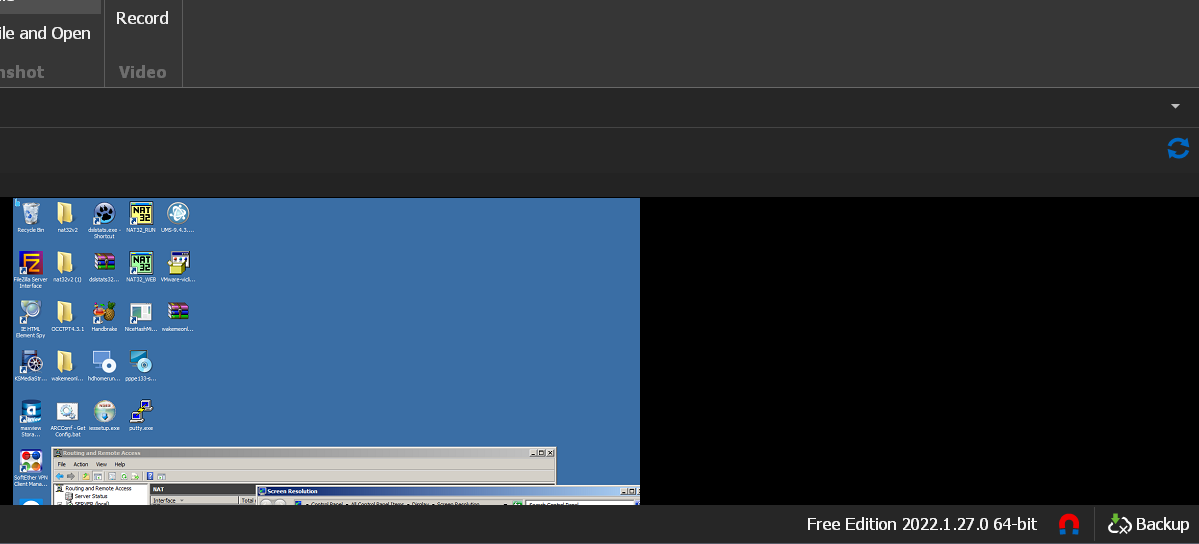
Issue3 PNG: Shows RDM shrunk down to a narrow but very tall window. In this case I am able to see the bottom of the window, however there is an odd off center behavior where there's a lot of black space from the top of the window to the top bar of RDM while the space at the bottom is far less. This results in the viewer window being very bottom justified in position.
Hopefully this is helpful, thanks again for looking into this!
RDM-VNC_Sizing_Issue3.PNG
RDM-VNC_Sizing_Issue2.PNG
RDM-VNC_Sizing_Issue1.PNG
Hello again
Thanks for the detailed follow up.
Your client OS is Windows 10 - what do you have configured in Settings > System > Display > "Scale and Layout"? Specifically, I'm wondering what scale factor your display is configured for.
Thanks and kind regards,
Richard Markievicz
150% is my scaling factor for my desktop display. (4K / 3840x2160)
Hello again
Thanks for the update. I confirm the issue seems to be due to display scaling on the client side.
The UltraVNC integration is quite old, and only recently we updated the code and removed the "deprecated" flag from the connection type. There was some layout logic that was never updated - prior versions of the .NET Framework didn't handle display scaling so well, and needed workarounds to get everything displayed properly.
I'm working on a fix for this, and it should be in an upcoming release but I cannot say exactly when that will be. We'll endeavour to update this post once the fix is available.
Moving forward, it's in our roadmap to integrate the UltraVNC file transfer capability into freevnc; so I encourage you to keep an eye on the release notes and look for that in a future release.
Thanks and kind regards,
Richard Markievicz
Fantastic! Thanks for the update and I'll look for those changes coming to future releases, either one would take care of the problem nicely for me.
I appreciate your attention to this issue, thanks again!
Hello
Remote Desktop Manager 2022.2.13.0 is available and does contain a fix for this specific issue.
The QA team noted that there are still issues when using scaling of 200% of higher, so the ticket is still open on our side and we will be taking another look.
However, I'd be interested to know if the issue seems resolved from your side since you are using a lower scaling setting.
Please don't hesitate to post if you have other questions or concerns.
Thanks and kind regards,
Richard Markievicz