RDM should update to morden UI

The program should be updated from inside to outside, coz it's to slow. Everytime I use it I need to wait 10-20 secs. It's even slow than my computer boot up time(Windows 11 need 7 secs).
All Comments (11)
Hello,
Thank you for contacting us on this subject!
We do have a couple of recommendations to help accelerate the start up of RDM.
- Make sure to have less than 3000 entries in your vault. Having more than that can affect RDM's performances and loading times.
- You can go to File > Options > Application > Application Startup and disable "Show Splash screen" to accelerate the startup process
I also invite you to consult our help topic on the subject of startup performances in RDM, especially point number 3 which can also help alleviate slowness on startup. https://kb.devolutions.net/rdm_startup_performance.html
Best regards,
Gabriel Degrandpré
OK, I have try a clean install, and disable splash screen, it save 3 secs for me, but it still need 10 more secs. I don't know why RDM so slow, even slower than Photoshop, I think you guys can feel it too. Please take your time to optimize the program, it's really important, coz save time, save lives.
Our startup time is about 6 seconds when OTP is not required, which our customers consider acceptable given that they launch RDM once a day.
Hello xray,
I believe it might still be possible to shave some time from your RDM startup. In most environments, with certain exceptions, the 6 seconds that justpaul mentions is closer to what is expected.
If you are interested in continuing to troubleshoot this issue, we should be able to identify the nature of the slow startup with the RDM profiler.
With the Command Prompt, you can navigate to the folder where RDM is installed on your computer (the default location is C:\Program Files (x86)\Devolutions\Remote Desktop Manager) and use the command line RemoteDesktopManager64.exe /Profiler
This command line will launch RDM and the Performance Profiler. Please provide us a screenshot of the results in the Performance Profiler. This will give us a good idea of what is causing RDM to take this long to start.
Best regards,
Gabriel Degrandpré
Thanks for your reply, there is the profiler from my notpebook:
Main thread (UI)
----------------------------------------
RefreshConnections...
LoadConnections [UI - Sqlite : Local Data Source] - 64-bit...
Engine.Clear - DisposeInternalList - ClearTemplates - ClearRoot : 12 ms
Reload: False - HasSecurityChanged: True - HasChanged: True
Engine.Clear - DisposeInternalList - ClearTemplates - ClearRoot : 0 ms
LoadConnectionsFromDataSource...
LoadDataSourceSettingsFromDataSource...
GetDataSourceSettings : 11 ms
LoadDataSourceSettingsFromDataSource : 11 ms
GetConnections...
Database.GetConnections...
DecryptData : 0 ms - Count : 3
DeserializeData : 1 ms - Count : 3
Database.GetConnections : 5 ms
GetConnections : 5 ms
DoSetConnections...
Engine.Clear - DisposeInternalList - ClearTemplates - ClearRoot : 0 ms
DoSetConnections : 0 ms
LoadConnectionsFromDataSource : 20 ms
LoadConnections [UI - Sqlite : Local Data Source] - 64-bit : 38 ms
RefreshConnections : 38 ms
TreeView.LoadConnectionList...
BeginUpdate...
PreCreateGroups : 0 ms - Run count : 1
BeginUpdate : 9 ms
TreeView.LoadConnectionList : 9 ms
Load Expand States...
Expanded: 1 - Nodes : 4
Nodes...
Expand : 0 ms - Run count : 1
Collapse : 0 ms - Run count : 0
Nodes : 0 ms
Load Expand States : 0 ms
LoadConnectionList : 1 ms
RootDashboardOverviewManager.LoadRootDashboardOverView - Quick Load : 119 ms
SelectionChanged...
RootDashboardOverviewManager.LoadRootDashboardOverView - Quick Load : 164 ms
SelectionChanged : 339 ms
Thread : 10
----------------------------------------
10 - RootDashboardOverviewManager.LoadRootDashboardOverViewAsync - Full Load : 1419 ms
I think 6 secs is RDM bootup time, you saw software interface does not mean it can be used, every function in dashboard is slow responsed. I'm not joking, RDM is more slower than photoshop.
Hi xray,
Stéfane here from the development team. What I'm understanding here is two issues. Slow startup and slow dashboard actions.
First, if you could perform the same test that Gabriel asked of you but with the command line below. FYI, -65 will set the profiler flags and disable the auto clear so that we can capture the entire startup not just the last actions. Please post the entire result for analysis.
emoteDesktopManager64.exe /Profiler -65
Second, having slow response from the dashboard actions is not normal, as we aim for sub-second response on all(most) user actions.
Please clear the profiler using the Clear button right of the profiler window then perform any action in the dashboard. Do this for a few dashboard actions that are slow.
For example, "Properties" dashboard button (1.5s) - first time, RDM must create the controls that subsequently cached for future use.
Main thread (UI)
----------------------------------------
SelectionChanged : 319 ms
Connection States: Refresh...
    GetAllConnectionStates : 48 ms
Connection States: Refresh : 48 ms
FrmConnection.DoInitializeComponent : 1049 ms
FrmConnection.LoadConnectionInControls...
    FrmConnection.LoadGroups : 1 ms
    FrmConnection.freConnectionVPNPanel : 69 ms
    FrmConnection.freConnectionSecurityGeneralPanel : 1 ms
    FrmConnection.CreateConnectionSettingsFrame : 53 ms
    FrmConnection.LoadCredentialsToControls : 1 ms
    FrmConnection.Panels.LoadConnectionInControls : 305 ms
FrmConnection.LoadConnectionInControls : 552 ms
"Properties" dashboard button (249ms) - second time, much faster.
Main thread (UI)
----------------------------------------
Connection States: Refresh...
    GetAllConnectionStates : 48 ms
Connection States: Refresh : 48 ms
FrmConnection.LoadConnectionInControls...
    FrmConnection.freConnectionVPNPanel : 56 ms
    FrmConnection.CreateConnectionSettingsFrame : 27 ms
    FrmConnection.Panels.LoadConnectionInControls : 104 ms
FrmConnection.LoadConnectionInControls : 249 ms
With this I should have a better understanding of your performance issues.
Best regards,
Stéfane Lavergne
Main thread (UI)
----------------------------------------
RefreshConnections...
LoadConnections [UI - Sqlite : Local Data Source] - 64-bit...
Engine.Clear - DisposeInternalList - ClearTemplates - ClearRoot : 2 ms
HasSecurityChanged : 1 ms
HasChanged : 1 ms
Reload: True - HasSecurityChanged: True - HasChanged: True
Engine.Clear - DisposeInternalList - ClearTemplates - ClearRoot : 0 ms
LoadConnectionsFromDataSource...
LoadDataSourceSettingsFromDataSource...
GetDataSourceSettings : 405 ms
LoadDataSourceSettingsFromDataSource : 406 ms
GetConnections...
Database.GetConnections...
Reading connections from database : 3 ms
DecryptData : 4 ms - Count : 3
DeserializeData : 354 ms - Count : 3
Database.GetConnections : 389 ms
GetConnections : 394 ms
DoSetConnections...
Engine.Clear - DisposeInternalList - ClearTemplates - ClearRoot : 0 ms
DoSetConnections : 39 ms
LoadConnectionsFromDataSource : 1098 ms
LoadConnections [UI - Sqlite : Local Data Source] - 64-bit : 1767 ms
RefreshConnections : 1859 ms
Connection States: Refresh : 5 ms
TreeView.LoadConnectionList...
GetGroupInfos : 1 ms
BeginUpdate...
LoadConnectionInTreeNode : 10 ms
PreCreateGroups : 1 ms - Run count : 1
BeginUpdate : 99 ms
TreeView.LoadConnectionList : 102 ms
Load Expand States...
Expanded: 1 - Nodes : 4
Nodes...
Expand : 0 ms - Run count : 0
Collapse : 0 ms - Run count : 0
Nodes : 0 ms
Load Expand States : 3 ms
SelectionChanged : 1 ms
Silent: System.Net.WebException: 无法连接到远程服务器 ---> System.Net.Sockets.SocketException: 由于目标计算机积极拒绝,无法连接。 127.0.0.1:443
在 System.Net.Sockets.Socket.DoConnect(EndPoint endPointSnapshot, SocketAddress socketAddress)
在 System.Net.ServicePoint.ConnectSocketInternal(Boolean connectFailure, Socket s4, Socket s6, Socket& socket, IPAddress& address, ConnectSocketState state, IAsyncResult asyncResult, Exception& exception)
--- 内部异常堆栈跟踪的结尾 ---
在 System.Net.HttpWebRequest.GetRequestStream(TransportContext& context)
在 System.Net.HttpWebRequest.GetRequestStream()
在 Devolutions.Cloud.ApiWrapper.RestClient.GetInfoDataFromBodyRequest[T,K](String apiUrl, T postObject, Boolean allowRetry)
在 Devolutions.Cloud.ApiWrapper.CloudWebClient.Login(RDMOLoginParameters parameters)
在 Devolutions.RemoteDesktopManager.RDMOProxy.RDMOWebApiClient.Login(String username, String datasourceID, Boolean forcePromptLucid, String source, String applicationPassword)
LoadConnectionList : 49 ms
RootDashboardOverviewManager.LoadRootDashboardOverView - Quick Load : 553 ms
RefreshConnections...
LoadConnections [UI - Sqlite : Local Data Source] - 64-bit...
Engine.Clear - DisposeInternalList - ClearTemplates - ClearRoot : 6 ms
Reload: False - HasSecurityChanged: True - HasChanged: True
Engine.Clear - DisposeInternalList - ClearTemplates - ClearRoot : 0 ms
LoadConnectionsFromDataSource...
LoadDataSourceSettingsFromDataSource...
GetDataSourceSettings : 7 ms
LoadDataSourceSettingsFromDataSource : 7 ms
GetConnections...
Database.GetConnections...
DecryptData : 0 ms - Count : 3
DeserializeData : 1 ms - Count : 3
Database.GetConnections : 4 ms
GetConnections : 4 ms
DoSetConnections...
Engine.Clear - DisposeInternalList - ClearTemplates - ClearRoot : 0 ms
DoSetConnections : 0 ms
LoadConnectionsFromDataSource : 15 ms
LoadConnections [UI - Sqlite : Local Data Source] - 64-bit : 29 ms
RefreshConnections : 29 ms
TreeView.LoadConnectionList...
BeginUpdate...
PreCreateGroups : 0 ms - Run count : 1
BeginUpdate : 9 ms
TreeView.LoadConnectionList : 9 ms
Load Expand States...
Expanded: 1 - Nodes : 4
Nodes...
Expand : 0 ms - Run count : 1
Collapse : 0 ms - Run count : 0
Nodes : 0 ms
Load Expand States : 0 ms
LoadConnectionList : 1 ms
RootDashboardOverviewManager.LoadRootDashboardOverView - Quick Load : 86 ms
SelectionChanged...
RootDashboardOverviewManager.LoadRootDashboardOverView - Quick Load : 82 ms
SelectionChanged : 112 ms
Thread : 18
----------------------------------------
18 - RootDashboardOverviewManager.LoadRootDashboardOverViewAsync - Full Load : 309 ms
CPU Intel(R) Core(TM) i7-6600U CPU @ 2.60GHz 2.81 GHz
RAM 16.0 GB
Two things are odd here.
- Where is your SQLite file located? It took
1859 msto refresh your 3 connections, this is not normal.- If you test with a new (local) SQLite file is it faster?
- You are getting errors when RDM tries to do a login but the URL is being redirected (127.0.0.1:443)
- Disable the auto-login to your Devolutions account
- File > Devolutions Account > uncheck "Automatically sign-in at startup"
- or Remove the URL redirect
- Disable the auto-login to your Devolutions account
Stéfane Lavergne
For security reason I disable all links except trusted sites. I'll try to uninstall RDM and test it again.
BTW, ftp function was not stabilized, sometimes it refreshes all the time that I can't do anything, and if I delete all the files in directory, I can't go back parent directory.
For security reason I disable all links except trusted sites. I'll try to uninstall RDM and test it again.
BTW, ftp function was not stabilized, sometimes it refreshes all the time that I can't do anything, and if I delete all the files in directory, I can't go back parent directory.
Regarding ftp, it's best to open a new thread to keep things from getting muddled and to make others who might be experiencing similar issues able to find an existing thread more easily.
The internal FTP is not the best and we use RDM's ability to encapsulate the external FileZilla into an RDM tab. That being said, I was curious about your symptom and I tried to recreate it. I took a test FTP and set it to use the native client and then created some test folders and a bunch of test files. 
I then deleted all of the files.
and was able to go up to the Parent Folder (testing) by double-clicking the .. 
That being said, if I just let the native FTP idle, I do get a disconnect. 
Could be that the server is not seeing any activity, I'm not sure. My recommendation is to use FileZilla embedded.
-Paul
For security reason I disable all links except trusted sites. I'll try to uninstall RDM and test it again.
BTW, ftp function was not stabilized, sometimes it refreshes all the time that I can't do anything, and if I delete all the files in directory, I can't go back parent directory.
Regarding ftp, it's best to open a new thread to keep things from getting muddled and to make others who might be experiencing similar issues able to find an existing thread more easily.
The internal FTP is not the best and we use RDM's ability to encapsulate the external FileZilla into an RDM tab. That being said, I was curious about your symptom and I tried to recreate it. I took a test FTP and set it to use the native client and then created some test folders and a bunch of test files.
I then deleted all of the files.
and was able to go up to the Parent Folder (testing) by double-clicking the ..
That being said, if I just let the native FTP idle, I do get a disconnect.
Could be that the server is not seeing any activity, I'm not sure. My recommendation is to use FileZilla embedded.
-Paul
I tried to restore this bug as a video.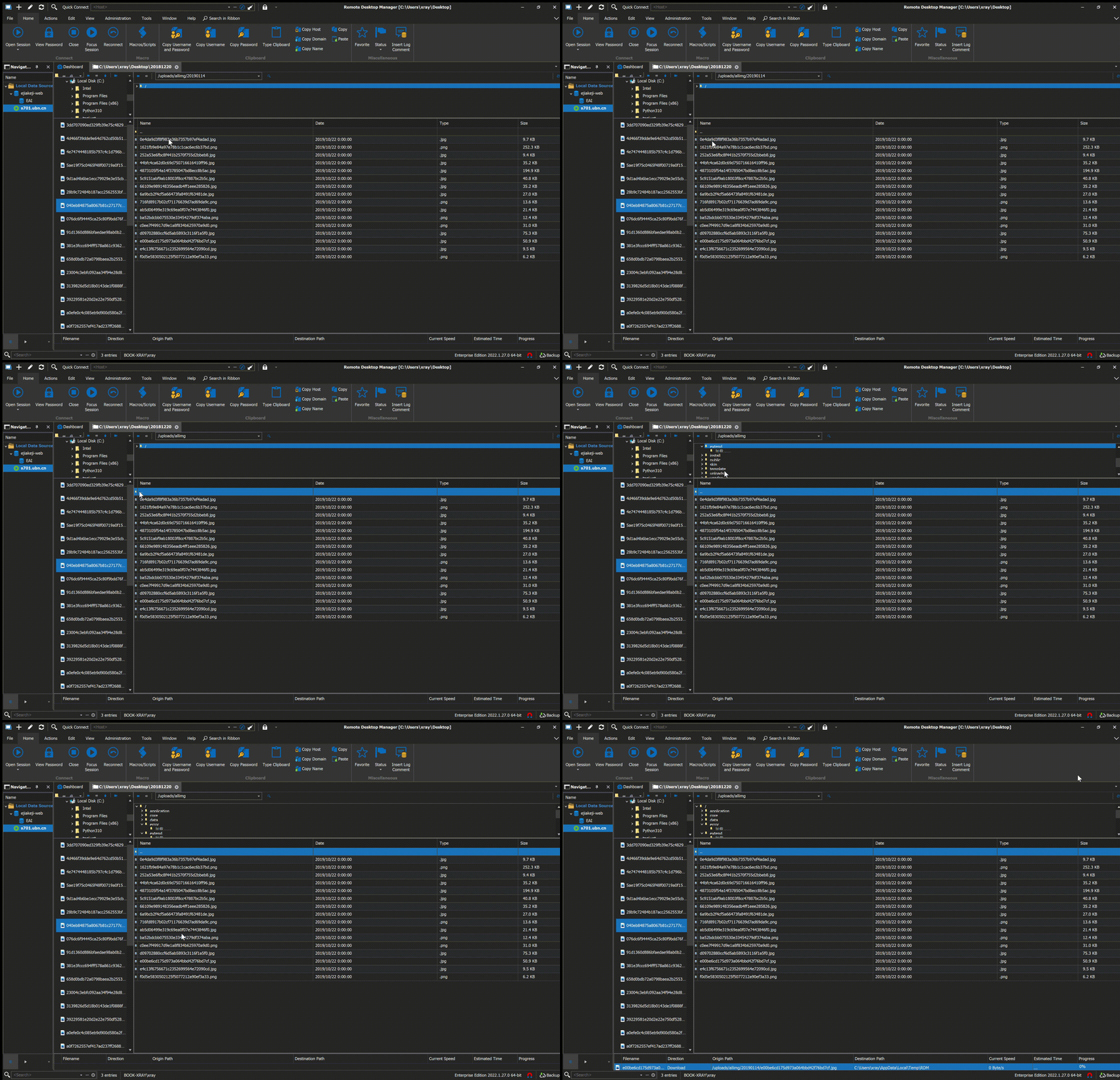
Remote Desktop Manager.gif