RDM High amount of CPU usage (2022.1.15.0 newly updated)
Dear Support Team,
Today I received a notification that there is a new version for RDM which is 2022.1.15.0
I updated the application without a problem. After 1-2 hour later, when I tried to open a SSH session, the application stucked and CPU usage of RDM went to 450%.
After this behaiovur, I forcibly closed the application and open from scratch. But again after 1-2 (maybe 3) hrs later, It is just happened again.
Please see the attachment.
note: on both of my case, there were only 6-7 SSH sessions opened. In other words, there were no RDP or any other opened connection other than SSH.
Best Regards,
Samet
Screen Shot 2022-05-12 at 14.24.26.png
All Comments (26)
Hi sametkalkanci,
This is weird. We will investigate.
We'll get back in touch when we have more information.
Best regards,
Xavier Fortin
Oh, actually, the next time it hangs, could you generate a share with us a spindump of the application. It can be done from the Activity Monitor: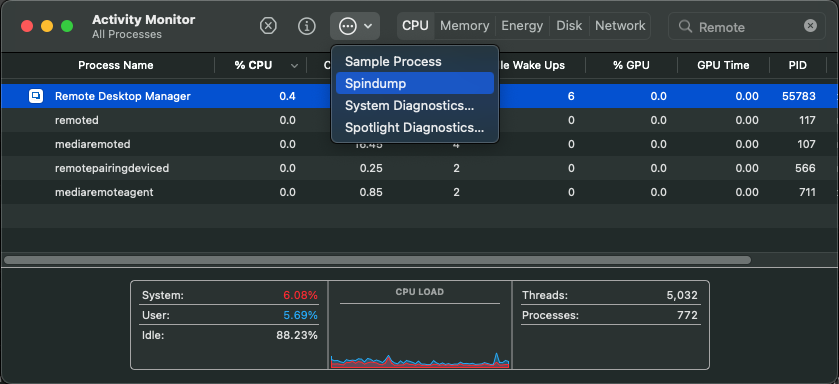
Best regards,
Xavier Fortin
Spindump.png
Hi Xavier,
Thank you for your response. Ofcourse, I will share it.
I also let application send a crash report to let developers investigate the problem (on first crash).
Best Regards
Hi Xavier,
It is happened again.
I can't attach spindump file here. Therefore, I am sharing we transfer url:
https://wetransfer.com/downloads/f530c7601ff5ac66d9bc4c767b82510720220512134807/5558109eb0aba3f718121a228c27507020220512134831/1ed00d
Best Regards
Thanks for this!
I've added it to the ticket.
Best regards,
Xavier Fortin
Hi,
Unfortunately, it happens three or four times a day. This spindump belongs to second crash for the last 10-15 minutes:
https://we.tl/t-bLIoFqC2Mp
For the first of last 10-15 mins: I just opened the app and tried to open one of SSH sessions. I forcibly quit the app and re-opened it. After 10-15 minutes later, it happened again.
Is it possible to get download link of the latest relase of RDM before 2022.1.15.0 ?
edit 20220514_1:
I have found a URL from another topic
Enterprise version: https://cdn.devolutions.net/download/Mac/Devolutions.RemoteDesktopManager.Mac.2022.1.12.0.dmg
Free version: https://cdn.devolutions.net/download/Mac/Devolutions.RemoteDesktopManager.Free.Mac.2022.1.12.0.dmg
- I think it was 2022.1.13.0, I got failure after opening the application.
- I am not able to use TAB button in SSH sessions with version 2022.1.14. Therefore I again wanted to try 2022.1.15.
- After three different version of the application remove and install (.13, .12 and .14), I again installed 2022.1.15. However, problem again occurs. I don't know why but the number of occurance of crash has been increased for the last two days. I tried to be careful what programs also running while these crashes happening. But it also occured while the Mac is just running RDM.
BR
samet
Hi,
We are investigating the issue right now.
That being said, did rollbacking to the version 2022.1.12.0 solve the issue in the mean time?
Best regards,
Xavier Fortin
Hi sametkalkanci,
A version 2022.1.16.0 of RDM is now available with a possible fix for this issue.
Could you try it and confirm if the issue still persists?
Best regards,
Xavier Fortin
Hi Xavier,
I updated the RDM and I can say that this problem haven't occurred yet. I will use the RDM for following 2-3 days and I will inform you the results.
Thank you for your support and quick action.
Best Regards,
Samet
Glad to hear it!
Please, do get back in touch if any issues occur.
Best regards,
Xavier Fortin
Hi Xavier
Sorry to say that It is occurred again.
I've shared spindump file via wetransfer.
https://wetransfer.com/downloads/29706a24c43b801cfd5e19a23b4ae0cf20220519201959/4bd35179098453dcd9aa0d9a7090500720220519202023/e64778
would it helps you whether i share another spindump if i will face this issue again?
Best Regards
Samet
activity_monitor 2022-05-19_23-15.png
Hi,
This is unfortunate. I've reopened the ticket and notified the developer in charge of it.
We'll post back when we get further news.
Best regards,
Xavier Fortin
Hi Xavier
I wonder whether there is a good news or not.
Regards
Samet
Hi,
We are still investigating the issue, although we also have a possible fix for that. But we'll need to confirm with you when the release is available.
Best regards,
Xavier Fortin

OK, thanks for info. I have been sending spindump for couple of days to help you understand the situation better.
beside high cpu usage based "not responding", I have also experienced hanging problems and there is no high resource usage when it happens. also sent spindump for this case (via application)
Regards
Samet
Hi Xavier,
Yesterday I received a notification from RDP application about the new update. I have updated to 2022.2.4.0. However, things a little bit worse. The application hangs almost in every 15 min (for example when I want to duplicate a connection).
When it hangs, the app is not clickable and I see a square on the middle of the screen (attached a screenshot).
I also attached spindump file (Spindump_20220621_1.zip) .
Here what I tried today:
- I deleted the application via "clean my Mac"
- Downloaded the latest versin form devolutions.net
- Install the app and imported my backup (I noticed that preferences settings is not being backed up. When I imported by backup, all preferences settings was gone. Do you have a feature to save user preferences)
- I opened three SSH connection
- when I select one of connections after 5-10 minutes, application hanged (spindump: Spindump_20220621_2_cleaninstall.zip)
- the last hang didn't show a square like below.

Spindump_20220621_2_cleaninstall.zip
Spindump_20220621_1.zip
2022-06-21_09-12.png
Additionaly
I removed the application again and installed 2022.1.14.
After 15-20 mins, I haven't faced with hang issue but "tab" key was not working and it really annoyed me. Therefore, I updated to 2022.2.4.0 through application. After the update operation completed, I relaunched the application. It hanged immediately.
Did I miss something to be able to use tab key button feature on 2022.1.14?
Best Regards
Thank you for the spindumps. We will keep investigating the issue.
In the meanwhile, have you try switching the terminal engine to the legacy one to see if it solves some of the issues?
You can do it in Preferences > Types > Terminal and then switch the Use legacy engine to yes in the Advanced section.
Best regards
Michel Lambert
Hi Michel,
I haven't tried switching to legacy before. To be able to try it, I updated the application again to the latest version. It is switched now. For the first minutes it is OK. This is definitely something.
I will keep post if I also face an issue with this settings.
Thank you for involved to the problem.
Regards,
Samet
Hi Michel,
It has been working wihtout any problem for hours. I haven't faced with a hang issue yet.
Only problem that I face with this selection is that when you double click in order to copy something, terminal select only single word. For instance if you want copy of output of pwd (xyz/abc/qwe), you can only select single word(abc).
both terminal type has been tried (terminal and item)
double-click delimiters is empty.
It is not a critical problem for since being able to use the application much more important for me. But, if I can select whole line, definitely would bring comfort.
Regards,
Hi,
Thanks for the feedback, it is really appreciated.
Have you tired triple-clicking? From what I got, by triple clicking you should be able to select the whole line.
Best regards,
Michel Lambert
Hi Michel,
Thank you for your response.
Actually it is my mistake to mention as "whole line". Lets say part of a line. like below:
0 4 * * * /root/scripts/backup_gitlab.sh >> /root/gitbck.log 2>&1
When I double click on the bold area, Putty based applications and RDM with "Legacy System Off" option can select the part of line (/root/scripts/backup_gitlab.sh).
If Legacy System is On, lets say when I double click "scripts", it only selects "scripts".
Best Regards
Samet
Hi,
Sadly there no more work being done on the legacy terminal. I'm going to try to keep in touch with the Terminal team
and keep you updated on how the work is advancing.
If there anything else don't hesitate to ask or mention it.
Best regards,
Michel Lambert
Hi sametkalkanci,
We've released a new version of RDM (2022.2.8.0). Some fixes were made to the new terminal that could have fixed your initial issue. You can easily try by turning off the "Use legacy engine" option in the Preferences:
Best regards,
Xavier Fortin
UseLegacyEngine.png
Hi Xavier,
I have been using 2022.2.8.0 and 2022.2.9.0 for couple of days. I changed "Use legacy engine" to "No". I can confirm that I don't have any problem from past regarding this topic.
App works smoothly. Thanks for the all work and development.
Best Regards,
Samet
Glad to hear it!
And thanks for confirming this with us!
Do not hesitate to post back again if you encounter any further issues.
Best regards,
Xavier Fortin