Automatic Webpage login

Auto-discovery does not find the correct fields.
How can I make sure username and password fields are filled in automatically?
This is what the login to the website looks like: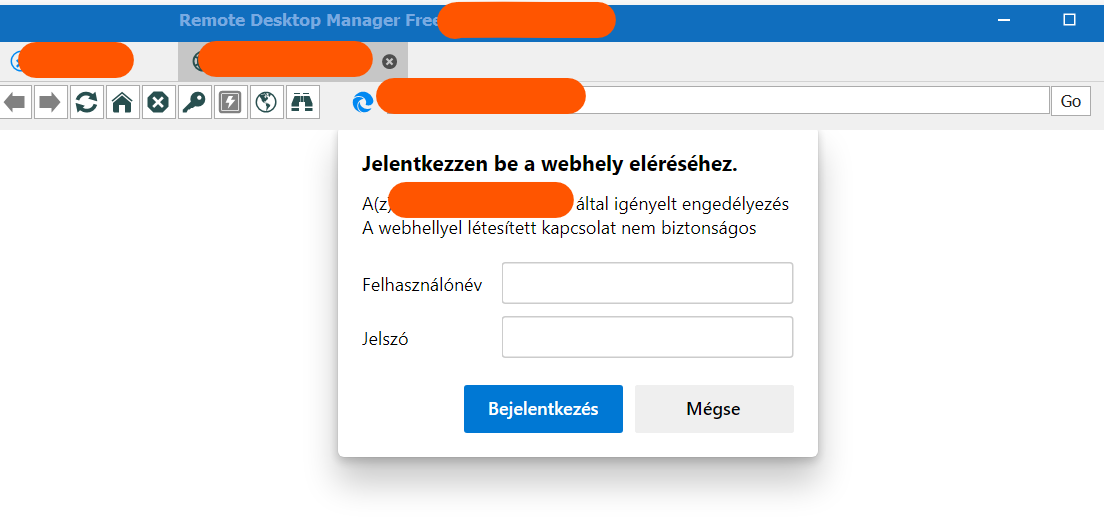
Regards, Peter
Login_Page.png
All Comments (5)
Hello,
Thank you for reaching out to Devolutions Support.
I'd like to confirm which version of RDM you're using?
I believe the following knowledge base article would be of interest in this case: https://kb.devolutions.net/rdm_web_browser_web_authentication.html
In this article, you will find the manual method to find the field IDs used by RDM in order to autofill credentials.
That being said, from looking at your screenshot I do not believe it will be possible to autofill the credentials in embedded, due to the fact that the credential window seems to be a prompt.
Let me know if it works for you,
Best regards,
Samuel Dery
Hello,
Unfortunately, it is not possible to find out with the manual mode either.
The source of the data request window is not visible.
When right-click on username field, the inspect option does not appear in the menu.
Thanks for the help.
Regards, Peter
Hello,
Thank you for your reply,
I'd like to confirm if you used your Google Chrome browser outside RDM to perform the manual method?
Let me know,
Best regards,
Samuel Dery
Hello,
Yes, I tried manual method in the external Chrome app.
Regards, Peter
Hello,
Thank you for your reply,
I see, in that case, I'm afraid autofilling the credentials in "Embedded" mode will not be possible.
Perhaps, using "External" mode with our Devolutions Web Login browser extension may work for you, but due to the fact that there are no IDs and that the credential window seems to be a prompt, I suspect it will not work either.
Unfortunately, I do not have access to a similar website to test on my end.
Best regards,
Samuel Dery