Why am I prompted for credentials on Windows, but not Mac?

I have my passwords stored in each RDS session configuration. On my Windows machines, when I double-click a session, it says login failed and asks me to re-enter my password. On my Mac, double-clicking the same session just logs me right in.
Also, there's a spelling error in the Search box in the forums area on the website. :)
All Comments (6)
Hello,
What version of RDM are you using?
Is it possible to post a screenshot of the message that you receive please?
Best regards,
Jeff Dagenais
I'll get a screenshot for you tomorrow. Thanks for the reply.
Version 2022.1.23.0 (64-bit)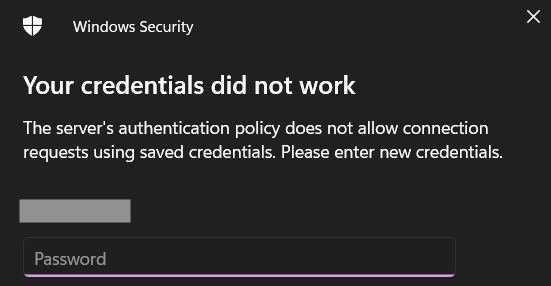
rdm2.png
Hello,
Thank you for your swift reply and for this screenshot.
This message is sent by your server since a policy has been applied to block connection requests made using saved credentials.
There are only 2 workarounds to this policy:
1- You can change the RDP engine that you are currently using for the "FreeRDP" engine. This can be done by going under File -> Options -> Types -> RDP and using the first dropdown next to "RDP" to choose "FreeRDP" (either latest or 7.0 should do the trick)
2- You could follow the procedure mentioned here https://kb.devolutions.net/rdm_microsoft_rdp_cant_store_pass.html
Let me know if that helps!
Best regards,
James Lafleur
Awesome! Thanks. Given the solution, I'm assuming that the reason it doesn't prompt me on the Mac is that the Mac version defaults to "FreeRDP?"
That is correct!
James Lafleur