Using FortiClient IPSec connection over CLI

Hi everyone,
We are using 5.2.5 version of FortiClient, (figure 1 on screenshot) and we need to configure IPSec VPN connection with Pre-shared key (PSK).
To automate connection, we wanted to somehow run the script on CLI for connection, because RDM FortiClient option does not have that option in the GUI (figure 2 on screenshot) . Last topic about that on this forum was 3 years ago, so I wanted to ask if there is some workaround for that.
Our RDM version is: 2022.1.16.0
Thanks in advance.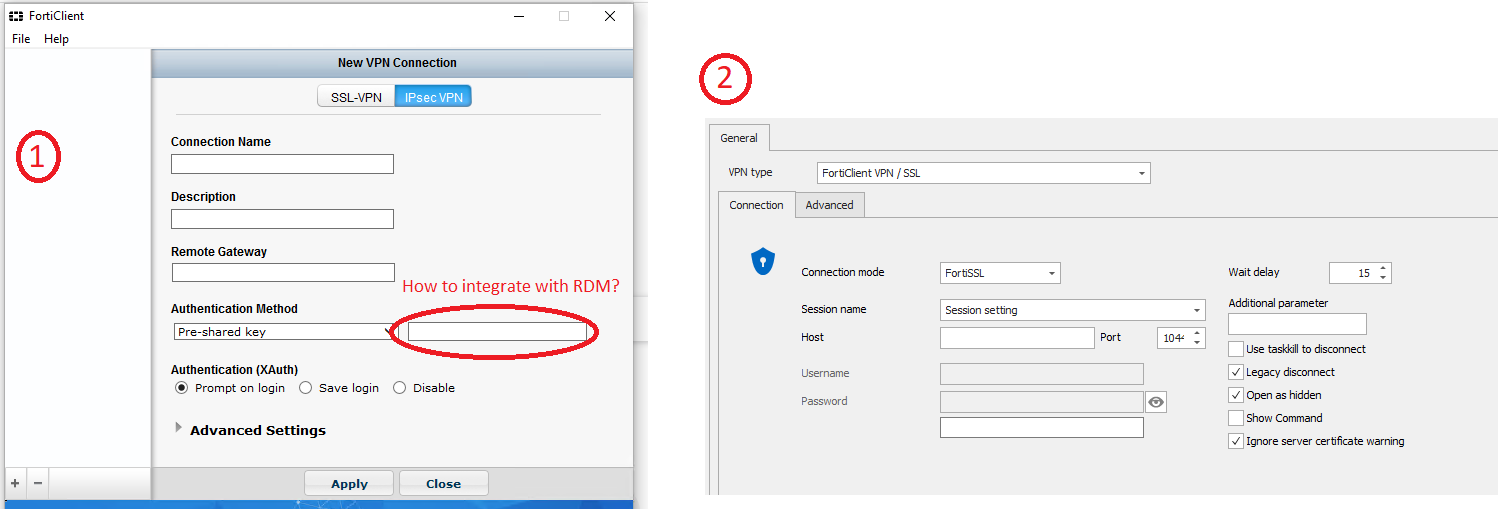
Devolutions - IPSec Forti Client.png
All Comments (4)
Hello,
I am unsure if this is currently possible, I will have to verify with the engineering department.
Best Regards,
Etienne Lord
Any news on this?
Thanks in advance.
Hello,
The engineering department are still looking into it!
Best Regards,
Etienne Lord
Hello,
After speaking with the engineering department, here's the conclusion :
Unfortunately FortiClient is something that we cannot help that much. We do not have access to the CLI documentation because it is a paid service. If you do have a method to make it go through the CLI, you could give it a try but sadly this is not something that can be done on out side.
I also want to note that at the time, the methods provided by the CLI were the following:
FortiSSLVPN client connect [-s <connection settings name>]
[-h <sslvpn server>[:<port>]]
[-u <sslvpn username>[:<password>]]
[-c <certificate subject>[:<issuer>]]
[-i] Ignore server certificate warning
[-m] Minimize window on connection
We are currently integrating each of these features, but if they haven't added any to the fields that you would required, since we do not have access to the CLI.
Best Regards,
Etienne Lord