Shortcut Button Bar

hello, i started using remote desktop manager. I was using securecrt before.there are some habits.
There are shortcut button bars on the bottom of the device that I make an ssh connection to.
I wanted to show what I wanted to say by adding a screenshot.
For example, we made a connection to a linux machine and I don't remember the command for disk space.
If I have added the command as a button before, I can use it quickly from there.
I'm talking about the buttons at the bottom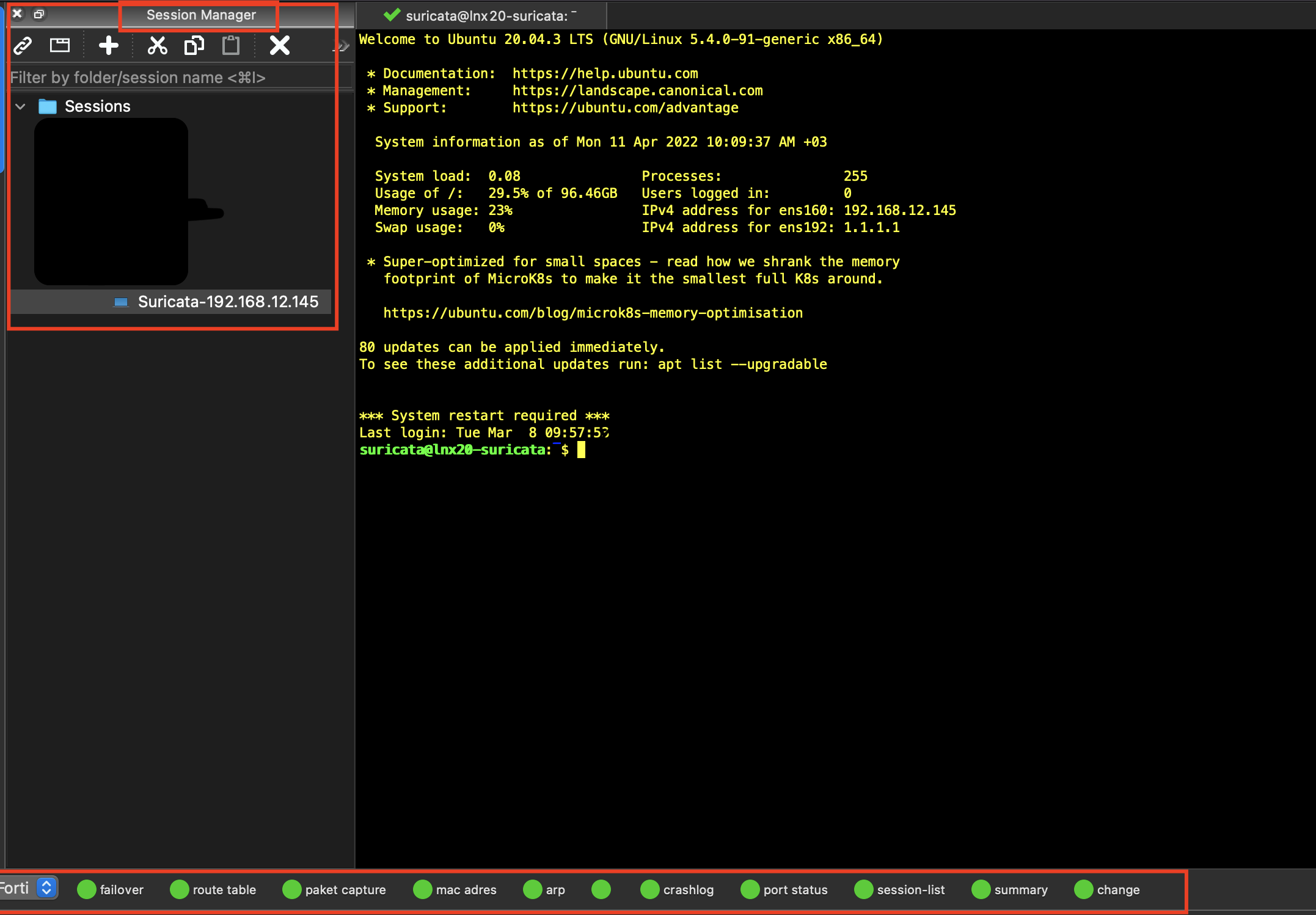
ss.png
All Comments (26)
Hi,
Just to be sure I understand correctly. SecureCRT has a feature where you can set some kind of shortcuts to frequently used commands that will appear at the bottom of the window and can be executed by being clicked on? Are those global to the application or specific to the entries? What's the role of the pop up button at the left end of the bottom bar?
Best regards,
Xavier Fortin
Hi,
Just to be sure I understand correctly. SecureCRT has a feature where you can set some kind of shortcuts to frequently used commands that will appear at the bottom of the window and can be executed by being clicked on? yes you got it right
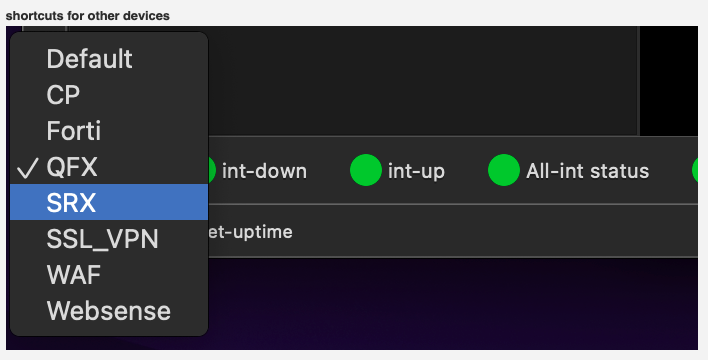
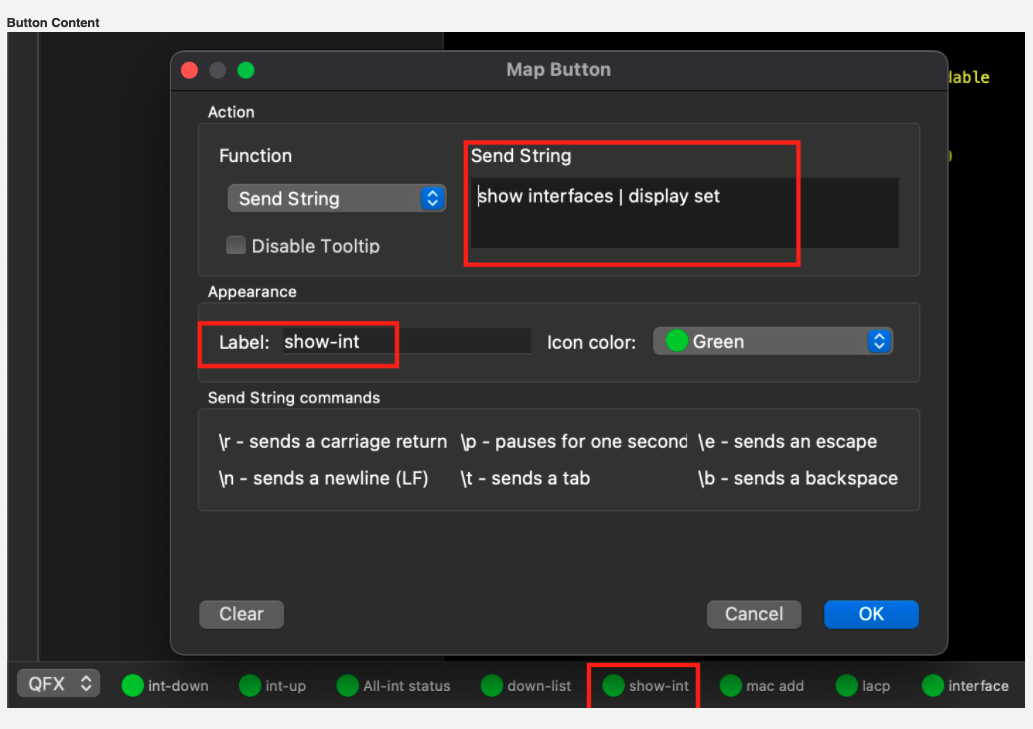
A distinction can be made for each device. For example, there is a command shortcut for devices such as Fortigate, Checkpoint, Juniper QFX, SRX on my screen.
The purpose of these shortcuts is important because I manage multiple brands of devices, they help me remember the forgotten commands by adding shortcuts.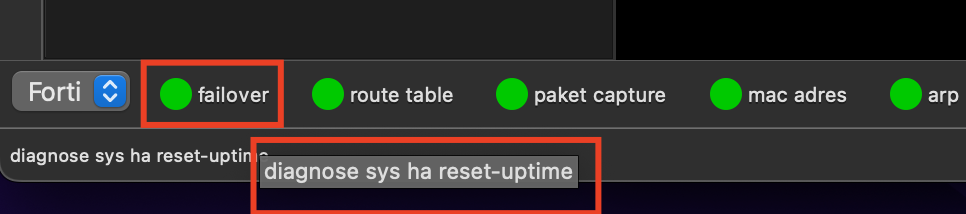
Screen Shot 2022-04-12 at 09.46.32.png
Screen Shot 2022-04-12 at 09.46.18.png
fortigate-1.png
Hi,
I've discovered that we have a similar feature in RDM Windows (under the Macros tab of the SSH settings view). We've opened an improvement ticket and we will get back in touch when the feature is done.
Best regards,
Xavier Fortin
Hi,
I'm using macos, can you develop the feature in mac?
Best regards,
Özgür
Yes, that's the purpose of the ticket.
Best regards,
Xavier Fortin
Thanks when will the new feature come on average.
Best regards,
Özgür
There's no fixed date for this. But we will try to have this for the 2022.2 release (early-June).
Best regards,
Xavier Fortin
Very good thank you.
Best regards,
Özgür
Hello,
New updates have arrived. Could you please let me know if this feature has been added?
Best regards,
Özgür
Hi freeundismayed,
Unfortunately, we haven't had the time to work on this. I can also already tell you that it will not be available for the 2022.2 release (that is coming in early June).
This will be one of the first task that we will work on after the June release and we will try it to get it available for one of the following patch.
Best regards,
Xavier Fortin
Hi,
What's the latest on the feature?
Best regards,
Hi,
Unless something goes wrong, the feature should be available in the next release.
But I can't give a release date for it yet.
Best regards,
Michel Lambert
Thank you for your attention. I really need this feature. With this feature, you can attract all SecureCRT users. :)
Best regards,
HI freeundismayed,
I just finished implementing the Macro Bar feature you requested and it has been added to the latest release of Remote Desktop Manager for Mac (2022.2.8.0 and up).
In order to give you and head start, here's a quick tutorial showing you how to use Macro Bar inside an SSH terminal window:
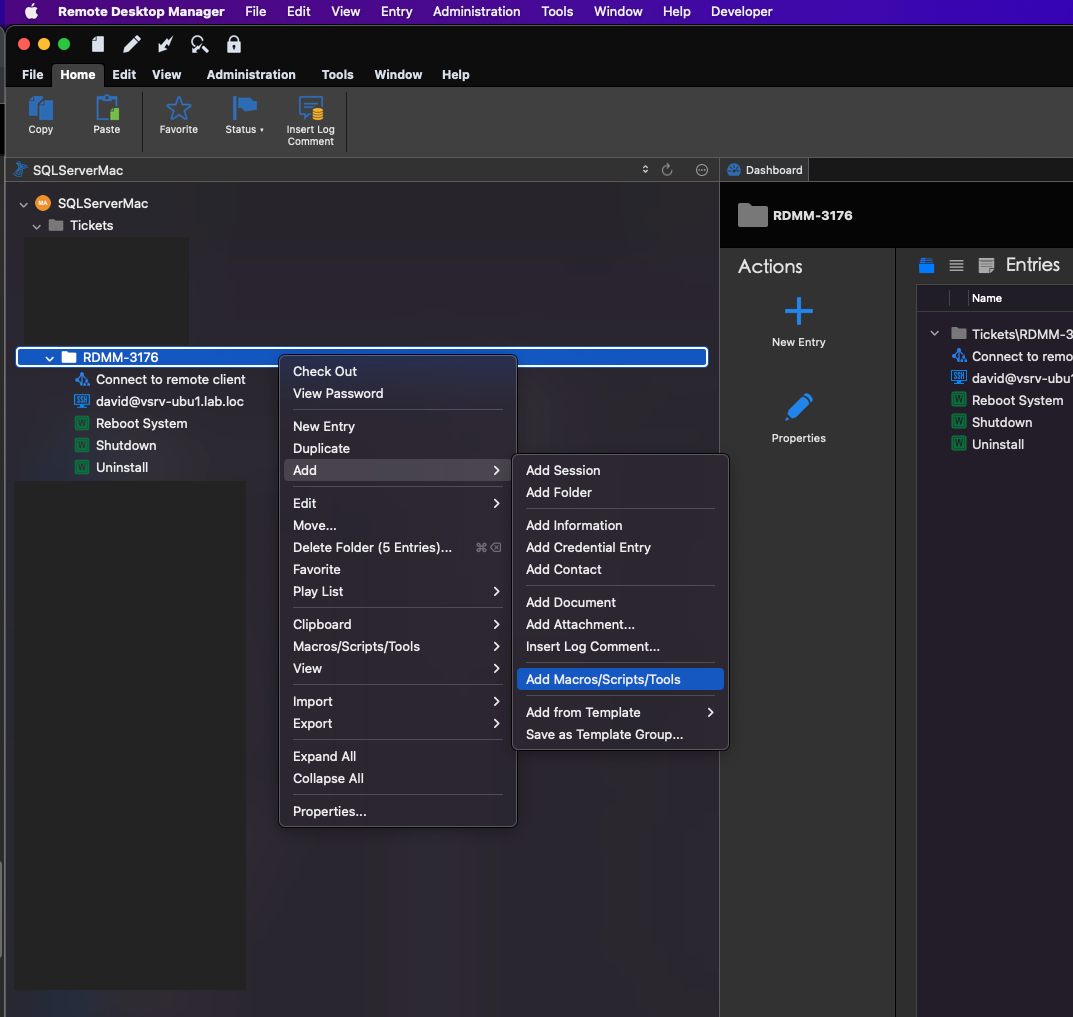
- In order to use the Macro Bar you will need to create Typing macros inside the same vault as the connection you wish to use the macros on. To create a macro, simply right click -> Add -> Macro/Script/Tool inside the panel containing the vault entries on the left side of the application main window:
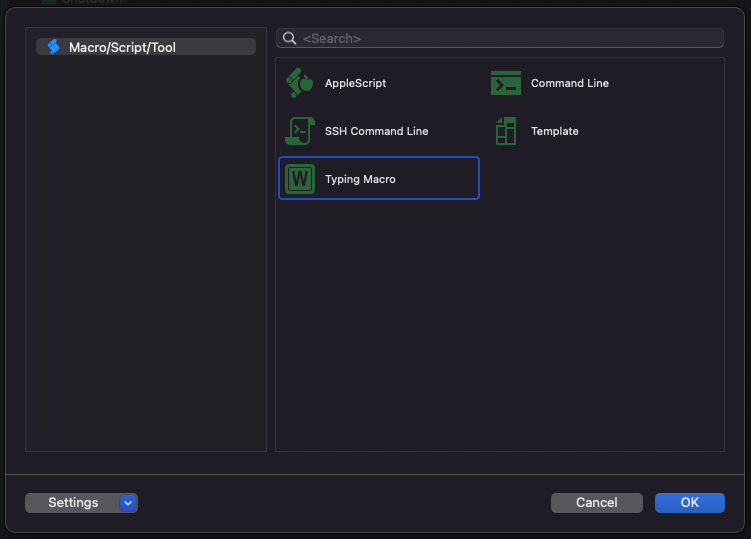
- In the entry creation window that appears double click the Typing Macro to create the macro:
- Inside the the popup that appears you can name the macro however you like (the name of the macro will be the one used to identify the macro the inside the Macro Bar) and most importantly, under the Typing Macro tab, you can define the commands executed by the macro using our Macro Scripting Language:
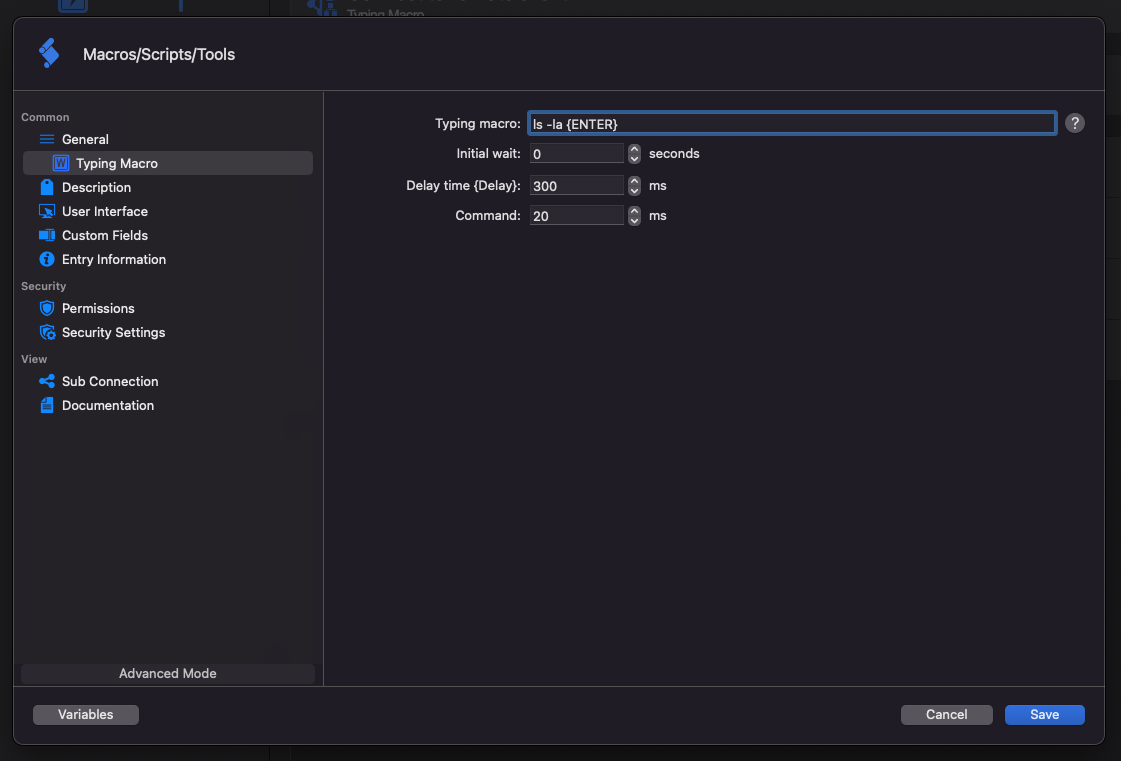 For more information about writing macro using the Macro Scripting Language see https://kb.devolutions.net/rdm_event_auto_typing_macro.html Note: You can Also modify the icon associated with the macro by clicking the Image to the right of the name field under the General tab. `
 - To display the macro bar inside a SSH Terminal window you will need to go inside the connection settings (Right click the connection -> Properties) and select yes in the Enable macro dropdown menu under General -> SSH Shell -> Macro:
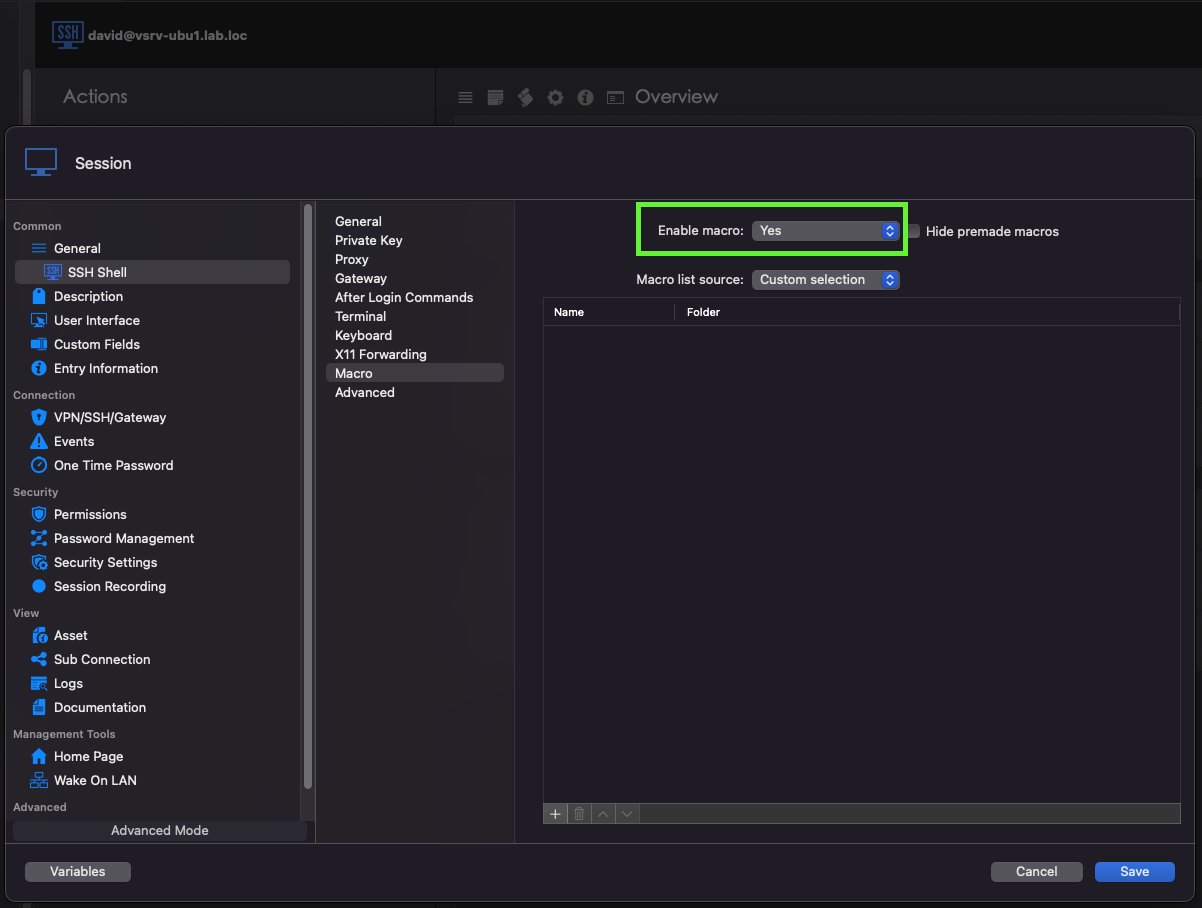
- By default the connection contains all the macros inside the vault, in order to change this behavior and select a custom set of macro to use with the connection you will need to select the Custom Selection option inside the Macro list source dropdown menu.
- Adding macros to the connection is pretty simple and is done by clicking the "+" button in the bottom left corner of the list, selecting the macro you want to add to the connection and clicking Ok.
- You can also change the order of appearance of the macros inside the Macro Bar by changing their position in the list using the arrows at the bottom of the list.
- After saving your modifications on the connection you will be able to use the Macro Bar inside this connection (Note the presence of the toolbar at the bottom of the terminal window):
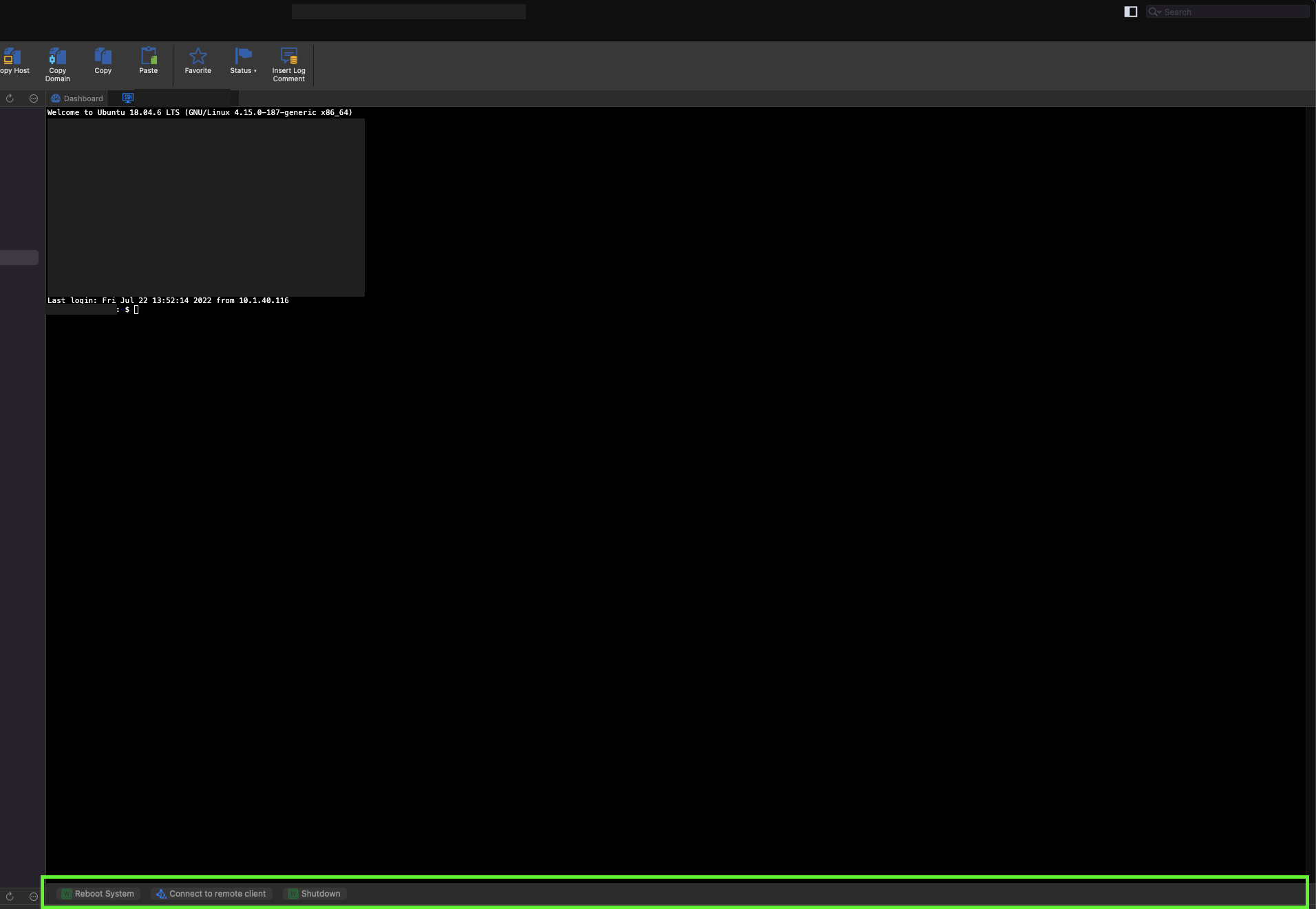
- To execute a macro inside the connection simply click on it inside the Macro Bar.
Note 1: You can also hide the Macro Bar by right clicking on the bar and selecting "Hide Macro Toolbar", to display the Macro Bar after hiding it you will need to right click the tab at the top of the connection window and select "Show Macro Toolbar". (This is not remembered between sessions so re-opening the connection will always show the Macro Bar if the "Enable Macro" is set to Yes).
Note 2: There is one issue with the Macro Bar that we were not able to find before the release of the feature. The issue arises when trying to change the size of 2 separated windows with 'Enable Macro' activated and causes Remote Desktop Manager to hang. The good news is that a Ticket has been created in order to fix this issue and the corrections should be available soon, I will keep you updated on this.
Best regards,
Marc Antoine Griffiths-Lorange
Screen Shot 2022-07-22 at 1.58.26 PM.png
Screen Shot 2022-07-22 at 1.56.33 PM 1.png
Screen Shot 2022-07-22 at 1.38.01 PM.png
Screen Shot 2022-07-22 at 1.29.28 PM.png
Screen Shot 2022-07-22 at 1.23.26 PM.png
Screen Shot 2022-07-22 at 1.08.11 PM.png
Hello Marc Antoine,
Thank you very much for the development. I tested it, it's very good.
This feature made me very happy. I will immediately inform all my friends who use it. :)
Best regards,
Özgür Yılmaz
Hello,
I get an error when I want to select the source of the macro list.
HI freeundismayed,
In order to investigate the problem you encountered, could reproduce the error and send me the text contained in the "What does the error report contains?".
You can open the error report by clicking the down arrow located next to "What does the error report contains?".
Best regards,
Marc Antoine Griffiths-Lorange
Hi Marc,
Details of error content,
NullReferenceException - Object reference not set to an instance of an object
at Client.Scaffolds.ConnectionModel.get_ID () [0x00000] in <fa8ae715e03c4e07b5da9df399a67b3d>:0
at Devolutions.RemoteDesktopManager.SshTerminalConnectionSettingsViewController+<>c.<OnBeforeOKClick>b__116_2 (Client.Scaffolds.ConnectionModel conn) [0x00000] in <fa8ae715e03c4e07b5da9df399a67b3d>:0
at System.Linq.Enumerable+SelectEnumerableIterator`2[TSource,TResult].ToArray () [0x0001d] in <6a15b9b1f7a94fbdbbd910d257fe8034>:0
at System.Linq.Enumerable.ToArray[TSource] (System.Collections.Generic.IEnumerable`1[T] source) [0x0001f] in <6a15b9b1f7a94fbdbbd910d257fe8034>:0
at Devolutions.RemoteDesktopManager.SshTerminalConnectionSettingsViewController.OnBeforeOKClick () [0x00171] in <fa8ae715e03c4e07b5da9df399a67b3d>:0
at Devolutions.RemoteDesktopManager.ConnectionHostViewController.OnBeforeOKClick () [0x0008c] in <fa8ae715e03c4e07b5da9df399a67b3d>:0
at Devolutions.RemoteDesktopManager.DialogWindowController.butDefaultOK_Click (Foundation.NSObject sender) [0x00052] in <fa8ae715e03c4e07b5da9df399a67b3d>:0
HI freeundismayed,
I have investigated the problem that you reported and if everything goes according to plan this should be fixed in the next release of Remote Desktop Manager.
Best regards,
Marc Antoine Griffiths-Lorange
Hello Marc,
Thanks, I'll test it and let you know when the next version comes out.
Best regards,
Özgür Yılmaz
Hello Marc,
The new update has arrived but when I add a folder the app crashes.
When I add a folder, sub-objects do not appear.

HI freeundismayed,
I will look into the issue you just reported and get back to you as soon as possible.
Best regards,
Marc Antoine Griffiths-Lorange
Hi,
RDM 2022.2.15.0 is now be available with a fix for the latest issue you mentioned.
Best regards,
Xavier Fortin
Thank you very much guys for this feature.
Can you make the text field for the Typing Macro... multiline? That will make it even better.
Keep up the excellent work !!!!
We will open an improvement ticket.
Best regards,
Xavier Fortin
Hi jorgedelgado,
Sorry for the delay! The ticket seems to have fell between the cracks. That being said, the Typing Macro macro field should now be multi-line as of RDM Mac 2023.1.12.0.
Best regards,
Xavier Fortin