Not connect on first attempt

Hi, with last version 2022.1.10.0, when i Click on an RDP entry, most of the time it try to connect but nothing appen. (no error displayed).
I need to click 5/10 time to have a rdp opened.
Here you can view a video
https://youtu.be/zmJTwf78SvM
All Comments (35)
Hi,
What version were you using before updating? Do you remember?
Best regards,
Xavier Fortin
Two version before this (i think)
Because i have this problem form the version before the last.
I was on 2022.1.08.0. (for example) and no problem.
i have update to 2022.1.09.0 and i have this problem.
i have update to 2022.1.10.0 hoping resolv but the problem persists.
Weird. I'm not aware of any consequential changes to RDP in either of those versions.
Can you confirm to me that you can't reproduce the problem in 2022.1.8.0? Here are the versions:
Enterprise: https://cdn.devolutions.net/download/Mac/Devolutions.RemoteDesktopManager.Mac.2022.1.8.0.dmg
Free: https://cdn.devolutions.net/download/Mac/Devolutions.RemoteDesktopManager.Free.Mac.2022.1.8.0.dmg
Best regards,
Xavier Fortin
Oh! Also, before that, could you provide a Session Logs of one of the session (Help -> Session Logs)?
Could you also provide your application logs (Help -> Application Logs)?
Best regards,
Xavier Fortin
Application Log:
[01/04/2022 13:35:19 - 2022.1.10.0 64-bit]ERROR Devolutions.FreeRDP.Wrapper.RdpIpcException: NSInvalidSendPortException: [NSMachPort sendBeforeDate:] destination port invalid
at Devolutions.RemoteConnections.RDPProxyImplementation.get_Connected () [0x00016] in <e6a9cc5a2567460bb685349457ab06bf>:0
at Devolutions.RemoteConnections.SandboxedRDPSession.get_Connected () [0x00013] in <e6a9cc5a2567460bb685349457ab06bf>:0
at Devolutions.RemoteDesktopManager.EmbeddedFreeRDPAPIView.get_Connected () [0x0001b] in <5b8888b535d54010a1ddad437ad93a23>:0
[01/04/2022 13:36:45 - 2022.1.10.0 64-bit]ERROR Devolutions.FreeRDP.Wrapper.RdpIpcException: NSInvalidSendPortException: [NSMachPort sendBeforeDate:] destination port invalid
at Devolutions.RemoteConnections.RDPProxyImplementation.get_Connected () [0x00016] in <e6a9cc5a2567460bb685349457ab06bf>:0
at Devolutions.RemoteConnections.SandboxedRDPSession.get_Connected () [0x00013] in <e6a9cc5a2567460bb685349457ab06bf>:0
at Devolutions.RemoteDesktopManager.EmbeddedFreeRDPAPIView.get_Connected () [0x0001b] in <5b8888b535d54010a1ddad437ad93a23>:0
[01/04/2022 13:36:52 - 2022.1.10.0 64-bit]ERROR Devolutions.FreeRDP.Wrapper.RdpIpcException: NSInvalidSendPortException: [NSMachPort sendBeforeDate:] destination port invalid
at Devolutions.RemoteConnections.RDPProxyImplementation.get_Connected () [0x00016] in <e6a9cc5a2567460bb685349457ab06bf>:0
at Devolutions.RemoteConnections.SandboxedRDPSession.get_Connected () [0x00013] in <e6a9cc5a2567460bb685349457ab06bf>:0
at Devolutions.RemoteDesktopManager.EmbeddedFreeRDPAPIView.get_Connected () [0x0001b] in <5b8888b535d54010a1ddad437ad93a23>:0
Session log attached
932f065b-6b6b-404d-9a64-1057d59fa3f0.log.txt.zip
Those RdpIpcException are nothing out of the ordinary (and should definitely not cause the issue your having). As for the Session Logs, there doesn't appear to be any error in it. So wherever the issue is, it's not there.
Could you export one of the entry with the issue? Make sure to not include the credentials while exporting. You can also obfuscate any other sensitive info (e.g. host, etc.). I just need to know the configuration of the entry. I would also need two (one scrolled up the second scrolled down) screenshot of the Preferences -> Types -> RDP pane.
You can send both of those directly to me via email: xfortin@devolutions.net
Best regards,
Xavier Fortin
Email sent !
Thanks
Hmmm... It doesn't seem like I have received your mail.
Could you try to send me the same files but with Direct Message from the forum (just click on my name and you should be able to find a mail envelope button "Send a Direct Message").
Best regards,
Xavier Fortin
Done
Hi m1,
Just to inform you that I have received the message. I will open a ticket for investigation and we will get back in touch when we have more information.
In the mean time, if RDM 2022.1.8.0 resolves the issue, I'd suggest to keep using it.
Best regards,
Xavier Fortin
Thanks. The 1.8 have same problem. 1.4 no. So i’ll use 1.4 for now.
Thanks
i have sent you another log via message forum
Thanks
You reproduced with 2022.1.4.0? If so, it would actually make more sense considering we have a similar issue that was reported for 2022.1.4.0.
Best regards,
Xavier Fortin
Yes. Same problem with 2022.1.4.0
So i need 2022.1.3.0 😊
Xavier Fortin
Any update?
Hi,
It is still being actively investigated.
Best regards,
Xavier Fortin
Hi m1,
Good news, we have a fix for this issue. It should be available in a release that should be available somewhere next week.
If, after updating, the issue still persists, please do get back in touch.
Best regards,
Xavier Fortin
Thanks Xavier.. so i’ll wait for the 2022.1.11.x right?
Exact.
Best regards
Xavier Fortin
Thanks!
Is there an rss feed of
https://devolutions.net/remote-desktop-manager/release-notes/free
so i can receiv news about the new release?
Thanks
Yes. You can use our updater appcast: http://cdndevolutions.blob.core.windows.net/download/Mac/RemoteDesktopManagerFree.xml
Although you won't get much more out of it than the version number.
Best regards,
Xavier Fortin
Thank you
It seems that the new release has resolved this issue
I’ll keep trying it
Thanks
I was just about to post an update!
Indeed, RDM 2022.1.12.0 was just released with a fix for this.
Please, do get back in touch if you can still reproduce the issue.
Best regards,
Xavier Fortin
Thanks Xavier. This problem seems to be resolved.
But now seems ther is some problem with the resolution screen
See this video.
https://youtu.be/E2PWx5uwAzk
When opening an RDP, what top of the windows is hidden (i cant view the close button in the top right corner). I have to hide the Navigation Bar, than Show the navigation bar again and then the screen resolution resize the window and than i can show the full windows (with the close button).
Is this a normal behaviour? In the past it works better.
Thanks
M.
Hmmm... this is weird.
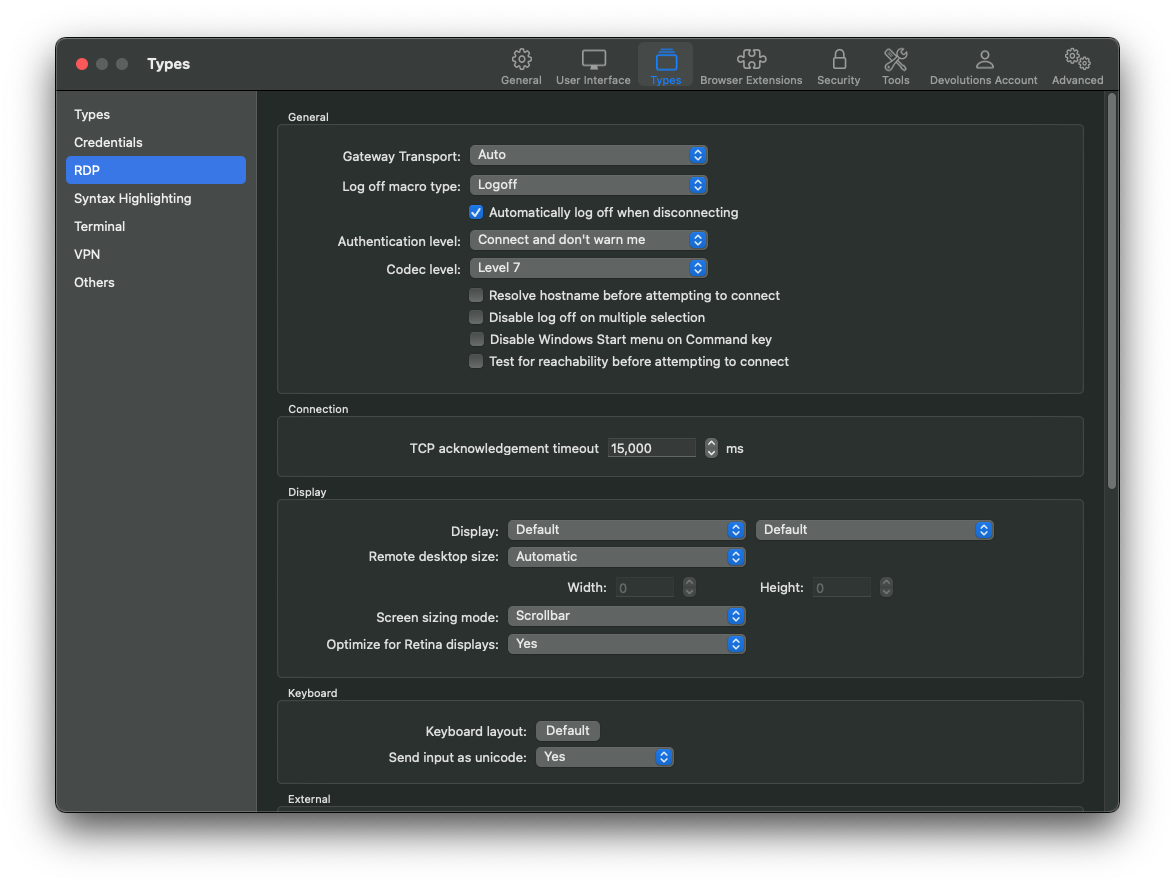
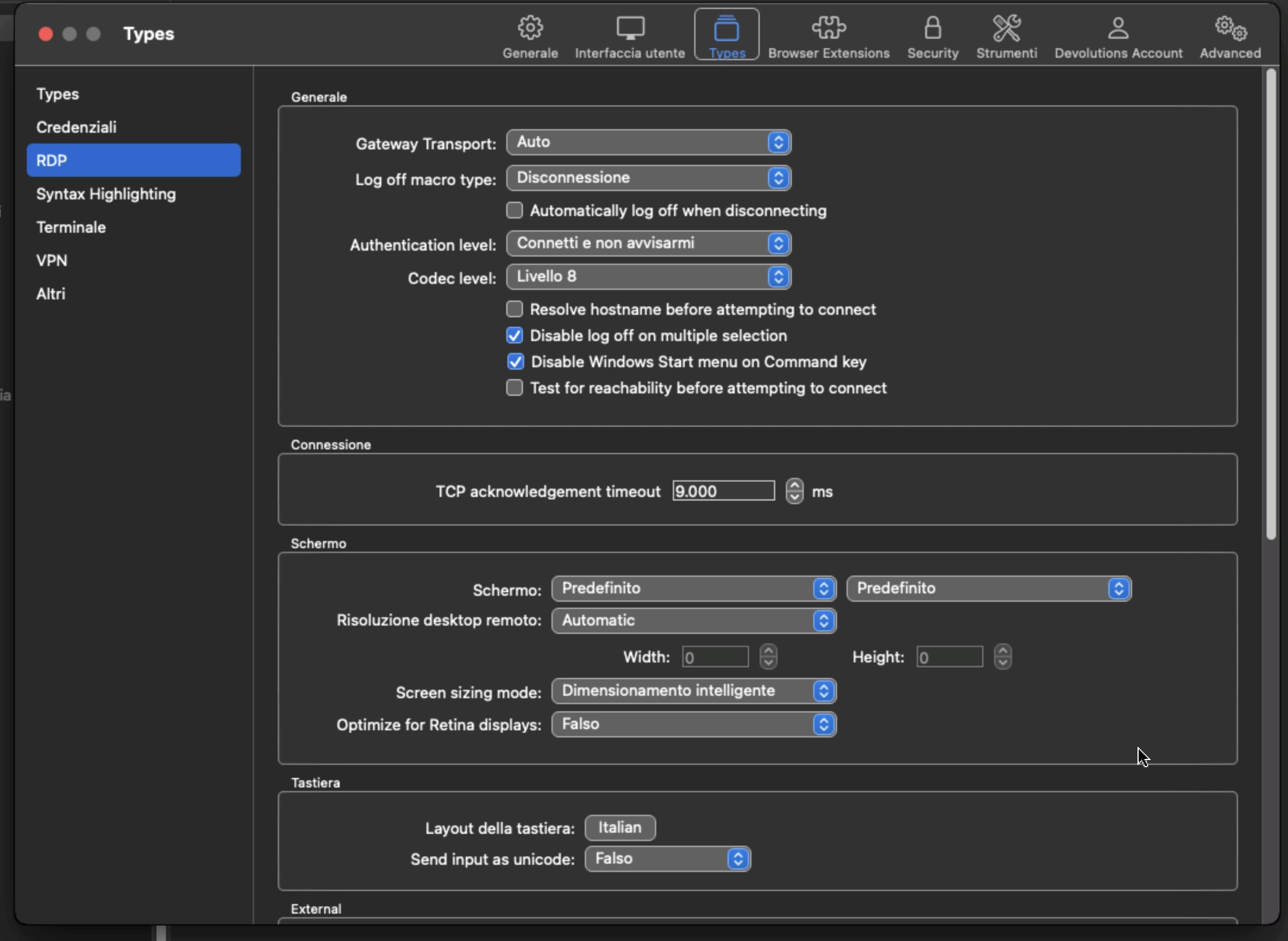
How is you entry configured under the Display tab? And how about in the Preferences (Types -> RDP)? Could you provide screenshot? Like this: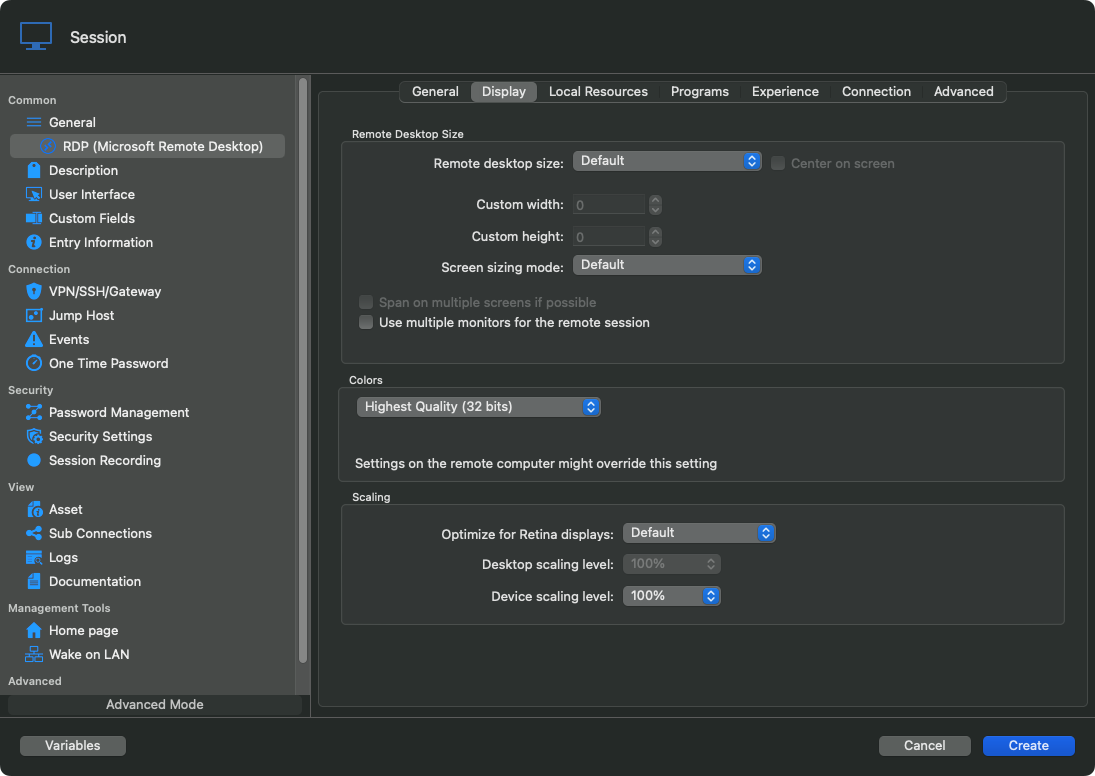

 Best regards,
Xavier Fortin
Preferences2.png
Preferences1.png
EntrySettings.png
Plese see attachment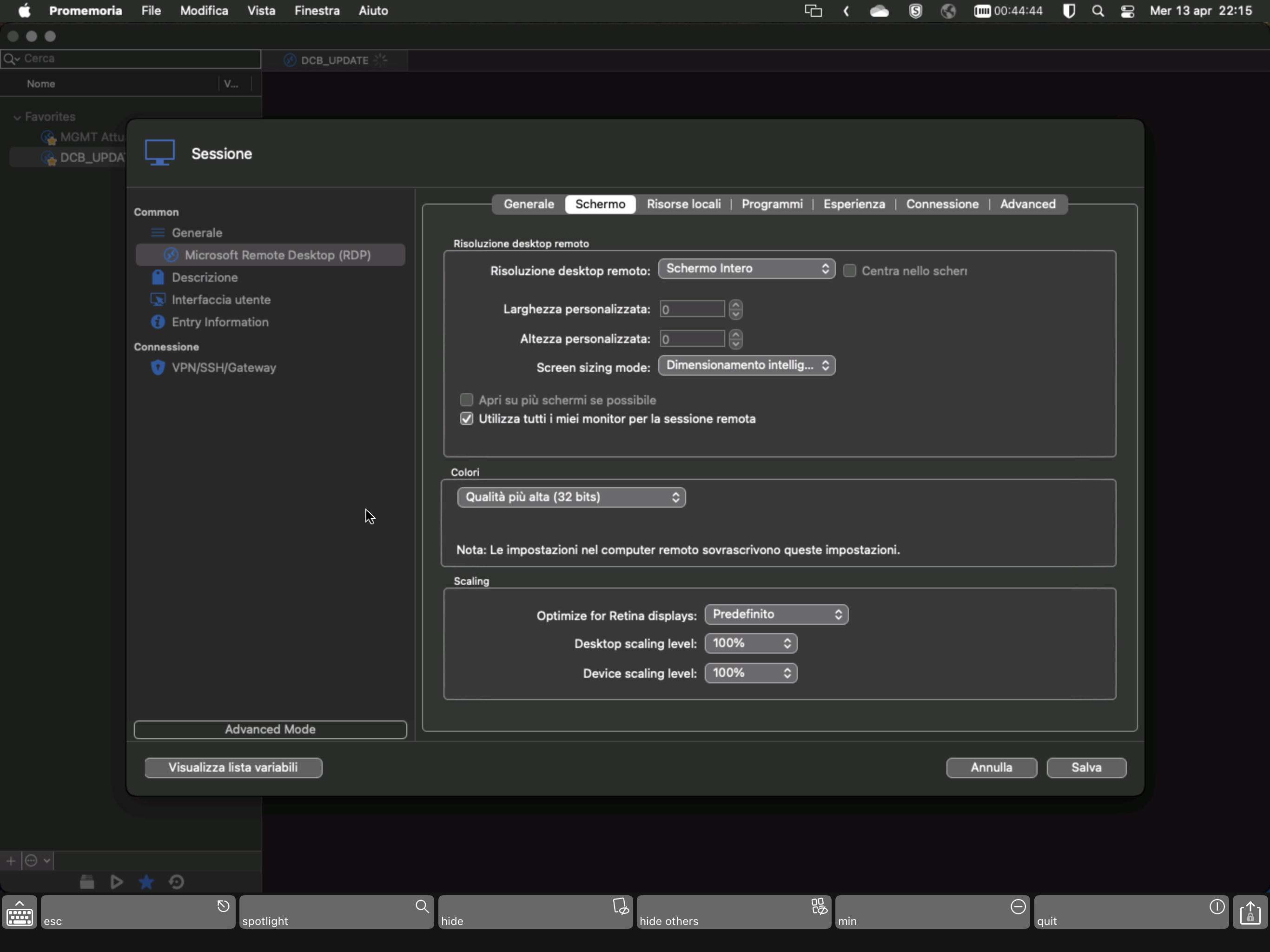
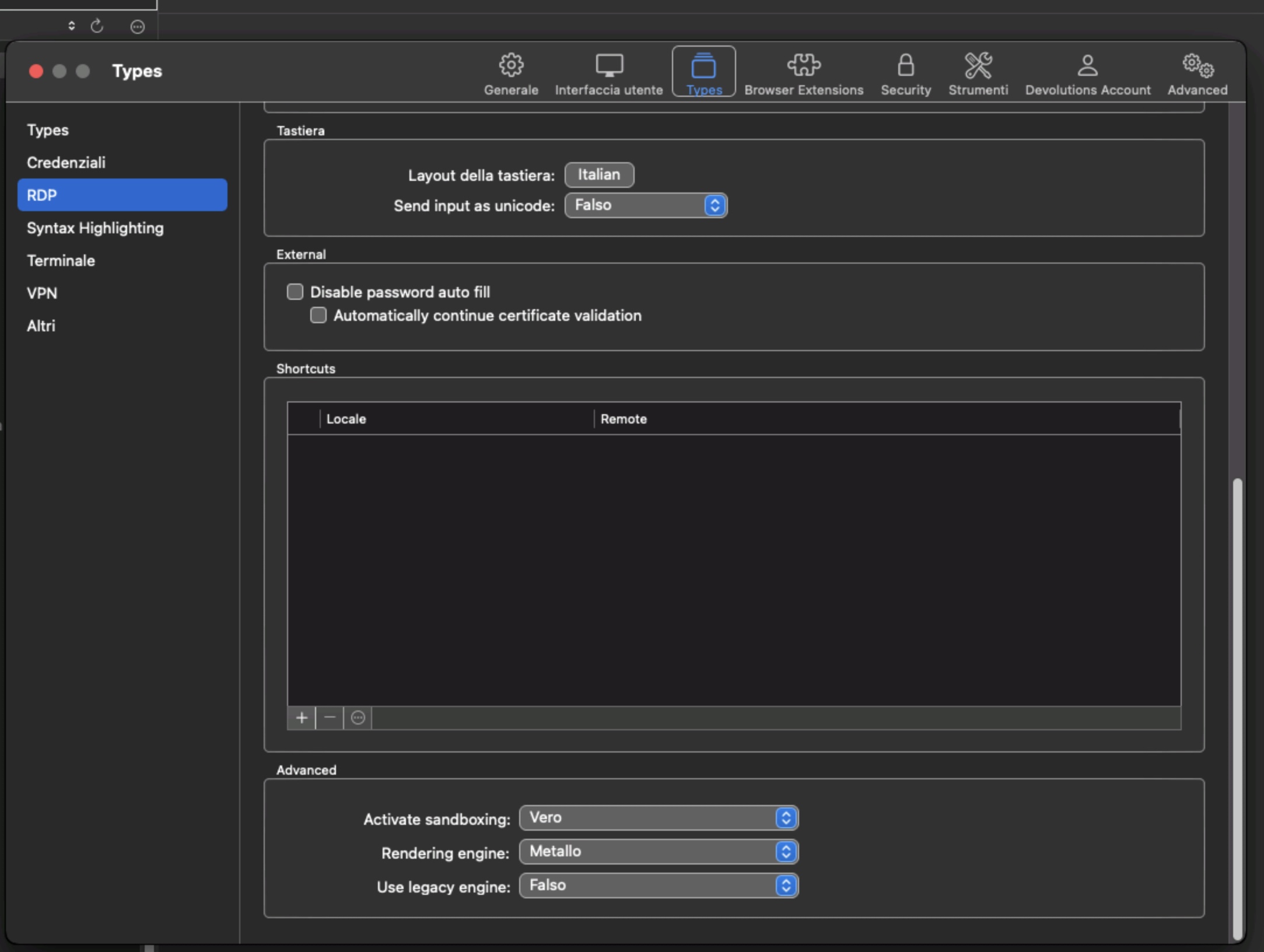
0C5E9A63-87CA-49ED-B1D7-EC4FB1E8CDEC.png
B58FBB7E-17D9-4050-A30D-74203B10772D.jpeg
5224C37E-C573-4BAD-8B2F-4437B81886E4.jpeg
It seems that with Codec Level 7 works better (so the issue is Level 8)
I’ll continue to troubleshoot
Yep. I can reproduce. It looks like the initial application of the "Smart sizing" (Dimensionamento intelligente) is not done with Codec Level 8, or overwritten.
I've got a hunch as to what might be the issue here. I'm opening a ticket and will investigate this.
Best regards,
Xavier Fortin
I've pinpointed the issue and have the beginning of a fix. You can expect this to be fixed in the next release.
Best regards,
Xavier Fortin
Grest! Thank you!
Hi m1,
RDM 2022.1.13.0 is now available with a fix for the issue with Smart Sizing + Codec Level 8.
Please, do tell me if the issue still persists after the update.
Best regards,
Xavier Fortin