RDM does not run

Hello,
While modernizing our Remote Desktop Manager build process, an issue went undetected. A tool that performs actions against our code base has introduced an issue within the application. The result of this issue is that the following Remote Desktop Manager versions will no longer allow you to start the application after a given date (see list below).
Remote Desktop Manager Enterprise/Free
Version Expires on
2022.1.19.0 2022-03-29
2022.1.20.0 2022-03-31
2022.1.21.0 2022-04-05
The cause was the improper licensing of the tool during the automated build process. In other words, even though we have the proper licensing, the licence information was not being passed to the tool.
We have since resolved the issue in all builds greater or equal to 2022.1.22.0.
You can download the latest version here - https://devolutions.net/remote-desktop-manager/home/download
Please note that we also have a blog on that subject - https://blog.devolutions.net/2022/03/update-required-important-information-for-rdm-users/ and a KB article - https://kb.devolutions.net/rdm-wont-start.html
Best regards,
Jeff Dagenais
All Comments (5)
Ouch. This hit us. We had 2022.1.23 on our planned patch for this week, but did not realize the critical nature from the Release Note:
Fixed an important start up issue
Ideally, this would have been marked, Critical/Breaking Bug, but it does bring up an interesting question:
When a critical bug is found in a Devolutions product, what is the official channel that will be used so customers have a single, consistent location to find these critical bugs. Would the blog be the location?
Indeed,
We have this on our roadmap: https://forum.devolutions.net/topics/37246/get-notified-when-important-information-for-rdm-is-published#161292
It's now more important than ever and this is now a P1 priority.
Regards
David Hervieux
Hi,
RPM won't run and throws the following error at startup. This started occurring after upgrading to version 2022 this morning. 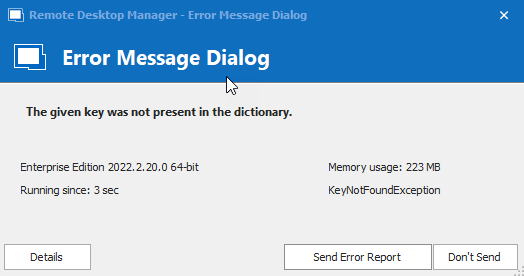
2022-09-27_15-22-12.png
Hello,
Thank you for contacting us on that matter!
Would it be possible for you to create a portable installation of the latest version of RDM and see if this issue still occurs? To do so, you will need to do the following:
1- Download the .zip file below:
https://remotedesktopmanager.com/home/thankyou/rdmbin
2- Create a new folder on your Desktop
3- Extract the content of the .zip file into the folder created at #2
4- Go in this folder once the .zip file has been extracted and run remotedesktopmanager64.exe
5- Enter your current serial
If you are using the free edition of RDM, please use this link instead:
https://devolutions.net/remote-desktop-manager/home/thankyou/rdmfreesetup
In that case, the executable will be remotedesktopmanagerfree.exe (step #5).
I would recommend contacting us at service@devolutions.net if you encounter the same issue with the portable installation of RDM. Simply make sure to mention this forum thread in the description of your case.
Best regards,
James Lafleur
Thanks for sharing