Cannot upload files via SFTP on MacOS M1

Hello, I´m trying RDM free 2022.1.8.0 on MacOS 11.6.5 with M1 chip and was able to establish SSH and SFTP (two different sessions) to a remote server (linux based). SSH is working fine after to adjust the algorithms, but via SFTP it allows me to download a file from the server, but when I try to upload any file to the server it simply shows "Failed".
PS: Tried using Drag and Drop and also with right click to Copy and Paste at the folder.
Thanks
All Comments (4)
Hi epicolo,
Could you enabled the "Show logs" checkbox and set the Verbose value to 4 in the "Advanced" tab of your SFTP entry? You should then see a log panel in your session with more information. Could you provide us with the output of the log?
Here's the option I'm talking about: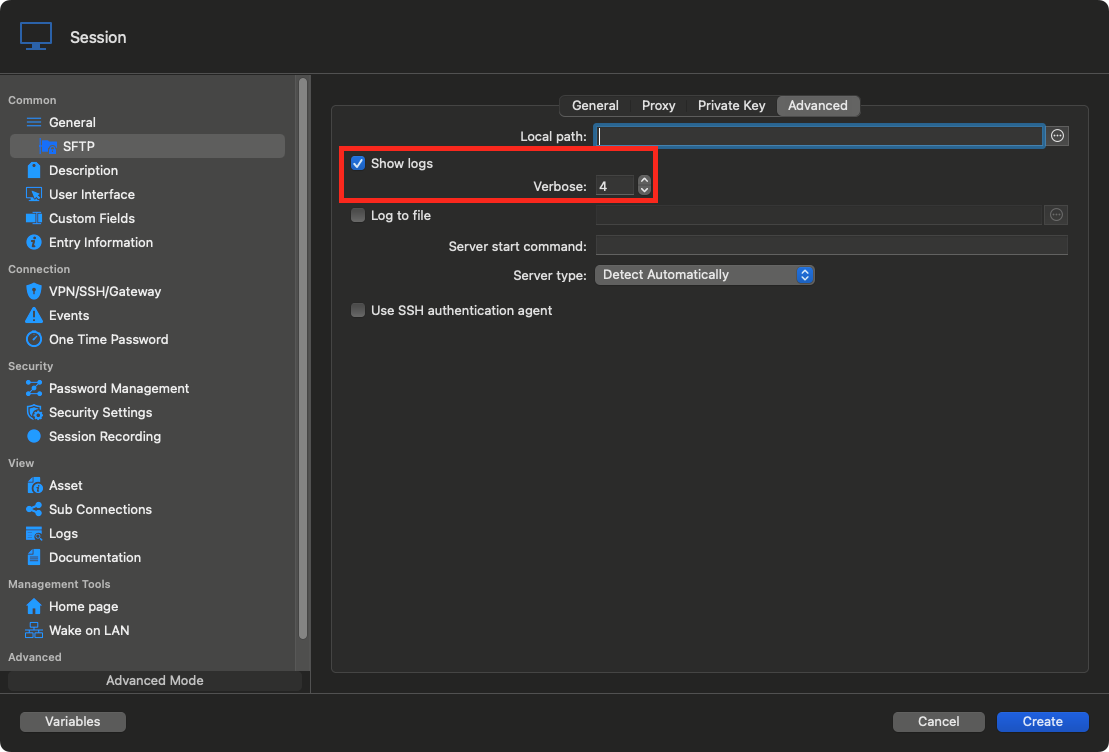
Best regards,
Xavier Fortin
SFTPLogs.png
Hi, this verbose level is amazing kkk, just enabled the log with verbose 4 and it works.
I have configured another server of the same type and got the same behavior, cannot upload file (failed). I´ve enabled the log and changed to verbose 4 and it works.
Then changed back to verbose 0 and unchecked the log and it keeps working.
The problem seem to be at initial configuration, after the suggested changes (check log box and change verbose to 4) it works.
This is weird, but not unheard of.
We'll see if we can identify the potential problem.
Best regards,
Xavier Fortin
ok, thanks for your help