compatibility problem with cryptomator

Hi there,
I am using Cryptomator. And every time I try to update RemoteDesktopManager (free) I get an error which says something like "invalid drive: N:\" (N is the drive of my cryptomator safe).
(In my case I am using it with FUSE because it is faster: https://community.cryptomator.org/t/winfsp-how-to-use-it/7980)
The only solution is to unmount all cryptomator safes and then perform the update. (Maybe it is on installation too.)
How to reproduce:
- Install Cryptomator and create a safe: https://cryptomator.org/downloads/
- Mount the safe as folder (not tested with default Dokany - in my case I use FUSE, see above)
- Try to update RemoteDesktopManager
Would be great if this can be fixed. Not only because I have no clue what RemoteDesktopManager is looking for on my encrypted folder - nor should it cancel the installation if there is any cryptomator drive.
Thx
Stefan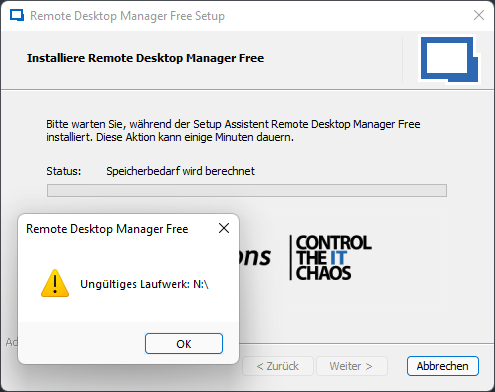
2022-03-21_14h10_53.png
All Comments (2)
Same for mounted drives using e.g. AirLiveDrive
Hello,
I suspect that Advanced Installer is doing something. I will check what could be done.
Regards
David Hervieux