Excute a script to an SSH session.

There used to be a section where you could paste a set of commands and send it to your SSH sessions. However, I am unable to find it anymore?
I have attempted to create scripts and macros but I can't find one that works for me.
I wish to log on to a number of ESXi hosts and run a a small script like below.
esxcfg-vswitch --del-pg=TEST vSwitch0{enter}
esxcfg-vswitch --del-pg=TEST1 vSwitch0{enter}
esxcfg-vswitch --del-pg=TEST2 vSwitch0{enter}
esxcfg-vswitch --del-pg=TEST4 vSwitch0{enter}
esxcfg-vswitch --del-pg=TEST5 vSwitch0{enter}
I'd really like to make use of the broadcast feature and save these commands into RDM. Then I could quickly run it across the broadcast group and complete my tasks in one click.
SSH command line only allows a single line command rather than several
Typing macro also does a single line.
None of these seem to fit the bill?
I am running version 2022.1.21.0 64-bit
Regards
Iain
Thanks
Iain
All Comments (20)
Hello,
Did you give that option a try, by making a right-click on your Open SSH session 
Best Regards,
Etienne Lord
Ah OK so I guess the issue is due to me saving all my SSH session as HOST sessions then.
As then when I select it I get to pick the required template.
Execute Script is not an option in the context menu on the HOST session or from the session its self once running.
Thanks
Iain
Hello,
It is also possible to convert Host session into SSH Sessions. If you make a right-0click on your host session, you will be able to head over to Edit -> Edit (Special Actions) - > Change type and choose SSH Shell. 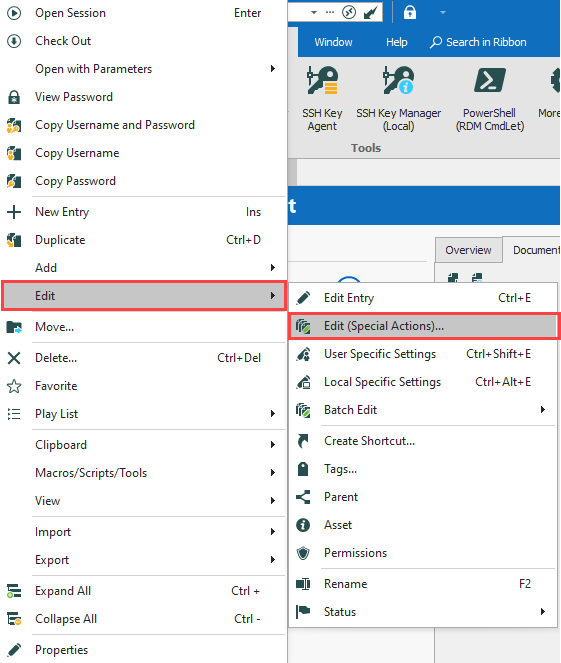
Best Regards,
Etienne Lord
2022-03-18_13-40-37.png
Hi,
I attempted that and got the following:
Likely due to the configuration I have..
Not really sure I want to convert the session any ways.
I was just looking for a way to push a script or a few lines of commands to a session or broadcast group.
I can see a options to load a script a and execute it..
Just the options I am able execute are all either single lines or incompatible with SSH..
Surely I am just missing something simple here that people do daily with this tool set??
Thanks
Iain
Is there a simple way to run multiple commands to an SSH session, other than Copy and paste?
I feel like I have done this in the past?
Thanks
Iain
Hello,
I will have to look into it, keep you updated on that!
Best Regards,
Etienne Lord
Hello,
You could try the broadcast option : https://kb.devolutions.net/rdm_broadcast_action_ssh.html
This will allow you to type a command in multiple sessions at once, but it would not allow you to automatically send the scripts.
Best Regards,
Etienne Lord
Hi,
Yes I wish to use this with the broadcast group which works great for exciting a command or copy and pasting commands.
However, I wish to call a upon a saved set of commands and run them one after the other. Copy and paste is not ideal when it's the same command over and over..
Thanks
Iain
Hello,
The option mentioned in my previous responses are what we currently have. It is quite limited since you are using a Host session instead of a SSH Shell session, therefore I do not believe there would be an option that can achieve what you are specifically looking for.
Best Regards,
Etienne Lord
Hi Etienne,
Thanks for getting back to me. That is a real shame though as I find host sessions have so much more flexibility.
I can associate multiple sessions types to a single host record through templates.
To convert them to an SSH session to gain a single function over the flexibility of host sessions would feel like a backwards step.
Would be possible to submit a feature request at all?
Thanks
Iain
Hello,
I will check with the engineering department!
Best Regards,
Etienne Lord
Hello,
After speaking with the engineering department, we will add the multi-line for Typing Macros. A ticket is open for that!
Best Regards,
Etienne Lord
Hi Etienne,
Brilliant news, thanks for the update. Will look forward to seeing this.
Thanks
Iain
Hi,
We have improved the Typing Macros to support multiple lines internally. It should be available starting with version 2022.2.10.0
Regards,
Jean-Francois Duchesne
thank you, I look forward to trying it out.
I have tried the multiple line Typing Macro, but it is unreliable. It does not work as simple as paste does.
If i have a bunch of commands to type, i can copy them (from Notepad++ for example) and then paste into teh SSH session and it works fine. Very quickly.
The Typing Macro seems to be VERY slow, sluggish and seems to step all over itself. I'm doing similar to the esxcfg commands from the OP. I'm trying to paste in lines like this:
ifconfig


ping -c 5 10.20.1.1
ping -c 5 10.20.0.5
ping -c 5 10.20.0.6
ping -c 5 4.2.2.2
ping -c 5 8.8.8.8


ping -c 5 www.google.com
Note the blank lines to give some space between the output of the commands. It seems to paste them all in and it's hard to process.
Maybe i'm doing something wrong....but it works great if i just paste from Notepad++ and i get the exact output i want.
Is there another option for existing SSH sessions? I dont want to create a new session and send commands. or is the Typing Macro the way to go? Also, it's a bit wonky because if i change focus to another session, the typing will go into that session. So, i have to wait for each session to complete before i change focus. Also, if anything pops up, or i change focus to anything else (email, browswer, etc) the pasting seems to go there. (I know that is explained in the help section).
Thank you!
Hi,
Thank you for reporting this issue. I have created a ticket and will keep you posted concerning the upcoming fix.
Regards,
Jean-Francois Duchesne
Hi,
We fixed this issue internally. You should now be able to use Execute macro > Execute in Current Tab Page and get the expected behavior.
The most reliable way to use macro would still be by going in the dashboard under the Macros/Scripts/Tools tab.
The changes should be available starting with version 2022.2.18.0.
Regards,
Jean-Francois Duchesne
Ok thank you for the follow up!
On a side note, is there a convention to the release numbers? I have yet to decipher them. I'm on 2022.2.12.0 right now. I see .17. is out. I will eagerly await .18.
Thank you!
Hello,
The RDM versioning scheme is <YEAR>.<MAJOR>.<MINOR>.0 at the moment. We usually release two to three major versions per year, and these major versions tend to require database upgrades and bigger changes which may not be compatible with prior major versions of RDM. As for the minor version, it's simply incremented by one each time we release a new build. Sometimes the minor version numbers don't start at 1, and sometimes numbers are skipped, it's because some builds are only for internal QA testing and never get released publicly.
Regards,
Hubert Mireault