OTP Automation with Secret Server credential type

Hi,
When using the Secret Server Credentials, i am unable to use an OTP credential or the OTP configured under "my account settings" to use when authenticating automatically.
I only have the options under "Two factor mode":
Ask only when the session expires
Ask every login
Is there a way i can have the OTP automatically filled in? This way i dont have to always generate it, when the token expires that is created.
Kr,
Jens
All Comments (4)
Hello,
Would increasing the session timeout be a possible solution for you ? That way you wouldn't get prompted as often.
This timeout can be configured in the Secret Server web portal, in Admin -> Configuration -> Genreral -> "Session timeout for Webservices".
Regards
Jonathan Del Signore
Sadly not, the tool is managed by our motherfirm, and OTP with a short token expiration is obligatory.
What i am trying to accomplish is checking out the account once a day, then working with it throughout the day as a credential stored in the user vault. But if the token expires, everytime i RDP or something else, i need to enter OTP.
What i do now is manually copy the password in the morning to a regule username/password. Is there a way to copy passwords automatically between credential objects maybe?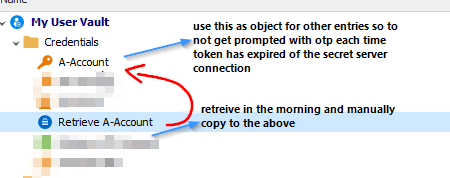
2022-03-17 15_17_32-Window.png
Unfortunately no, there's no way to copy passwords between credentials. But since you can't control the session timeout, we'll open a ticket in order to fill the OTP automatically.
We'll update this thread as soon as we have news on the progress.
Regards
Jonathan Del Signore
That would be awesome !
And perhaps, while you are at it, also provide an option to automatically fill in the "reason for view" , which is also a requirement for some accounts.
Looking forward to this
Kr,