RDP sessions not reconnecting after resume from standy

Hi!
New user, really like the tool but hoping someone has the solution for my RDP reconnect issue.
RDM is running on Windows 11 Version 21H2 (Build 22000.556). I've got several RDP sessions open (Windows 11, Server 2022, Ubuntu) and when i resume my system from sleep (S3), none of the RDP sessions reconnect. Neither if they're docked or undocked (which is how I use them).
Additional info:
- Read through the Knowledge Base and searched the forums but didn't found a solution
- File > Options > Types > Remote Desktop: I've tried all available options without success.
- Open Session / Focus Session buttons don't resolve the issue.
- The sessions are shown under 'Running Sessions' in the Navigation pane
- Local Connection Logs show 'Connecting' as last entry.
Any hints?
All Comments (7)
Hello,
Thank you for contacting us regarding this,
I have a few questions which you can hopefully answer.
- Which version of RDM are you using?
- Which type of data source are you using?
Could you provide me a screenshot of your entry "Properties" I would like to see the "Advanced" section if possible.
Let me know,
Best regards,
Samuel Dery
Hi Samuel,
I'm running 2022.1.17.0 64bit
The data source should be SQLite, since I used default installation settings.
Here is the requested screenshot.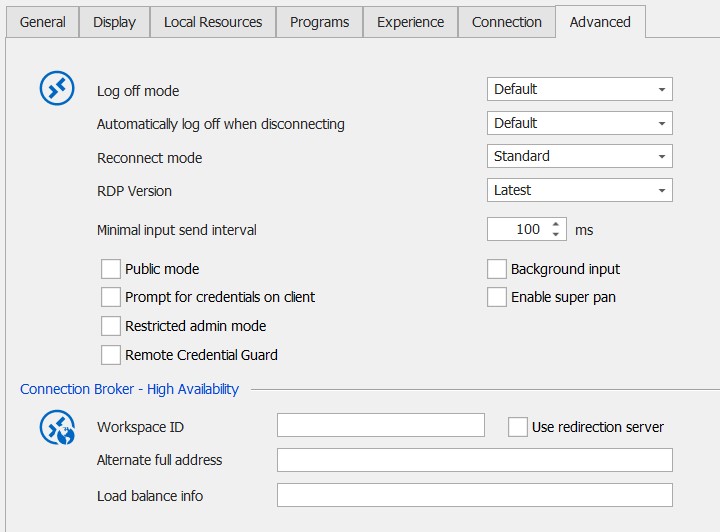

Kind regards,
Jeroen
TypesRemoteDesktop.jpg
AdvancedTab.jpg
Hello,
Thank you for your reply,
I'm wondering if the following configuration may work in your case.
If you go in your entry "Properties" under the "User Interface" tab and change the option "Keep tab page open on disconnect".
With this configuration, when your session is disconnected you should have this menu allowing you to reconnect:
Let me know if this helps,
Best regards,
Samuel Dery
Hi Samuel,
When I resume from standby I'm presented with the same popup:
Once I cancel that, then I get the buttons for reconnect and I'm able to reconnect to the session. This seems the easiest workaround so far. Still wondering why it doesn't reconnect automatically. ;)
Hello,
Thank you for your patience,
I've discussed your case with our engineering department, it looks like the issue is tied to the ActiveX we integrate for the Embedded RDP sessions, since the Reconnect action is handled by the ActiveX. Because we only integrate the ActiveX, and have no direct control over it, our hands are tied at the moment when it comes to this issue.
An update to the ActiveX containing a fix for this behavior will most likely be released eventually, and we will make sure to update our integration to incorporate the fix when it is released.
For the time being, perhaps using MSRDC may work for you this is a new feature added in RDM 2022, we have the following post regarding this:
https://blog.devolutions.net/2022/03/msrdc-is-now-supported-in-remote-desktop-manager/
Best regards,
Samuel Dery
Hi Samuel,
Funny thing is that I was using the Microsoft Remote Desktop app (from the Store) prior to switching to RDM. The MS Remote Desktop app kept crashing randomly, hence the switch to RDM, but that app was reconnecting after Standby.
I've tried your suggestion and installed MSRDC, but the same issue occurs and it keeps trying to reconnect, so that's not going to help. For now I'll just stick with the reconnect option you suggested, that's working fine.
Thanks for the support and explanation! Let's hope ActiveX gets a fix for this soon ;)
Kind regards,
Jeroen
Hello Jeroen,
No problem, my apologies for the inconvenience.
Let me know if you have further questions,
Best regards,
Samuel Dery
