Automatically Log Off When Disconnecting

Hello Everyone,
I want my RDM to NOT Log Off when disconnecting. I can't have it log off it messes up with the software that uses multi-display/touch screens that we have. I have it set to NO in my RMD Options/Types/Remote Desktop and in my entry's property/advance and it still logs off every time... What am I missing?
All Comments (8)
Hello,
Thank you for contacting us regarding this,
I have a few questions which you can hopefully answer.
- Which version of RDM are you using?
- Which type of data source are you using?
You're having this issue with an "RDP" entry type is that correct? Could you provide me a screenshot of your entry "Properties" I would like to see the "Advanced" tab if possible?
Let me know,
Best regards,
Samuel Dery
Hello Samuel,
We're using 2021.2.29.0 64-bit, its from an install from the previous Admin. It runs on a closed system. It is not up to date...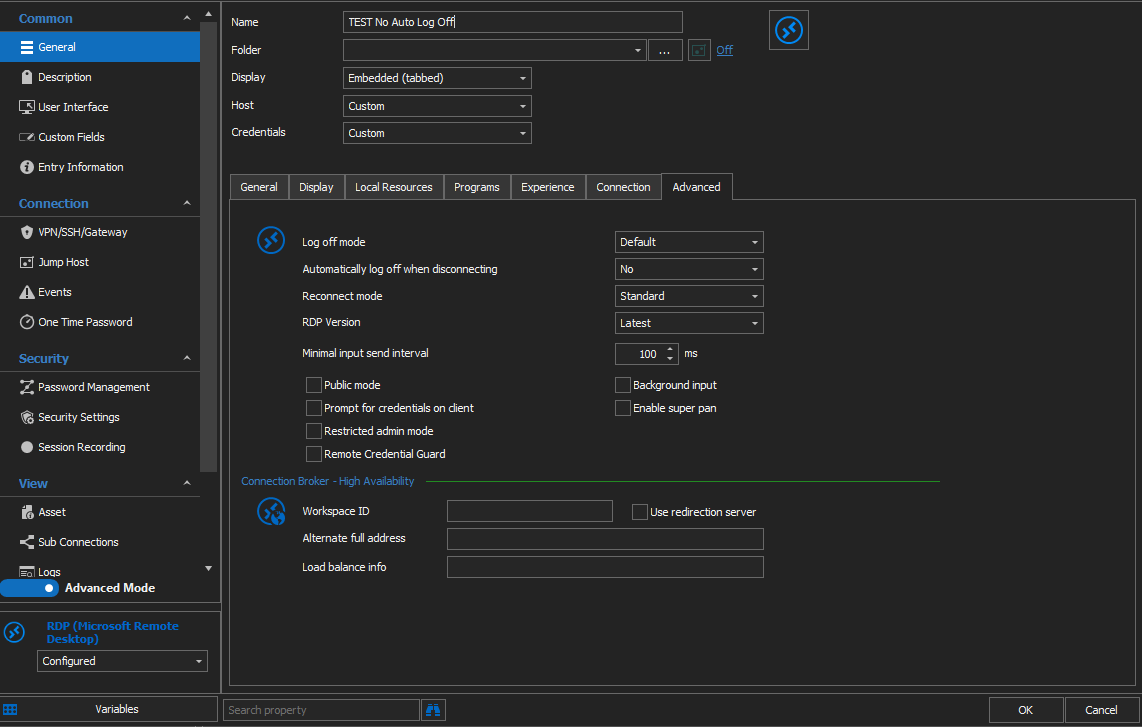
capture1.PNG
I have updated to 2022.1.13.0 and same issue...
I've tried to set it to YES to see if it would make a difference and it actually logs off as to before it just automatically Lock the screen instead...
For further information our computers are set for:
-Users DO NOT have to enter a user name and password to use this computer
-Accounts > Click sign-in options > Under Require sign-in set to: NEVER
-Personalization > Lock screen > Screen saver settings > On resume, display logon screen UNCHECKED
Hope this helps...
Hello,
There are settings on the RDP Host itself to handle idle sessions and timeouts. We have no way from within RDM to get that information, and I do not want to assume that you have full admin rights on the remote host, so my question is "Does it reacts the same way when using the native MSTSC client?"
Maurice
Hello,
There are settings on the RDP Host itself to handle idle sessions and timeouts. We have no way from within RDM to get that information, and I do not want to assume that you have full admin rights on the remote host, so my question is "Does it reacts the same way when using the native MSTSC client?"
MSTSC Client or Universal Remote Desktop does not lock up the pc.
Hello,
We'll need to escalate to our ticketing system for further troubleshooting. Please drop us a note at service@devolutions.net to get the ball rolling.
Best regards,
Maurice