RDM Updates - Is there a better for it?

Hi team,
We currently use RDM for managing our estate etc. But I find the update process, very old, out-dated etc. I mean I literally have to keep typing in a minimum and maximum version in to RDM every time a new update is released, its time consuming for those of us that are absolutely up against the clock with work.
Is there no way I can set RDM to force updates to the LATEST version after every upgrade so I don't have to keep adding and changing the min/max versions so everyone is basically on the same version as the database?
Cheers,
James
All Comments (5)
Hello,
(For example, when you go from 2021.2 to 2022.1)
When you upgrade your database, you will receive the following message : 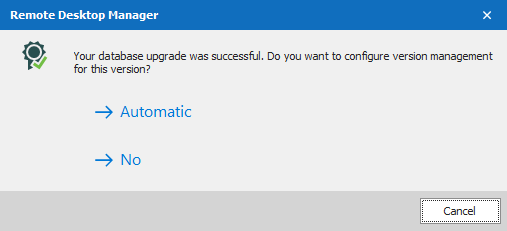
If you choose "Automatic" the version management will be set like so : 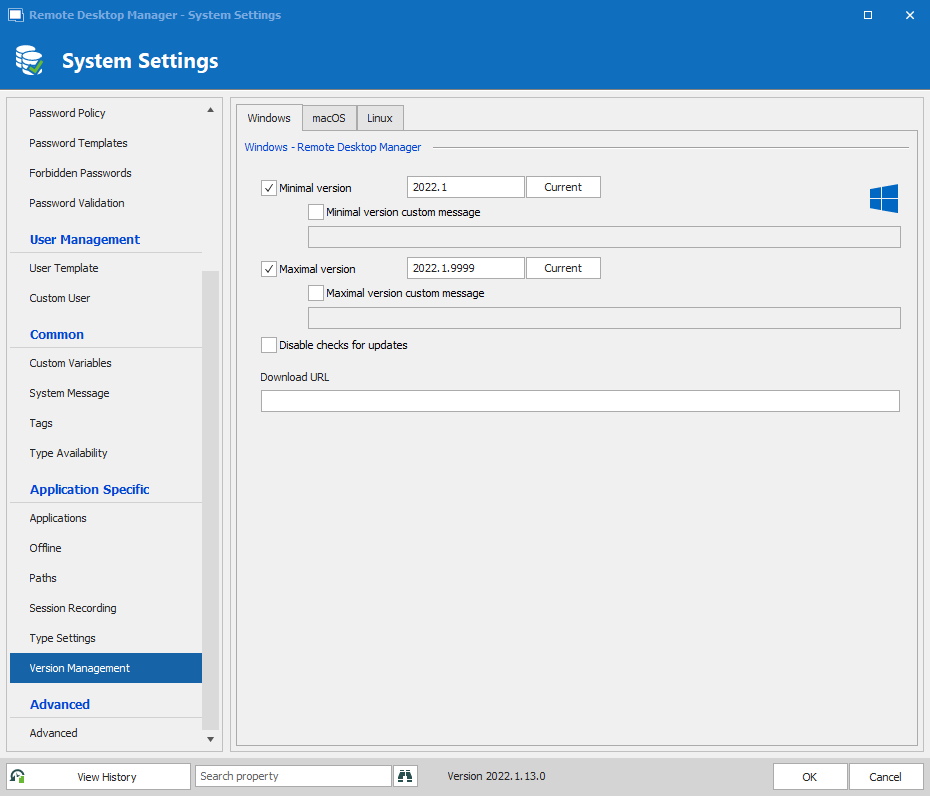
Which means that as long as you are running 2022.1.x.x, it will work, since these version are compatible. Would that work for your?
Best Regards,
Etienne Lord
2.png
1.png
That sounds like a really bad security risk cause users still have the ability to switch off updating their RDM clients and can stay on the first version while others might be on a more later version.
This is just an example theory, but can you confirm if
2021.2.20 will have all the same security updates back ported to it that 2021.2.28 has?
Not at all since you (the administrators) have total control on what versions you allow your users to use. You get to decide what level of control you want to enforce.
Let's step back for a moment. So RDM's numbering of version are in the major.minor.path format (example: 2021.2.38, 2022.1.13) .
Why does this even matter? Well, we work hard to make our release backwards compatible from one release to the next. Things get complicated when we change major.minor since this is where we perform the database upgrades.
So to alleviate this issue and prevent users from possibly corrupting the data and/or maybe circumventing a new security feature by using an older version we suggest, at a minimum, that you set the Version Management to Automatic. This will in effect set the allowed range of RDM versions between major.minor.0 and major.minor.9999, in other words, to all possible versions compatible with the state of the database.
You want more control? No problem, set the min/max values to your current installed version forcing every non-admin to be on that particular version or any other range of version of your choosing. As an administrator will get a warning but RDM will allow to continue so that they can at least go change the version management values. We don't really have a choice, if you can't connect because I don't have the proper version then how can you change what versions are allowed to connect?
You want more control, set the Download URL to URL or local network path of the installer that you want people to be running so that when users run a version outside allowed range we will automatically launch the URL specified in the option and perform the upgrade.
Does that answer your questions/concerns?
Best regards,
Stéfane Lavergne
One last question...
Let say you found a security vulnerability in 2021.2.28, would this affect all previous versions of 2021.2? Or would only only affect 2021.2.28?
If it does affect all previous versions, would the end user be notified to say they have a security issue in their current and advised to update to 2021.2.29 for example where it would have the fix?
Hello,
For you last question it's really depend of the vulnerability. You will find the details here:
https://devolutions.net/security/advisories
We will try to fix the current and the previous version if it's possible. We are working on improving our notification system and add a specific track for security advisories.
Regards
David Hervieux