RDM Migration To New PC - Domain No Longer Passes Through On RDP
RDM Migration To New PC - Domain No Longer Passes Through On RDP

I migrated my RDM to a new PC. I exported the configuration from the old PC and imported to the new PC. For some reason the domain name is no longer being passed through to the hosts when I try to RDP. In RDM-Screen1.png attached I input the domain name in the credentials field. When trying to RDP the domain is not passed through, RDM-Screen2.png. Anyone run into this before?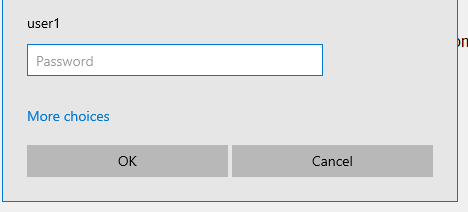
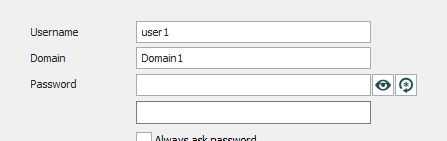
RDM-Screen2.png
RDM-Screen1.png
All Comments (8)
Hello,
What should it look like? Would you like for RDM to send user1@domain1?
Best Regards,
Etienne Lord
Hi Etienne,
Thanks for responding. On my old PC when I have the Domain field and Username field populated in the properties for my host it passes through both on the RDP prompt such as:
Domain1\user1
Example attached.
It's no longer doing that.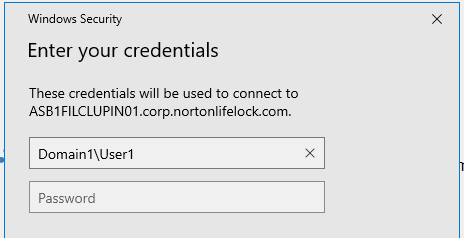
Example.png
Hello,
If you head over to the Advanced Tab of your Session, you will be able to change the Username format and set it to Domain\User, let me know if that works for you! : 
Best Regards,
Etienne Lord
Thank you, that worked! However how do I make this a global change? I have over 100 sessions configured. Is it possible to make this a global change for each configured session?
I looked trough the options for the app itself and I don't see were to make this a global change.
Hello,
It doesn't seem like we have any Global settings for that but you can edit the option in bulk.
Simply select your RDP Sessions make a right-click - Edit - Batch Edit - Edit Entries (General Settings) and once again head over to the Advanced tab to override the Username Format : 

Furthermore if you head over to File - Templates - Session (Under Local Default Settings) - RDP, by setting the option in there, it will be set by default when creating a new RDP session.
Best Regards,
Etienne Lord
Okay, I'll try all that. Thank you.
Any idea why this default behavior changed after importing the settings from my old laptop? I never had to change the username format, on my old PC it applied the domain\username format by default.
I just ran across another issue, which may be related:
When already connected to a host, if I click the reconnect button, the credential pop-up comes up without the domain prepended to the username, so I need to re-enter all my credentials again including the domain\username and password. Prior to this all I had to do was re-enter my password as the username was populated correctly. I just checked on my old PC and it works fine. It seems RDM is not saving the domain anymore for whatever reason. I think this may be due to the different version on my new PC and may be a bug in the latest version. Old PC is running 2021.1.36.0, new PC is running version 2021.2.28.0.
Can you please check to see if this is a 'bug' in the latest build?
I just did an uninstall and clean re-install. I still see the same behavior.
Workaround - Set the Username with : Domain\Username and set the domain as : Domain
Etienne Lord