Typing Clipboard in Windows Login Screen Issues

Whenever I attempt to paste the Clipboard into a Windows Login Screen field (either username or password) it omits characters. for example I.2o{J.0tq9[ turns into io{Jtq[ . It does not happen on my Windows Install of RDM Free.
Any ideas?
Tom
All Comments (13)
It is a known issue and a ticket is opened for it. The mechanism we use to "simulate" key presses (the AppleScript keystroke command) does not handle all characters properly. It really does simulate key presses but seems to struggle to properly apply key modifiers and such. This is kind of tricky to fix.
I'll attach this post to the ticket.
Best regards,
Xavier Fortin
Actually, there might be a workaround for this. It worked for me, but I haven't tested on the Login Screen. You can try to turn on "Send input as unicode". You can do this either globally (Preferences -> Types -> RDP -> Keyboard -> Send input as unicode) or for specific entries (RDP (Microsoft Remote Desktop) -> Local Resources -> Keyboard -> Send input as unicode).
Best regards,
Xavier Fortin
the work around seems to be working like a charm... thank you!
Glad to hear it!
Do not hesitate if you have any other issues.
Best regards,
Xavier Fortin
Good morning,
It does seem that some characters still do not work. The keys that I noticed are not working are + and '
Hi,
We still have the ticket opened. It's actually pretty tricky to fix.
We'll post back when progress is made.
Best regards,
Xavier Fortin
I do not know if it is the same Error/Bug or a different one but when I copy a password from for my Mac into a freshly opened Notepad in a RDP Session all seems fine (pasting it in the login field does not work), 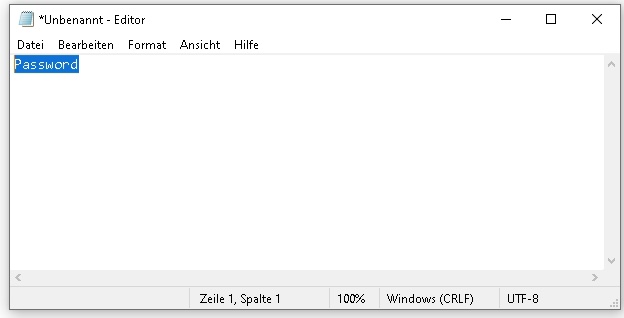
But now I copy that password from that Notepad and copy it into a freshly opened Word file and let Word show me all the formatting characters there is a weird box shaped character in front of the copied text. 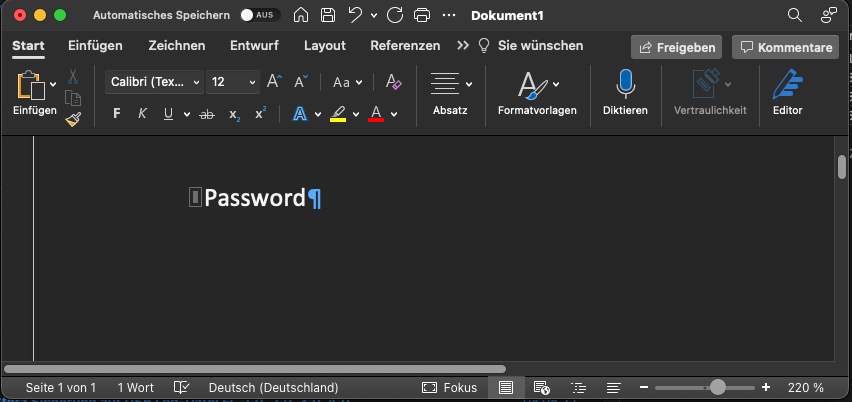
That box is not there when I type something myself in Notepad and copy that to the Word file.
Notepad.jpg
Word.jpg
This is most likely some special non-visible character, but I can't guess as to what.
That being said, if you are using the copy/paste feature, and not the Typing Clipboard feature, It's not exactly the same issue.
Is the character causing issue (i.e. would it prevent authentication)?
Best regards,
Xavier Fortin
Hi Rauch
To follow on to what my colleague wrote - it looks like you have a non-printable character at the start of the password you copied. I would expect this to cause a problem with authentication (if you used the "Type Clipboard" feature, or otherwise pasted the password into a non-WinLogon field).
I'd recommend checking that the character is actually contained in the password, and not being introduced by a bug elsewhere. You can copy the password on your Mac and then paste it into a local program that allows you to see invisible characters (for example, BBEdit let's you see this from the View -> Text Display menu).
If the invisible character is included in the original password, simply remove it and then paste the updated password back into RDM.
If the invisible character is not present in the password before you send it to the Windows server, then something else is going on...
Thanks and kind regards,
Richard Markievicz
I have tried to reproduce the Error with other Programs and not Word but wasn't able to. I am using the standard COMMAND+C / V method to copy and paste.
The source of the phrase I'm copying is not important, it can be a newly written Password in an Excel sheet or a word I copy anywhere from Safari or out of an E-Mail.
My colleagues can use our password list without a Problem (Windows PCs with MS RDP). When I try for example to login into a printers web interface in a RDP-Session in RDM I have to type the password manually because copy paste doesn't work. But when I use the RDP-Client from Microsoft for Mac I also can copy the password in without a Problem.
Hi - this seems to be more of an issue with just passwords in Monterrey 12.4 / RDM 2022.1.15.0
It looks like simple copy/paste is adding non visible characters when copying from mac -> windows in embedded connections. I have copied text from the terminal window to notepad ++ in windows and can see that the start of the text is in a slightly different font (due to non visible characters I am presuming) - hopefully you can see in the attached screenshot. For me it was working perfectly (including password copy/paste) in earlier versions (possibly prior to Monterrey upgrade). I have tried the unicode workaround but that does not work. This does cause issues on the windows side (i.e. pasting the text into MySQL or DNS on windows causes the entry not to be recognised).
I have also just tried using MS own Remote Desktop (external) and that works perfectly - including copying passwords.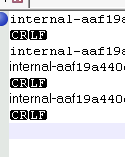
Screenshot 2022-05-17 at 15.22.31.png
Hello
Thank you both for the extra information.
I've identified an issue where, when copying unicode text on the macOS side, the source data might contain a byte-order mark. Depending on the paste destination on the Windows side, the BOM might not be expected and, as such, the extraneous bytes at the start of the data might cause this strange behaviour.
I've submitted a fix to the RDM macOS team, and that should be part of the next update. We'll post back here once this is available.
Thanks for your patience, and kind regards,
Richard Markievicz
Hi rauch and jamestune,
A version 2022.1.16.0 of RDM is now available with a fix for this issue.
Please, do get back in touch if you are still experiencing any issues with the newer version.
Best regards,
Xavier Fortin