Cyberark SAML authentication option

Is there a way to get Devolutions to work with Cyberark and authenticate via SAML? If not will this be available in a future release? Is there a Beta that has this functionality?
All Comments (16)
Hello,
It's still on our todo list. We are still in the final push prior to releasing v2022.1 in the coming weeks, we should start on this after the stabilization period to make it available in v2022.2 planned for summer. There's a chance that it's simple enough to appear before that, but I can't promise anything.
Best regards,
Maurice
Maurice,
Any news on this, our adoption of Devolutions with CyberArk is blocked by this as we chose to adopt SAML authentication.
Simon
I see that VERSION 2022.2.5.0 (July 04th 2022) has been released. I looked at version changes for it and previous ones and don't see the SAML authentication for Cyberark as an added feature. Has this been release yet? This is critical for us.
Hello,
Sadly, even today we do not even have SAML enabled on our CyberArk environment. It necessitates a lot of coordination between us and two teams over at CyberArk.
I see this is your first post on our forum, maybe you would drop us a note at service@devolutions.net and we'll see with your account manager at CyberArk to keep you in the loop.
Best regards,
Maurice
Hi all,
Well, as of TODAY (August 30th 2022) at 10am, we have finally enabled SAML auth on our CyberArk instance. We can therefore turn around and ask the RDM Team to implement this long awaited capability.
A huge thanks to Alex for rolling up his sleeves, digging deep, and taking ownership of the issue!
Maurice
This has made my day!
Looking forward to this for quite a while now, so how much longer?
is this SAML integration complete? it was enabled in your lab on Aug 30th. Any ETA on it being included in a release?
Hello,
We had some issues with our lab environment, but everything is in place now. The development team is currently finishing the integration with the SAML authentication, it should be available very shortly!
Best regards,
Richard Boisvert
Hello,
I have found new feature "Added CyberArk SAML authentication" in VERSION 2022.3.26.0 from December 06th 2022.
Where can I found documentation how to configure or implement this feature?
We have implemented PSM integration (Devolutions Remote Desktop Manager - CyberArk PSM integration guide) but our security switched from LDAP to SAML (with Ping Federation) and now integration does not work.
Thank You
Hello,
There is one setting when choosing SAML authentication in RDM, its called "IdP sign-in URL"
The person that configured SAML on CyberArk should provide that information to you. Sadly it is different for each identity provider and since we use Azure AD, its the only one I can tell you exactly where to find it.
In the Azure Enterprise App that was created as part of enabling SAML, you need to grab the "User Access URL" property.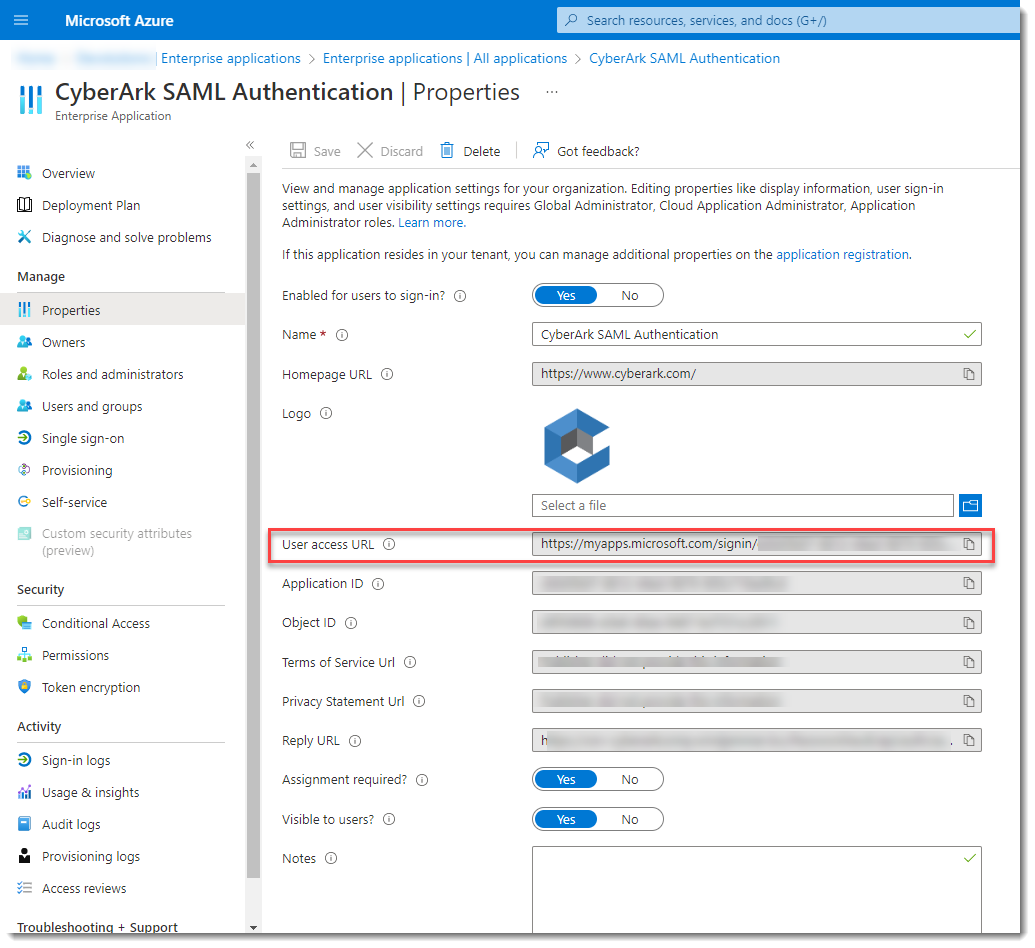
This info goes in the RDM entry, in the Idp... field
Please let us know how that works out.
Maurice
image-20221221-131940.png
Not working for me as I get a 404 error.
This url is outside of our platform, it should redirect you to login.microsoft.com.
We will need to enable dev mode in your browser and see where it hangs, its best to move to a ticket and have a second line specialist help you. I have located your account and will open a case for you.
Best regards,
Maurice
We do not use SAML with Azure. We use Ping Identity.
I have made some test, but without success. When I enter to RDM IdP URL which is used for SAML configuration on CyberArk infrastructure, then I get error from PingFederation.
When I use another URL we have from Ping, after click on account retrieve button, Ping is work successfully , but I get error 
We will investigate this behavior with CyberArk and Ping.
Best regarrd
This url is outside of our platform, it should redirect you to login.microsoft.com.
We will need to enable dev mode in your browser and see where it hangs, its best to move to a ticket and have a second line specialist help you. I have located your account and will open a case for you.
Best regards,
As far as I can tell it is our PVWA server returning the 404 do you have a relay url example to Cyberark? I will raose woth them as well.
We do not use SAML with Azure. We use Ping Identity.
I have made some test, but without success. When I enter to RDM IdP URL which is used for SAML configuration on CyberArk infrastructure, then I get error from PingFederation.
When I use another URL we have from Ping, after click on account retrieve button, Ping is work successfully , but I get error
We will investigate this behavior with CyberArk and Ping.
Best regarrd
The important notion to look for is the "client access" part, because RDM initiates the flow as a client, which needs to be accepted by the server. I will try to find as well on my side
Maurice
This url is outside of our platform, it should redirect you to login.microsoft.com.
We will need to enable dev mode in your browser and see where it hangs, its best to move to a ticket and have a second line specialist help you. I have located your account and will open a case for you.
Best regards,
As far as I can tell it is our PVWA server returning the 404 do you have a relay url example to Cyberark? I will raose woth them as well.
I'm not sure what you mean by relay, but on our server, the saml.config file contains something like
<ServiceProvider Name="PasswordVault" Description="PasswordVault Service Provider" />
<PartnerIdentityProviders>
<PartnerIdentityProvider Name="https://sts.windows.net/82.....
Maurice