secure gateway - RDP/SSH/HTTP(S)

Hi, I am testing the "secure gateway" with RDM on my MAC. It should replace the Jumphost-Feature that is only working with Windows.
SSH over secure gateway works perfectly.
RDP works only with "external", embedded I get a LOGON ERROR
- Is embedded not supported?
HTTP works only embedded with safari
- This is a problem because many websites are not working with Safari.
- Is it possible to use an external Webbrowser in combination with "secure gateway"?
- RDM open the external webbrowser with "localhost" and the dynamic port forward.
Thanks
All Comments (11)
Hi,
The Jump Host feature is available in RDM Mac (and has been since the version 2019.1.5.0 released in June 2019, see release notes).
For the use of the Secure Gateway with RDP, as far as I'm aware, it is supported. I'll see if I can find a working connection to test this.
For HTTP, there is no way with which we can proxy all the requests of a website if this website is in an external browser. Browsers typically do not expose proxying mechanism to external processes. Hence why it only works with the Embedded mode. And even for the embedded mode, it was all but straightforward to implement.
Best regards,
Xavier Fortin
Hi Christian,
I've just confirmed that the RDP over Secure Gateway works properly on my side. Could you describe exactly where it fails on your side? Does the Tunnel launch properly? Or is it the RDP session that fails to connect? If so, can you provide the session logs of both of those sessions? You can enable session logs and then find them in the Help -> Session Logs window.
Best regards,
Xavier Fortin
Hi, embedded RDM:
This ist the error Message:
SSH-Connection is running. I only cloned the "external" connection and changed it to embedded. The connection is using the credentials from my private vault.
Look like: 
Hi, I tried to open a preconfigured JumpHost Connection from our Windows Teams without success. Within connection settings, I can see the message "This application is not supported". Is this another Jump Host Feature ?!
Thanks
Hi,
For your first post, what is the format your username is configured with? Is it domain\username? If so, you're most likely hitting the same issue described here.
For your second post, I've noticed the same thing right after posting my first message. It's because there are two ways to configure Jump Host, and the two way do seemingly the same thing. We were not aware of this when we implemented this in RDM Mac. The way we support at the moment is through the General tab of the session: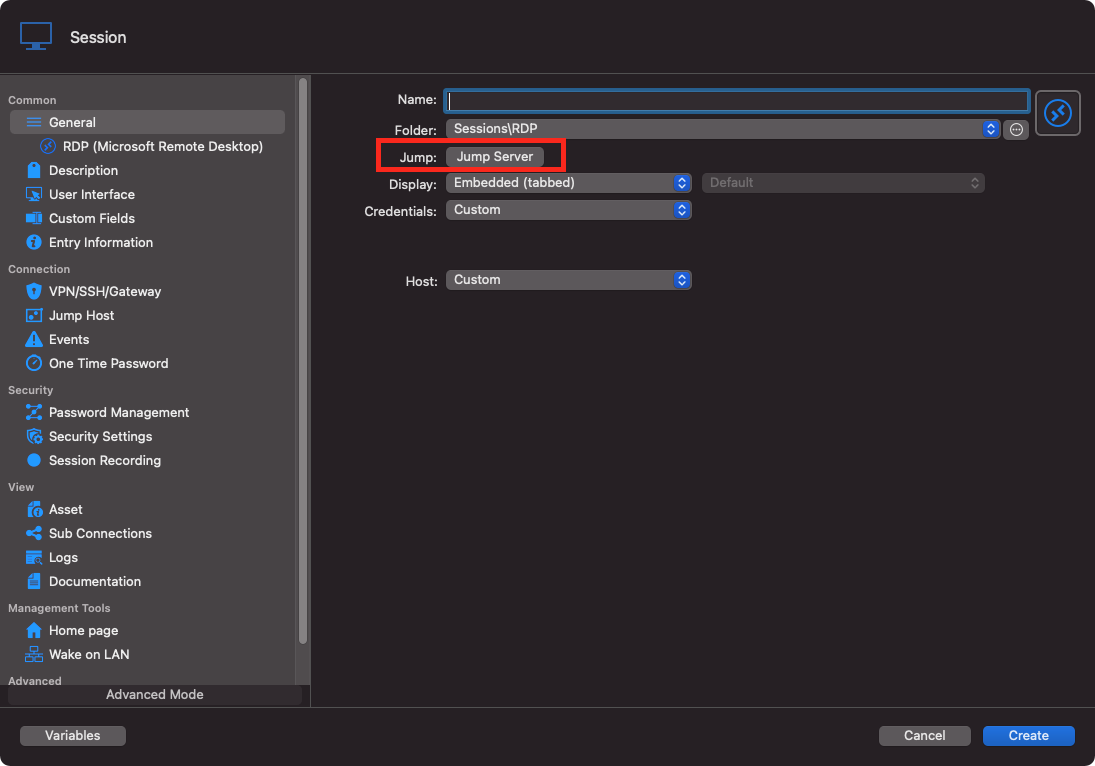
I've already filed and improvement ticket to add the support for the Jump Host in the VPN/SSH/Gateway tab.
Best regards,
Xavier Fortin
JumpHost.png
My credential is separated. I am using the user and domain field separately. But is saved under my User Vault.
I found the problem. There was an additional setting under "advanced". I changed it to "No change" and now the connection is working embedded and external. 
Well, my friend, you are one fast user! I was just about to ask you for this exact setting.
Anyway, we have a ticket opened for this also. We will try to make RDM RDP session user/domain usage conforms to mstsc.
Best regards,
Xavier Fortin
Hi Christian,
As of today, RDM 2022.1.3.0 is available and should now properly divide the user and domain if necessary.
Please, to tell us if it does not work as expected, or for anything else.
Best regards,
Xavier Fortin
Hi, thanks for the update. I cannot use this new version, our Backend is too old. I have to wait. BR Christian
Alright, keep me posted when you get a chance to test it.
Best regards,
Xavier Fortin