WinSCP template taking $USERNAME$ too literally...

I have a WinSCP template set up using the variables $HOST$ and $USERNAME$ (and a private key) but instead of getting these variables passed from the PuTTY session when opening the template from the entry it tries to login with the username "$USERNAME$" and not the one from the entry. So, basically the variable is not being filled or something.
The funny thing is that the same sort of entry but with password instead of SSH key worked fine until today when I started updating it. It now, too, attempts to connect as "$USERNAME$". What am I doing wrong?
Error
Template Step 1: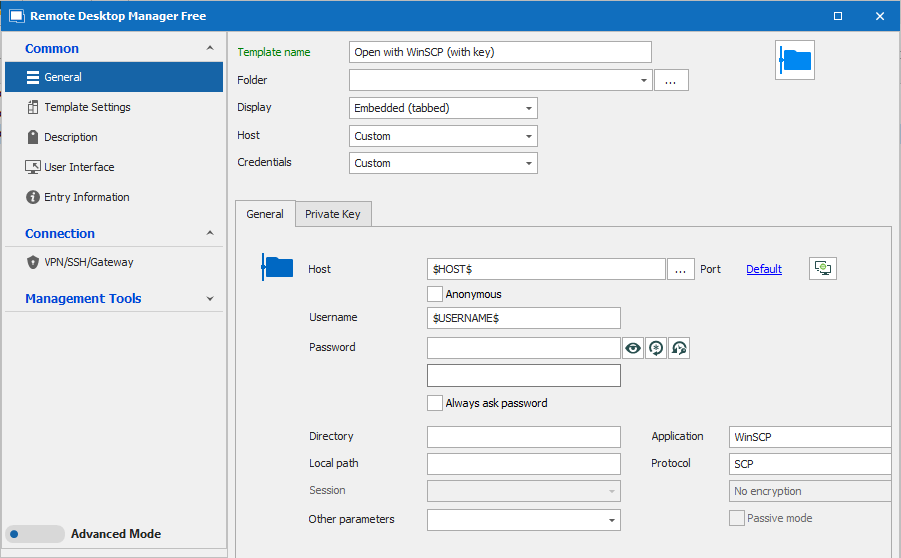
Template Step 2: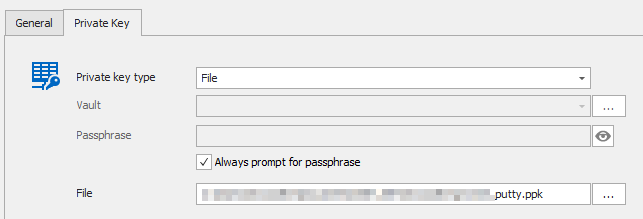
Entry from which I call the template: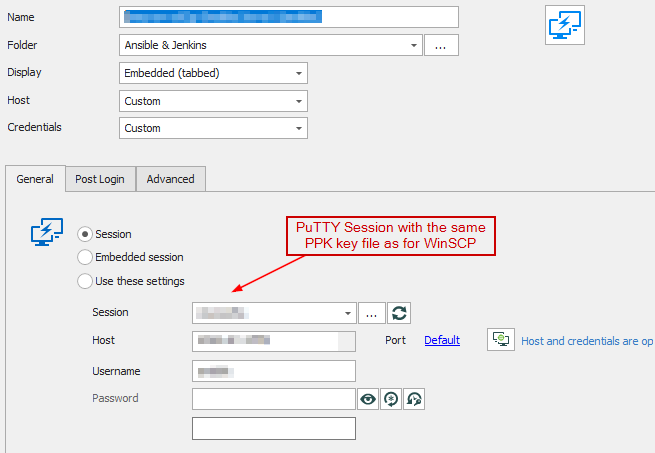
3.png
2.png
1.png
0.png
All Comments (6)
Okay, I fixed that issue by de-selecting the "Use credentials from template" checkbox.
However, despite me setting up a private key it is simply not being used by either WinSCP or the in-built SCP.
With WinSCP I get this error in the auth.log of the serverJan 26 15:15:56 some-server sshd[11576]: debug1: userauth-request for user XXXX service ssh-connection method none [preauth]
So, it's trying pubkey authentication method. I cleared the password.
With the built-in SCP it's insisting on using an (empty) password instead of using the key I configured in the template.
Hello,
Thank you for contacting us regarding this, I'm glad to see you were able to resolve one of your issues!
I have a few questions which you can hopefully answer,
- I would like to confirm which version of RDM are you using?
- Which type of data source are you using?
I'm also wondering if this was working previously for you?
Let me know,
Best regards,
Samuel Dery
Hello,
thank you for your reply. I am using RDM 2021.2.28.0 (Free Edition) which I believe to be the latest. I am using a local data source.
No, I've never been able to set up a working SCP connection using an SSH key. The regular SSH session work fine using keys, though.
Hello,
Thank you for your reply,
Indeed, that is the latest version of RDM Free. I'm wondering if this is working for your outside RDM?
That being said, If you create a new "WinSCP" entry and change the "FTP (Third-party)" option to "Built-in SCP" and complete your configuration, do you encounter the same issue?
Let me know,
Best regards,
Samuel Dery
Hi,
I've been able to get WinSCP to work properly by deleting it and re-setting it up. It now even works for both password and key sessions.
However, I haven't been able to get the built-in SCP to work with ssh keys at all. I set it up the same way as WinSCP but the server always returns that password login is prohibited. So for whatever reason it's still trying to forward a password (I didn't fill out the password field in the template).
For the time being I'm happy that WinSCP works but if you want me to test anything else I'd be happy to do so.
Many thanks.
Hello,
Thank you for your reply!
Great, I'm happy to hear that your WinSCP entry is now working.
If you have further questions let me know,
Best regards,
Samuel Dery