$VPN_PASSWORD$ variable not functioning for custom type vpn
$VPN_PASSWORD$ variable not functioning for custom type vpn

Good afternoon team Devolutions,
I am running into an issue where I am trying to use a vpn type "custom" and when I pass the variables to the application it does fine with everything except the $VPN_PASSWORD$ variable.
Executable:
C:\Program Files (x86)\SonicWall\SSL-VPN\NetExtender\NECLI.exe
Opening argument that FAILS:
connect -s $VPN_HOST$ -u $VPN_USERNAME$ -p $VPN_PASSWORD$ -d $VPN_DOMAIN$
Opening argument that SUCCEEDS:
connect -s $VPN_HOST$ -u $VPN_USERNAME$ -p MyP@ssw0rd! -d $VPN_DOMAIN$
I do realize that there is a Sonicwall Netextender client that can do this however I originally had this client set up as Custom and had to hardcode the password because the variable would not get substituted when passed to the CLI and mentioning this bug just in case I need to use a custom type in the future.
Thank you,
Tony
All Comments (4)
Hello,
Do you have the option "Allow password in variable" enabled?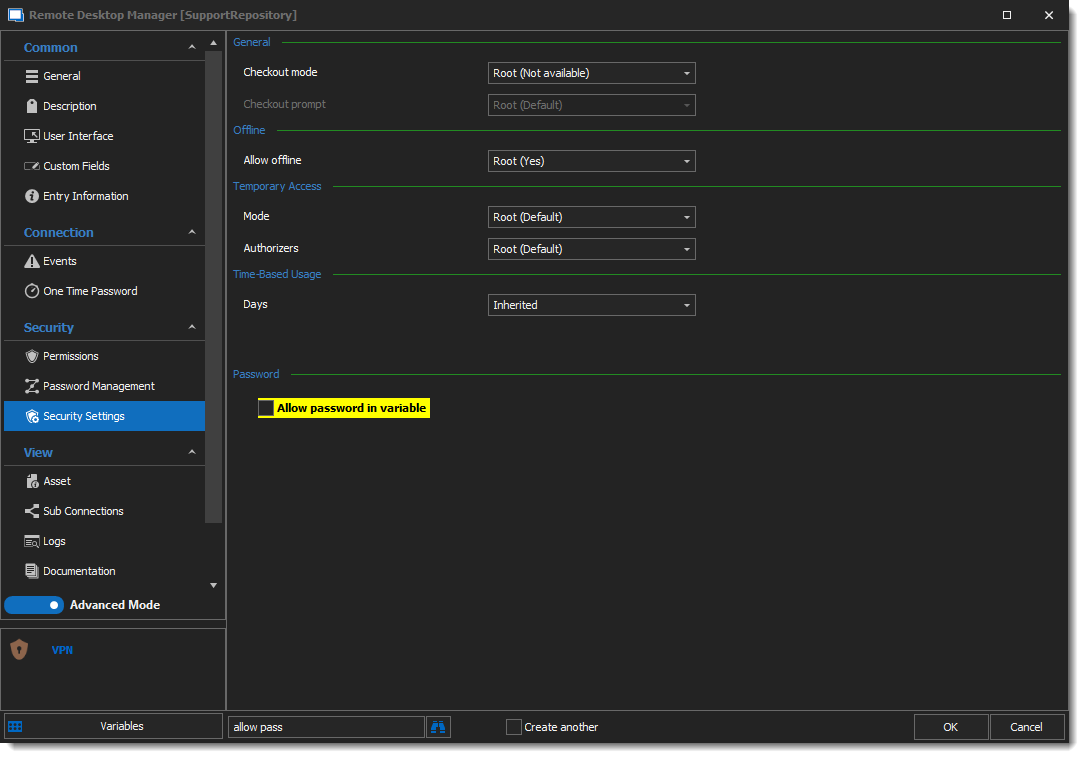
I hope this helps.
Best regards,
Alex Belisle
2022-01-20_9-10-56.png
That was the piece I was missing. I appreciate you pointing that out.
On a side note, I must still use this custom vpn for network extender for one single customer because the password has spaces in it and I have to pass the password using double quotes. It appears that the sonicwall network extender vpn likely does not use the double quotes and therefore the command line gets mangled.
My solution that now works:
connect -s $VPN_HOST$ -u $VPN_USERNAME$ -p "$VPN_PASSWORD$" -d $VPN_DOMAIN$
Note the double quotes above are allowing the password I was assigned which had multiple spaces in it. As a fake example (changing all the values except for the spaces) my password is something like "1a BC defg!!"
I am providing this so you can try a proof of concept on your side to watch it fail when using the devolutions sonicwall network extender vpn add-in. For now I have it working using the custom one.
Thanks,
Tony
Hello,
Very good, glad this was helpful.
I opened a ticket for the support of spaces and ensure that the quotation mark will work as well.
Thanks for reporting this, have a great one.
Best regards,
Alex Belisle
Hi,
We have made the changes internally. It should be fixed starting with version 2022.1.11
Regards,
Jean-Francois Duchesne