Connection shows as active after close

Occasionally, and I haven't exactly worked out the pattern yet, I'll close an RDP connection to a Windows server but it will still appear as live in the opened sessions pane. Clicking on it then fails to open a session to the server. The only ways to get around it are to either restart the App or to duplicate the connection and delete the old one. Please let me know what information I can collect to help diagnose this issue.
All Comments (19)
Hi,
I think we've had one such report in the past, but we never got around to reproduce the issue. What is your data source type (SQLite, XML, SQL Server, etc.)? Are you on the latest version of the application (2021.2.13.0)?
Also, could you provide your application logs (Help -> Application Logs -> Open button (to reveal the file in Finder))? I'd like to see if some silent error may be interrupting the session closing process from completing entirely.
Best regards,
Xavier Fortin
Hi Xavier, thanks for getting back to me so quickly. I'm using a local data source and version 2121.2.12.0. I can see I ran into this issue and had to duplicate an entry on 18/01 at 6:42PM, but I don't know what time the connection got into that state. I've attached the logfile for that day. Thanks
rdp_log.txt
I see two types of errors occurring quite frequently in your logs. An IPC exception, which means that that the communication between RDM and the remote RDP process was interrupted, and an error in the Pasteboard synchronizer. Both errors are trivial and and can be recovered from. This is hard to establish what could be the issue with this. Maybe one of the IPC exception is improperly handled, leading to the state of the connection to be improperly handled (in this case, closed).
In any cases, if you identify a way to consistently reproduce it, please do inform us. In the mean time, I'll open a ticket for investigation.
Best regards,
Xavier Fortin
Hi louiek,
We've just released a version (2021.2.14.0) with a potential "fix" for this. It's not a proper fix per say, in the senses that the issue (entries not being entirely flagged as closed) should persist, but, hopefully, it should be possible now to Close it again and for it to works (and from there to relaunch the entry).
I've found no realistic scenario on my side to properly reproduce the issue. I had to manually "skip" code to reproduce it (which, obviously will produce weird result). But, I found why entries in that state couldn't be closed. I'm hoping this is close enough to your issue for this fix to make it a bit less annoying (forgoing the need to relaunch RDM).
If you can, please, post back on the result.
Best regards,
Xavier Fortin
Thanks for all your work on this Xavier. I've installed the latest version and I'll let you know if I see the issue occur again.
Louie.
Hey Xavier. It's just happened again and I've got two connections in that state. I had 10 sessions that I closed. I think I chose 'log off', but I'm not completely sure. I noticed that there was a warning message about open applications, but I didn't pay attention to which servers they were on, so I don't know if they were on the two that are still showing as open. I've uploaded the application log for today. I closed the connections at 11:20:44 according to the local connection logs.
Thanks,
Louie.
Screen Shot 2022-02-04 at 2.28.16 pm.png
RemoteDesktopManagerFree.log
Hi,
As stated in my previous message, the version does not prevent the issue from happening. But it should hopefully allow you to close the improperly closed session with the Close button (either by right clicking the entry, or on the Dashboard). Does it work?
Best regards,
Xavier Fortin
Hi Xavier. Right clicking on the connection and choosing close does not remove the green arrow from the connection. Choosing 'open session' does not open a new session. The 'reconnect' option is still there but it does not reconnect.
Thanks,
Louie.
And you confirm that this is with the 2021.2.15.0 2021.2.14.0 or later?
If so, I'm at a lost. I'll reopen the ticket. But so far, we've still been unable to reproduce the issue.
Best regards,
Xavier Fortin
2021.2.14.0
I'll pay more attention next time I get a warning when closing.
Thanks,
Louie.
Most likely something unexpected happens in the close process that breaks its proper completion, maybe some concurrent processing. It's very likely you'd also have quite a hard time figuring this out on your side. When we get a bit more time, we'll try to investigate a bit more deeply again and see if we can identify what condition could cause this.
Do you have the "Automatically log off when disconnecting" option enabled? The option can be found either globally in the Preferences (Preferences -> Types -> RDP -> General -> "Automatically log off when disconnecting") or specifically for each entries in their settings (RDP (Microsoft Remote Desktop) -> Advanced -> General -> "Automatically log off when disconnecting").
Best regards,
Xavier Fortin
Hi louiek,
I've made a possible fix, although I can't confirm if it works or not. Would you be willing to try it. I've made beta versions (for the Free and Enterprise version) they're the same as the 2021.2.15.0 but with the mentioned. Here are the versions:
Enterprise: https://www.dropbox.com/s/pah0bmrlj5q1g67/Devolutions.RemoteDesktopManager.Mac.2021.2.15.1644510404.dmg?dl=0
Free: https://www.dropbox.com/s/vw4h2mez6i0rrpi/Devolutions.RemoteDesktopManager.Free.Mac.2021.2.15.1644510992.dmg?dl=0
In those version, if the error was to occurs (and if the fix does indeed fix the problem), you should see the following window being shown: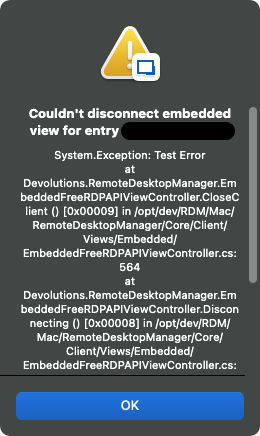
The session should then proceed to close itself (hopefully properly).
If and when it occurs, could you provide me with the content of this error window? You will be able to select and copy it.
Best regards,
Xavier Fortin
ErrorMessage.png
Hi,
I believe I've found the root cause to this. As of today, RDM 2022.1.3.0 is available with a fix for this.
Please, to tell us if the issue still occurs, or for any other issues.
Best regards,
Xavier Fortin
Thank you Xavier, installing 2022.1.4.0 now. Sorry, I didn't see your message from last week.
Regards,
Louie.
No trouble. Keep me posted!
Best regards,
Xavier Fortin
Hi,
This issue still occurs. It shows connections that do not exist. No one is logged on.

Version: 2022.1.12.0 64-bit
Please advice!
Hi sdevalk,
This does not appear to be the same issue. First, this was an issue specific to RDM Mac and it appears you are using RDM Windows.
In this case, it appears as if another user is already using the entry. If it is not actually the case, it's possible that a user was using those entries and RDM terminated unexpectedly (crash, OS shutdown, etc.) In which case, it would have been impossible for RDM to update the shared states.
You should be able to force the clearing of those states from the Opened Sessions -> Running Sessions (Global) tree (see attached FlagAsClosed.mp4 video).
Best regards,
Xavier Fortin
FlagAsClosed.mp4
Hi,
Thank you for your response. Videolink doesn't work.
Cannot find Opened Sessions -> Running Session
Please assist or provide a screenshot where we can find the option.
Thanks!
Hi,
Here you go: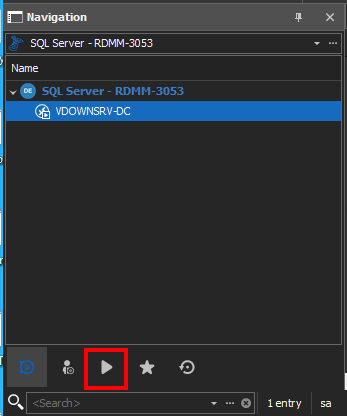
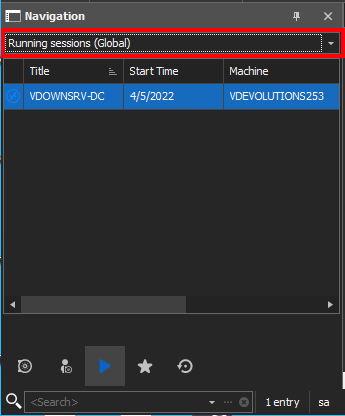
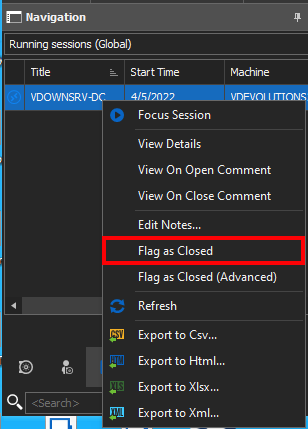
Best regards,
Xavier Fortin
Step3.png
Step2.png
Step1.png