Web Extension not connecting to RDM

We recently updated our RDM server and clients yesterday to run the latest version (2021.2.27.0) and since then the web browser extension we use in both Chrome and Edge (latest versions of both) no longer work.
Reading the documentation on the change to the web extension I can see this now should create a API access key between the browse and RDM client however that does not seem to be working on our machines. When we remove (clear browser cache) and then re-install the extension in Chrome (for example), we can open the extension, select RDM but then the window just says that An Application Key is required. From the documentation it should ask for a key to be entered (name of the browser for example) but there is no option for this. Have tried manually entering an application key within the settings for the extension but nothing seems to change and this still doesn't work.

Any help on this would be greatly appreciated as we make use of the web extension alot!?
Thanks
Rich
All Comments (18)
Hello,
Did you set the same key in both the Web Browser's Remote Desktop Manager settings : 
And in Remote Desktop Manager's File -> Options -> Browser Extensions like such : 
Best Regards,
Etienne Lord
Hi,
Yes tried that but same issue, screenshots to confirm that we have tried setting the same key value between RDM and the web extension options for Edge,

Have also tried this in Chrome, but same results.
Thanks
Rich
Hello,
I will verify with the engineering department, keep you updated on that!
Best Regards,
Etienne Lord
Great, thanks!
Hello,
Could you also try to change the Port that DWL uses : 

Best Regards,
Etienne Lord
Hi,
Tried changing the port to 19444 within both RDM and the web extension options but no joy.
Hi,
Could we please get some advise on how we can get the web plugin working again following the RDM update? A lot of our daily work flows and processes evolve around using this, so its vital we get this working again please.
Thanks in advance
Rich
Hello,
We are not quite sure why this would happen, do you work in a TS environment?
Best Regards,
Etienne Lord
Hi,
No, we all use Windows 10/Windows 11 machines with RDM installed locally. As mentioned before, we updated RDM to the latest version this week and it is since then that this is not working. I have repeated this on several machines here and all having the same problem. We use both Edge (Chromium) and Chrome, both of which are kept up-to-date via GPO policies so we always run latest versions.
Are there any log files, or extra details that we can review which might give us an indication of why this isnt working? The fact that the extension doesnt seem to 'read' or connect to our local RDM clients would seem to the the main problem here I suspect?
Thanks
Rich
Hello,
You can refer to this help topic : https://kb.devolutions.net/kb_dwl_troubleshooting_connection_logs.html
You should see a Red request in there, you can send us the screenshot of the following :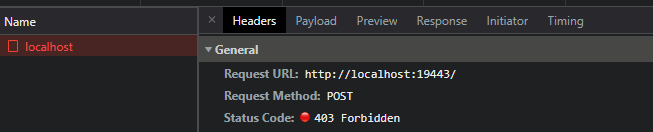
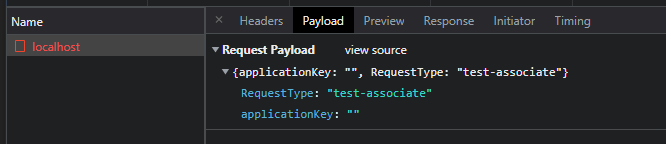
Best Regards,
Etienne Lord
DWL4.png
DWL3.png
DWL2.png
DWL1.png
Hi,
Tried to go through this process however the Inspect Views section does not show a URL for us to select. This is the same on both Edge (Chromium) and Chrome,
Here is a screenshot from both Edge and Chrome, with Dev mode enabled,

Could this be the reason why the extension is not working, and if so why would this section of the extension properties not be shown on both browsers?
Thanks
Rich
Hello,
This is most likely due to an Policy, in this case it would be DeveloperToolsAvailability that doesn't see Inspect View.
https://chromeenterprise.google/policies/?policy=DeveloperToolsAvailability
We suppose that DWL was installed using an Enterprise Policy and so the result would currently be the following : Setting the policy to 0 (the default) means you can access the developer tools and the JavaScript console, but not in the context of extensions installed by enterprise policy.”
The workarounds are the following :
- Change the Policy and set DeveloperToolsAvailability to "1"
- Try with a profile where the Extension wasn't installed using the Enterprise's policy
- Installing DWL on Opera if you do not have any policies related to Opera, from there, gather the logs.
Best Regards,
Etienne Lord
Hi,
So managed to go through this, and have gotten further using a user account which doesn't have any policies applied for deploying the web extension.
The backgound.html page now lists under the Inspect Views for the extension, and can see the localhost entry is Red. It looks like this page is being blocked by our Sophos AV client due to this page being both uncategorised and also requiring Javascript,
Are you able to provide any background detail on how the web extension now works so I can further understand what we may need to tweak on the AV side of things to allow this work please?
Thanks
Rich
Good question, I will have to look into it.
Best Regards,
Etienne Lord
Hi,
So we have managed to resolve this issue by allowing the localhost:19443 website via our Sophos AV web protection client. In fact, we added 127.0.0.1:19433 to be allowed (as that will resolve localhost).
With this done, the web extension looks to be working again.
It would still be interesting to know any details on how this works from a backend perspective, to ensure we are allowing the correct site etc...
Thanks again
Rich
Hello,
This is indeed the solutions in that case, here is an answer that was sent from there engineering department before you sent you last response :
The communication between RDM and DWL has not changed since the last two versions, it still goes through localhost with steps to add, the reason for the issue is the following:
In the Sophos configuration, it has in "Endpoint Protection" a settings that makes a Warn in this is a website that is not in a category.
One of the possible workarounds to add in “Global Settings -> Website Management” the localhost url in one of the categories of your choice in the screenshot below: 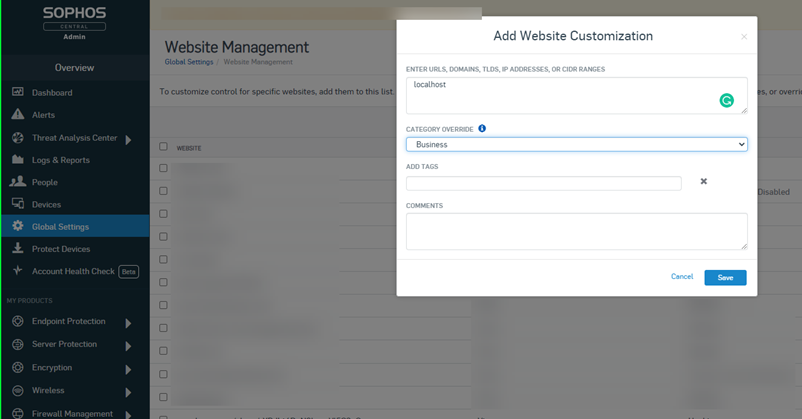
As for the details regarding the backend, I sent your question to my colleague, I will await his reply and let you know!
Best Regards,
Etienne Lord
Picture1.png
Hello,
DWL sends messages on http://localhost:portnumber/path. Portnumber being the port in your options and path changes depending on what information DWL needs. So allowing localhost with your port number is all you're going to need!
Best Regards,
Etienne Lord
That's great, we have this all working now by allowing http:\\localhost:port in our Sophos AV web protection policy.
Thanks for your assistance with this.
Regards
Rich