3CX Management console

Disabled
Hi Guys,
We are testing Remote desktop manager as a main tool.
We are having problems with using the 3CX remote management console which is webbased.
We already tried multiple browsers.
Created a new webpage entry: https://benkgroep1.my3cx.nl/ the page loads and the username and password fills automatically but then doesn't login.
When we copy paste the username and password into the webpage we can login.
Field for username
<div class="list-group-item"> <input placeholder="User name or extension number" class="form-control no-border ng-not-empty ng-dirty ng-valid-parse ng-valid ng-valid-required ng-touched" ng-model="$ctrl.user.username" required="" aria-invalid="false" data-com.bitwarden.browser.user-edited="yes" style=""> </div>
Field for password:
<div class="list-group-item"> <input type="password" placeholder="Password" class="form-control no-border ng-not-empty ng-dirty ng-valid-parse ng-valid ng-valid-required ng-touched" ng-model="$ctrl.user.password" required="" aria-invalid="false" data-com.bitwarden.browser.user-edited="yes" style=""> </div>
Does anyone also runs into this kind of problem or maybe knows how we can solve this problem?
All Comments (7)
Hello,
Thank you for providing us the URL for this website,
I've had a look at the website using the manual method described in this knowledge base article: https://kb.devolutions.net/rdm_web_browser_web_authentication.html
Unfortunately, while doing my inspection I found the value "Autocomplete=off" for both the "Username" and "Password" fields. I'm afraid this is most likely the cause of your issue.
In such cases, we recommend launching the entry in "External" display mode while using our "Devolutions Web Login" browser extension to autofill the "Credentials".
Best regards,
Samuel Dery
Disabled
Hi Samuel,
Thank you for the quick reply and the investigation.
We are going to test it further with the External and then the Devolutions Web Login option.
Best regards,
Dwayne
Hello,
Thank you for your reply!
No problem, let me know if you have further questions,
Best regards,
Samuel Dery
Hi, did you manage to get this working?
I have this: 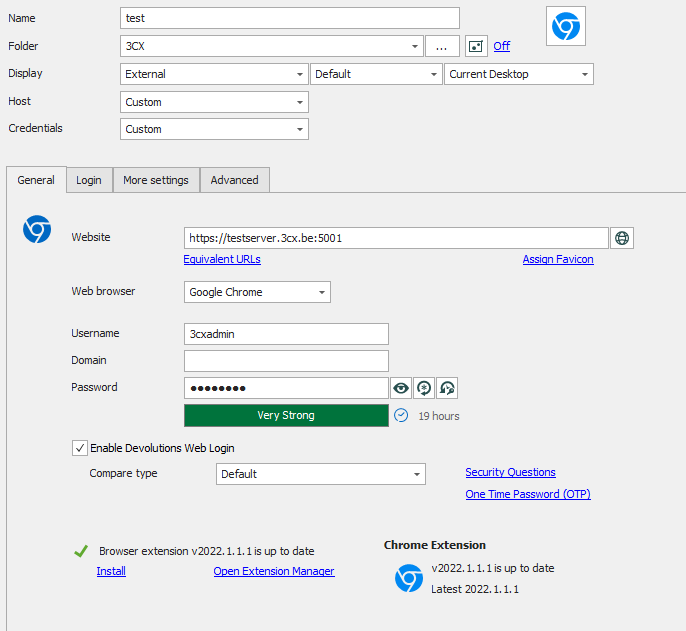
But if I use this external Display, it just autofills in something from the browser, which is the last extension I used for this server to log in. But no SUBMIT (AND the usernamen and password are not correct)
If I use the embedded thing, it does not fill in anything....
test3CX.png
Hello Nick6,
Unfortunately, the website provided in this topic initially did not allow for autofill in "Embedded" mode due to the value "Autocomplete=off" for both the "Username" and "Password" fields.
That being said, from testing on my end using "Devolutions Web Login" in "External" mode I was able to make it work for the credentials to be submitted automatically you will need to go in your "DWL" extension "Settings" select your "Data sources" in this case "Remote Desktop Manager" go under "Actions" tab and enable the option "Automatically Submit the form after filling".
Let me know if this helps,
Best regards,
Samuel Dery
Hi Samuel,
That did the trick.
I already asked 3CX to change the login page, but they were telling me only a gold partner could ask this via the ideas section.... and then it even needs to be upvoted....
Even though this adaptation takes 1 minute of their time and has nothing to do with 3CX itself....
Another solution within RDM itself is to use a custom JavaScript:
document.querySelector('[placeholder="User name or extension number"]').value = "$USERNAME$"
document.querySelector('[placeholder="User name or extension number"]').dispatchEvent(new Event("input"))
document.querySelector('[placeholder="Password"]').value = "$PASSWORD$"
document.querySelector('[placeholder="Password"]').dispatchEvent(new Event("input"))
document.getElementsByTagName('button')[0].click()