website / webbrowser

Webbrowser is under "session" and can have some settings be predefined (template).
Website is under "info" and cannot have some settings predefined.
They seem to be setup differently, but work more or less the same.
1) what IS the difference between them?
2) why can't we change some of the defaults, eg the external browser to use
3) can at least the icon in the vault tab be different ?
4) is there a way to disable websites?
All Comments (6)
Hello Hans,
Thank you for contacting us on that matter!
Please find my answers to your questions below:
1) what IS the difference between them?
The Web Browser entry offers more flexibility and features than the Website entry since it is considered a "Session" entry. The Website entry on the other hand is an "Information" entry meant to contain the information needed to connect to your websites.
2) why can't we change some of the defaults, eg the external browser to use
When the "External" display is used, the connection relies on the default native browser that you are using on your machine. This is the reason why it cannot be altered through RDM.
3) can at least the icon in the vault tab be different ?
Are you referring to the icon of both of these entry types?
4) is there a way to disable websites?
Which version of RDM and what type of Data Source you are currently using? Also, are you using the Free or the Enterprise edition of RDM?
Best regards,
James Lafleur
1) what IS the difference between them?
The Web Browser entry offers more flexibility and features than the Website entry since it is considered a "Session" entry. The Website entry on the other hand is an "Information" entry meant to contain the information needed to connect to your websites.
Thanks, although perhaps some more guidance (also in rdm) might be provided re when its best to use one or the other. Perhaps even a switch/upgrade/downgrade option.
2) why can't we change some of the defaults, eg the external browser to use
When the "External" display is used, the connection relies on the default native browser that you are using on your machine. This is the reason why it cannot be altered through RDM.
Not entirely true, as in both this setting can be changed. With the website its a bit awkward when compared to the browser, but doable.
3) can at least the icon in the vault tab be different ?
Are you referring to the icon of both of these entry types?
Yes, they are bothablue globe icon
4) is there a way to disable websites?
Which version of RDM and what type of Data Source you are currently using? Also, are you using the Free or the Enterprise edition of RDM?
Running enterprise, currently using the Devolutions Password Personal Hub, but considering switching to MariaDB
Hi hans,
To give a more thorough explanation, it's a case of a framework not being followed (that's on us).
Web Browser is a session. It's expected to come with the following behaviour: opening (in this case, launching a tab with a WebView) and closing (closing the aforementioned tab). It also comes with what would usually be session specific settings and feature (such as VPN/SSH/Gateway).
Website is an information entry. It is supposed to be a repository of information (website related information, usually, pretty much an URL).
With time, people using Website entries gradually requested more features that made the entry more and more similar to Web Browser (while not being exactly the same). This lead us to now where you can kind of do the same thing with any of the entry type, but they are still treated differently. If you want to avoid confusion, I'd suggest to use only one of them (Web Browser is the more feature rich one). If you want, Web Browser to be available in the Devolutions Web Login browser extension, you need to check the "Enable Devolutions Web Login" checkbox in the Web Browser (http/https) -> General tab of their settings.
As for the images, you can change the image of any entry individually, but not of a whole type of entry at once.
With MariaDB, it should be possible to disable a type of entry in the Administration -> System Settings. Under the Application -> Type Availability tab: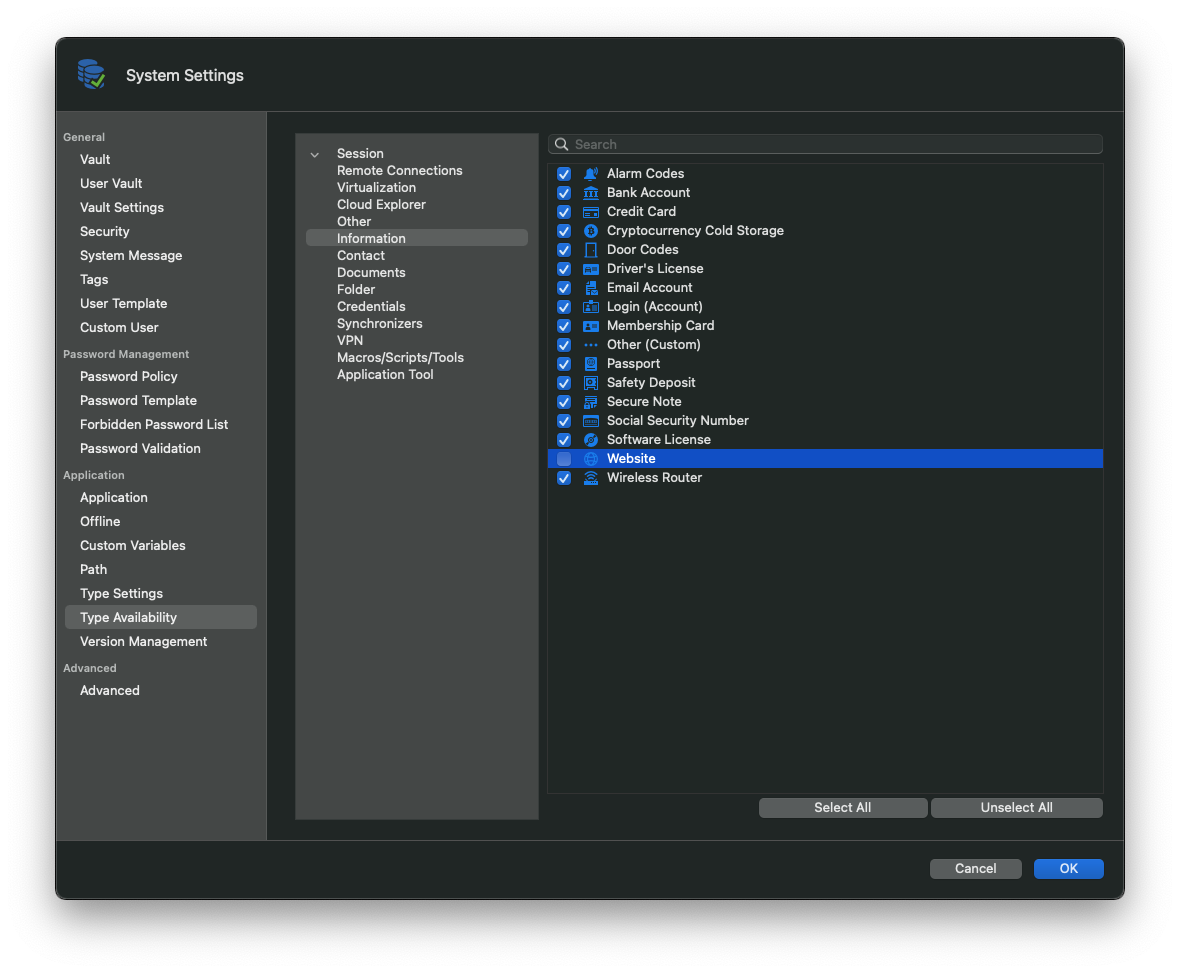 Best regards,
Xavier Fortin
TypeAvailability.png
Thanks
Hello Hans,
On a side note, I would recommend moving to either SQL Server or SQL Express if you want to opt for a local database. The reason for this is that we plan to remove the support of the MariaDB data source in the near future.
The setting mentioned by Xavier is also available for a SQL Server data source.
Best regards,
James Lafleur
"we plan to remove the support of the MariaDB data source in the near future" - combined with the Safari only for embedded webserver on Mac, this might be reason for me to transition to another tooling setup
