Adding terminal emulation
0 vote

Hello,
We use RDM to connect to linux machines and would need VT220 added to the "Function Keys mode" (see screenshot).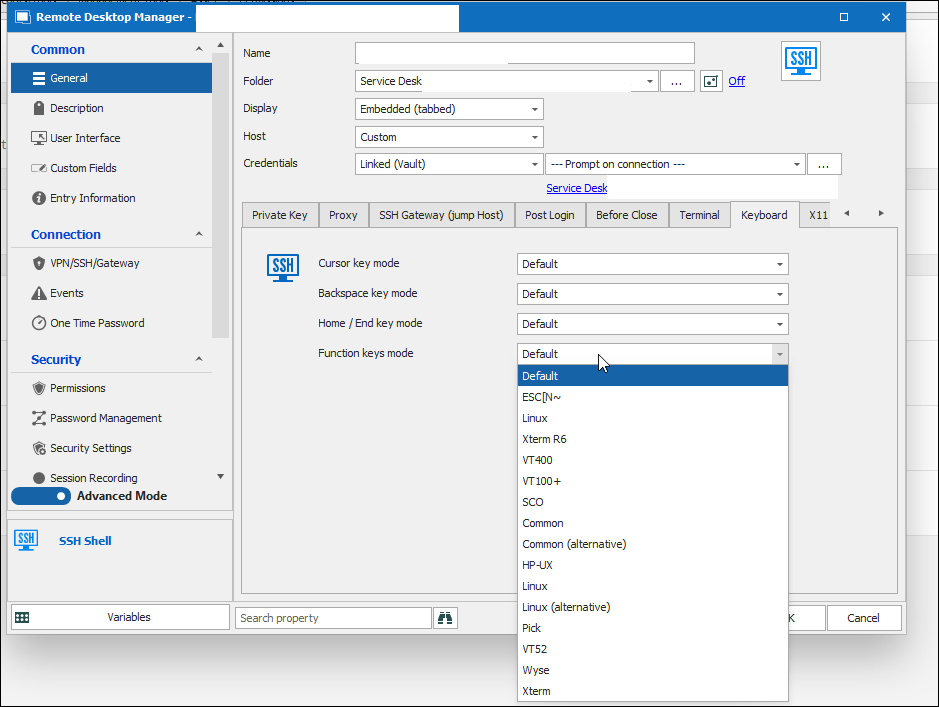
In putty I can easily select this. Would be nice if I could add other VT's myself or you guys could add them to the default selection.
Thanks in advance.
Joy
thumbnail_image002.png
All Comments (5)
Hello,
I will forward the request to our dev.
Thank you
Regards
David Hervieux
Hi @jayded,
Could you try to set "Function keys mode" to "Linux"? It should be equivalent to VT220. If not, I will add the missing terminal emulation.
Giving the user the ability to map specific keys (or key combinations) to custom escape sequences is a good idea. Do you know a terminal or SSH client which does that? So we could use it as a reference.
Thank you
Denis Vincent
Hello,
Quick personality switch here. I'm Steven Lapeire colleague of Joy.
I just did a test with another colleague of ours on the machine of a client. We chose the setting "Linux" and compared the result with the value defined in their vt220 terminfo setting.
To be more precise, we compared the value of function key 1 from the result of "infocmp vt220" with the value shown in the shell (ctrl-v + F1) and they don't match so the "Linux" option and the defined "vt220" (kft1) on the machine don't match. It is possible that this vt220 was modified at some point on the clients machine, but we cannot change this with trial and error, with the risk of having to go through a big bang modification.
So your remark (@Denis) "Giving the user the ability to map specific keys to custom escape sequences is a good idea" is right on point and what we would need for this issue.
You asked for some examples of clients having this ability, we can point you to "Zoc" (https://www.emtec.com/zoc/) and Reflection Desktop (https://www.microfocus.com/en-us/products/reflection-desktop/specs).
Zoc being the client in use by the client, and Reflection being in use by another client.
We ourselves use putty but have created a modified vt220 terminfo-entry with the name tm220 which works perfectly for the application with the "Linux" setting (and also under RDM), but this is on machines under our managment.
Best regards,
Steven Lapeire
Hi Steven,
Thanks for all the info, I will dig into it and see what I can do. I will open a ticket for this issue.
Regards
Denis Vincent
Hi,
We have added custom key mapping to both SSH Shell and Telnet internally. You will find this option in the properties of each of those entries under Keyboard > Key Mapping. This will allow you to select a key then a modifier to bind to a sequence. This feature should be available starting with version 2022.1.22.0 if you have any question we will be happy to answer them.
Regards,
Jean-Francois Duchesne
