ssh + keys - unclear how to configure it

It's unclear how to setup a working ssh connection, where:
- login is done using a ssh key
- ssh key is stored as a separate entry
The best I managed resulted in
In addition:
- pref that the username is stored not in the ssh key entry, as the same key can be used with different usernames
- in some cases they key would need to be stored inside the vault, in other cases it needs to be picked from a file
- when picked from a file, these should be machine specific (and thus user specific) files
- I'm using this from multiple machines where the usernames differs
- machines are now all on same os (mac), but likely a win and linux version will be added as well
- when picked from a file, these should be machine specific (and thus user specific) files
Screenshot 2021-12-19 at 12.57.23.png
All Comments (5)
Hello Hans1,
First thing, I would like to ask you which datasource you are using? It don't seem like something that should appear, even if your key is invalid.
For an Ssh entry the private key is controlled through the private key > private key type like that :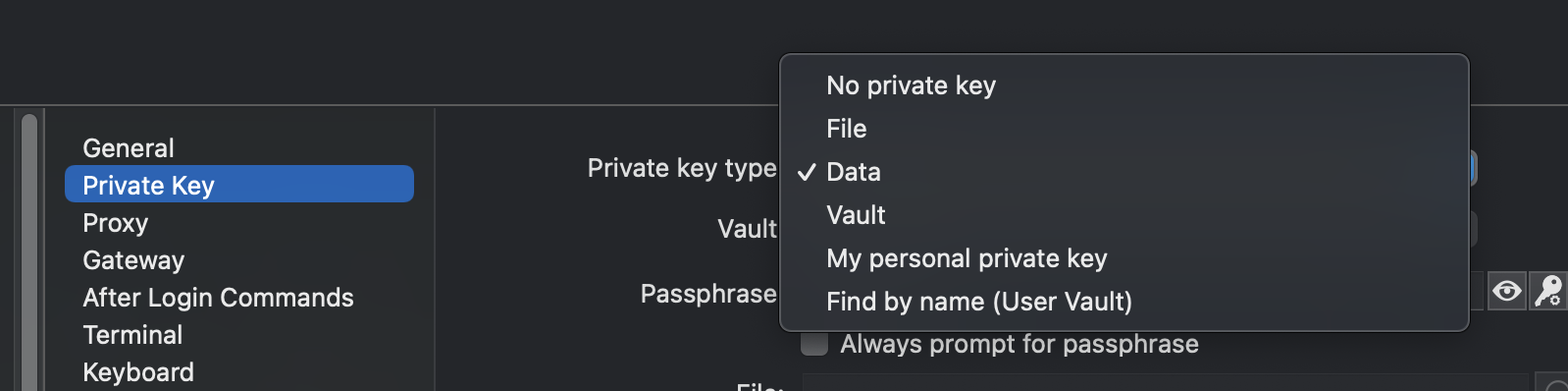
Vault will allow you to link your SSH entry to a Private key type entry and file will allow you to get it from a file on your computer.
For the requirement about the files the best way to do this would be to create environnements variables with the key path on your work stations and input it as the path when you need to use the file.
I hope this answered most of your questions. Like I said, if you could give me the type of datasource you have, this could help since the error your reported is not something that should appear.
Best regard,
Michel Lambert
Screen Shot 2021-12-20 at 9.13.33 AM.png
Observed in the Devolutions Password Hub Personal (with a private key in the main source), will also check it in the Maria DB.
I was looking in to the private key entry as well, but
- noticed inconsistent options re choice for file/data/vault/ ...
- personal private key only allows 1 key
Thanks for the other pointers.
Same issue with Martia DB backend.
Session is linked, via vault, to private key in the vault: same results as img in 1st post
The reason for the {"Data" is now also clear, was a copied entry from another data source. Recreated, now works fine
Hi Hans,
Just to make sure, everything work for you now? Do you need further assistance with this?
Best regards,
Xavier Fortin
