Black screen on RDP connection

Hello
Faced a problem when connecting RDP - when starting a session, a black screen appears for five to ten seconds, and then an error occurs:
"The connection to the remote computer has been lost, possibly due to a network connection problem."
At the same time, if you use a regular RDP client (mstsc), then the connection goes through without any problems.
black_screen.PNG
All Comments (5)
Hello,
Thank you for contacting us on that matter!
Would it be possible for you to change the display mode of your RDP connection to "External" and see if the same issue occurs? Also, which version of RDM and what type of Data Source you are currently using?
Best regards,
James Lafleur
Hello
RDM version 2021.2.26.0 64-BIT is used. Data source - local (.db format).
In the "external" mode, the same error: "The connection to the remote computer has been lost, possibly due to a network connection problem."
Hello,
Thank you for your swift reply!
1- Select the RDP entry that you in RDM (the one that uses the "External" display) -> Right-click -> Export -> Export as Remote Desktop File (.rdp)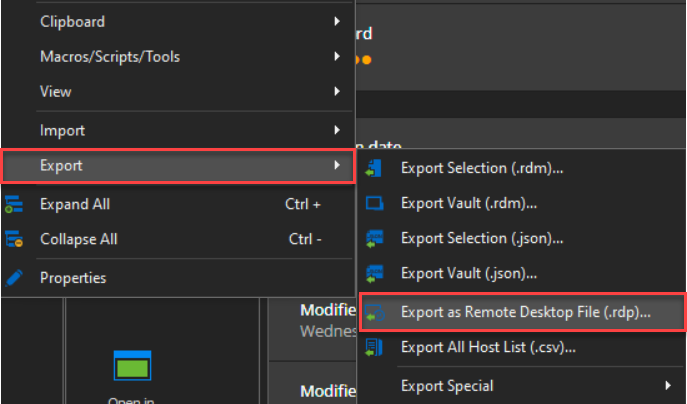
2- Save the connection you have configured with MSTSC.exe as a .rdp file
3- Compare both .rdp files in a text editor
4- Provide us a screenshot of the differences that you can find between both files
Best regards,
James Lafleur
exportrdp.png
Hello
In the attached screenshot, a comparison of the two files:
- _KZN_10.116.1.2.rdp (right) - unloaded file from RDM
- kznw.rdp (left) - file saved from mstsc
I also attached test versions of the specified files.
kznw.txt
_KZN_10.116.1.2.txt
rdp_all.PNG
Hello,
Would it be possible for you to go in the properties of your RDP entry, under "Connection" and uncheck the "Activate network level authentication NLA" option?
Best regards,
James Lafleur