Add ZeroTier support
0 vote

It would be useful for Remote Desktop Manager Free to support the ZeroTier network solution (https://www.zerotier.com/)
All Comments (25)
Hello,
Could you give us more information on what kind of integration you would like with ZeroTier products? How would you use it within RDM? And do you know if they have an API/CLI to facilitate integration?
Regards,
Hubert Mireault
At the moment I am supporting a customer by accessing one of their servers via RDP while running a ZeroTier client locally. However I cannot accesx the same server via RDP from within RDM. This would be useful as I manage multiple RDP sessions via RDM.
I believe ZeroTier have an APi - a quick Google search took me to https://docs.zerotier.com/ & https://docs.zerotier.com/central/v1/
See also https://www.zerotier.com/
Many thanks
Hello,
Thank you for your swift reply!
Would it be possible for you to do the following:
1- Save the RDP connection that you are using outside of RDM as a .rdp file
2- Go in the properties of your RDP entry in RDM
3- Use the dropdown menu found at the bottom left corner to choose "RDP file link"
4- Link your RDP entry to the .rdp file that you have created at step #1
5- Launch your RDP entry and see if it works as desired.
Let me know if that helps!
Best regards,
James Lafleur
That works. Thanks
Will
Great! Thank you for letting us know.
James Lafleur
Is this a fix or simply a temporary workaround?
Thanks
Hello,
Sorry for not mentioning that this is only a workaround. That being said, since this test worked, I would like you to do the following:
1- Select the RDP entry that you first created in RDM (the one that did not work) -> Right-click -> Export -> Export as Remote Desktop File (.rdp)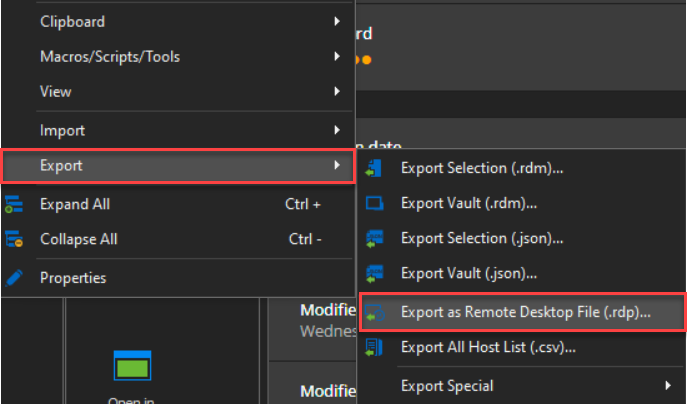
2- Compare this .rdp file with the one you have saved from MSTSC.exe in a text editor
3- Provide us a screenshot of the differences that you can find between both files
Best regards,
James Lafleur
exportrdp.png
See attached files for differences
Thanks, Will
differences.xlsx
differences.pdf
Hello,
Thank you for your quick reply!
I will transfer this information to our engineering department and get back to you shortly.
Best regards
James Lafleur
Hi,
I have compared both .RDP file options and did a quick look at ZeroTier to get a better understanding of how it works. If I understand correctly, ZeroTier exposes the destination RDP server to the client as if it were just a local IP address, so it is very similar to a VPN except with one IP address at a time? Does ZeroTier do anything special for RDP connections?
In order to figure out which difference makes it work with your .RDP file, I would suggest creating a copy of the working file, and then removing the following options one by one, in order:
networkautodetect:i:1
connection type:i:7
gatewaybrokeringtype:i:0
gatewayusagemethod:i:4
authentication level:i:2
enableworkspacereconnect:i:0
use redirection server name:i:0
rdgiskdcproxy:i:0
Try connecting after removing each of these options, and hopefully, you will find which one makes it work with mstsc.exe, after which we could see what RDM needs to set differently. How did you first obtain the working .RDP file? Do you have an RD Gateway deployed in your environment? What puzzles me a bit is that your .RDP file contains "connection type", which is apparently not documented officially anywhere. The "connection type" option, however, appears to depend on "networkautodetect" being set, I just don't know exactly what it does but it could be relevant to ZeroTier.
Best regards,
Marc-André Moreau
I removed each line in turn and the RDP connection continued to work after each one.
I obtained the RDP file by simply Saving the settings directly from the Windows RDP application.
All I am running locally is a ZeroTier One client in order to be connected the the relevant private network.
I'm not an expert in ZeroTier - I installed it last week for the first time (hadn't heard of it before then) to support a customer.
Thanks,
Will
Hi Will,
ZeroTier is also new to me, it doesn't look like it should require anything special, but there's obviously a specific option that it appears to require.
Can you try importing the .RDP file that works with mstsc back into RDM and see if it works. Also, can you confirm if the .RDP file exported from RDM works or not with mstsc? If it doesn't work, what error do you get, and can you take a screenshot?
Marc-André Moreau
Combinations
RDP that works from mstsc
- works in mstsc
- works in RDM either when linked or imported
Create RDP in RDM
- doesn't work in RDM
- doesn't work when exported to rdp file and run in mstsc
Error is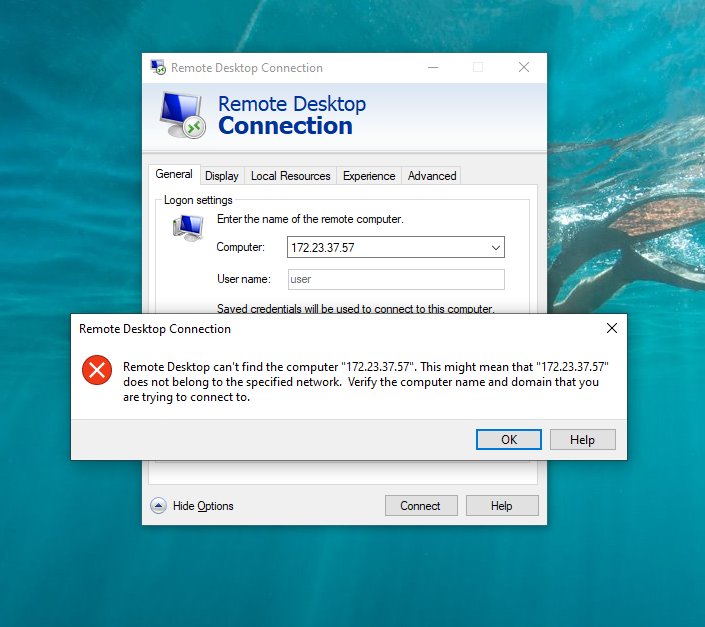
which is the same error seen when running RDP session created in RDM, from RDM
2021-12-17_15-20-01.png
Can you try re-exporting the working .RDP file that you imported in RDM and that works in RDM, and post it here? It should be slightly different from the original.
Which version of Windows is on the client? I've done a few tests on Windows 11 here and the error window from mstsc can provide a bit more information.
Here is what happens when trying to connect to the same IP address (obviously won't work from my computer). It takes a while and then fails:
However, if I try connecting to an invalid domain name, it fails much faster and throws the same error as you:
This leads me to believe that whatever ZeroTier is doing, there's something off with the calls that mstsc makes to resolve the IP address. I wonder if this could have to do with IPv6, I'll have to keep digging for clues as to what the problem might be. One of the networking options in the .RDP file probably works around the problem entirely, but we still don't know which one. If it's not IPv6, it could very well have to do with UDP, I'll see which options could force a clean TCP-only connection.
Marc-André Moreau
This is the export of the RDP file saved from mstsc and then imported (as opposed to linked) into RDM
and this works
Will
Global Maritime (use RDP+ZeroTier) imported rdp file.rdp
Hi Will,
There seems to be an issue with the attachment, maybe it's the file name. Can you rename it to "rdp.txt" and upload it a second time? I'm sorry the inconvenience.
Best regards,
Marc-André Moreau
see attached
Thanks, Will
Global Maritime (use RDP+ZeroTier) imported rdp file.txt
Hi Will,
I'm very sorry to ask again, there's apparently a bug with the URL encoding of the file name, I'm not sure if it's the + sign or (), but can you rename the whole file to just "rdp.txt" to avoid any special characters? We'll look into which character causes problems after.
Best regards,
Marc-André Moreau
see attached
WIll
rdp.txt
Hi Will,
Can you change the following in the entry that doesn't work in RDM? The default is
authentication level:i:0 (connect and don't warn me)
gatewayusagemethod:i:2 (automatically detect RD Gateway settings)
the screenshot with modified settings should correspond to this:
authentication level:i:2 (warn me)
gatewayusagemethod:i:4 (Do not use RD Gateway server)
It's just a feeling, but I'm thinking that automatic RD Gateway detection could be the issue here
Marc-André Moreau
BY this I assume you mean, export RDM entry that doesn't work, edit then re-import back into RDM and test
Unfortunate with the two changes it still doesn't work - either directly running the rdp file or after importing into RDM
Thanks for your support with this
Will
PS I'm just about to finish up for the day/week (I'm based in the UK) so I won't be back online until Monday next week.
Hi Will,
No problem, we can spend a lot of time fishing for the precise setting that makes a difference, but at least you have a way to make it work properly now by importing the working .RDP file in RDM. You can copy the connection entry to create new ones and it should work just fine.
Best regards,
Marc-André Moreau
Happy New Year!
I was just wondering if this was an active development you were still looking into?
The workaround of linked or imported RDP file works but it would be useful if ZeroTier support was native within RDM.
Many thanks, Will
Hi,
I've reviewed our discussion from before the holidays, and with a fresh mind I'm thinking that the test of removing options from the .RDP file may not be conclusive, since we don't know what mstsc.exe uses as a default. The following two options stand out from the working .RDP file:
networkautodetect:i:1
bandwidthautodetect:i:1
Rather than remove them, set both of them to 0 to see if mstsc would stop working:
networkautodetect:i:0
bandwidthautodetect:i:0
You can find the corresponding options in RDM in the "Experience" tab:
See if tweaking those options can make the broken RDM entry work
Best regards,
Marc-André Moreau
Still doesn't work - attached are two RDP export files
Global Maritime (use RDP+ZeroTier).txt - doesn't work
Global Maritime (use RDP+ZeroTier) imported rdp file.txt - works
Will
Global Maritime (use RDP+ZeroTier).txt
Global Maritime (use RDP+ZeroTier) imported rdp file.txt