VPN/SSH/Gateway w/ SSH Tunnel

Hi,
When connecting to a RDP session through a SSH Tunnel, what is the purpose of 'Connect manually'?
I've setup a RDP session with a SSH Tunnel and then I start the SSH Tunnel manually before starting the RDP session, but it does not seem to use the existing SSH Tunnel connection and the RDP session fails to connect.
If I let the RDP session start the SSH Tunnel, then it works as expected.
All Comments (4)
Hi,
The only purpose to "Connect manually" is to disabled the auto connect of the tunnel. The difference between that and not having any VPN/Tunnel configured is that when configured like this, there should still be "Open VPN" and "Close VPN" buttons available in the dashboard when the entry (the RDP entry in your case) is selected: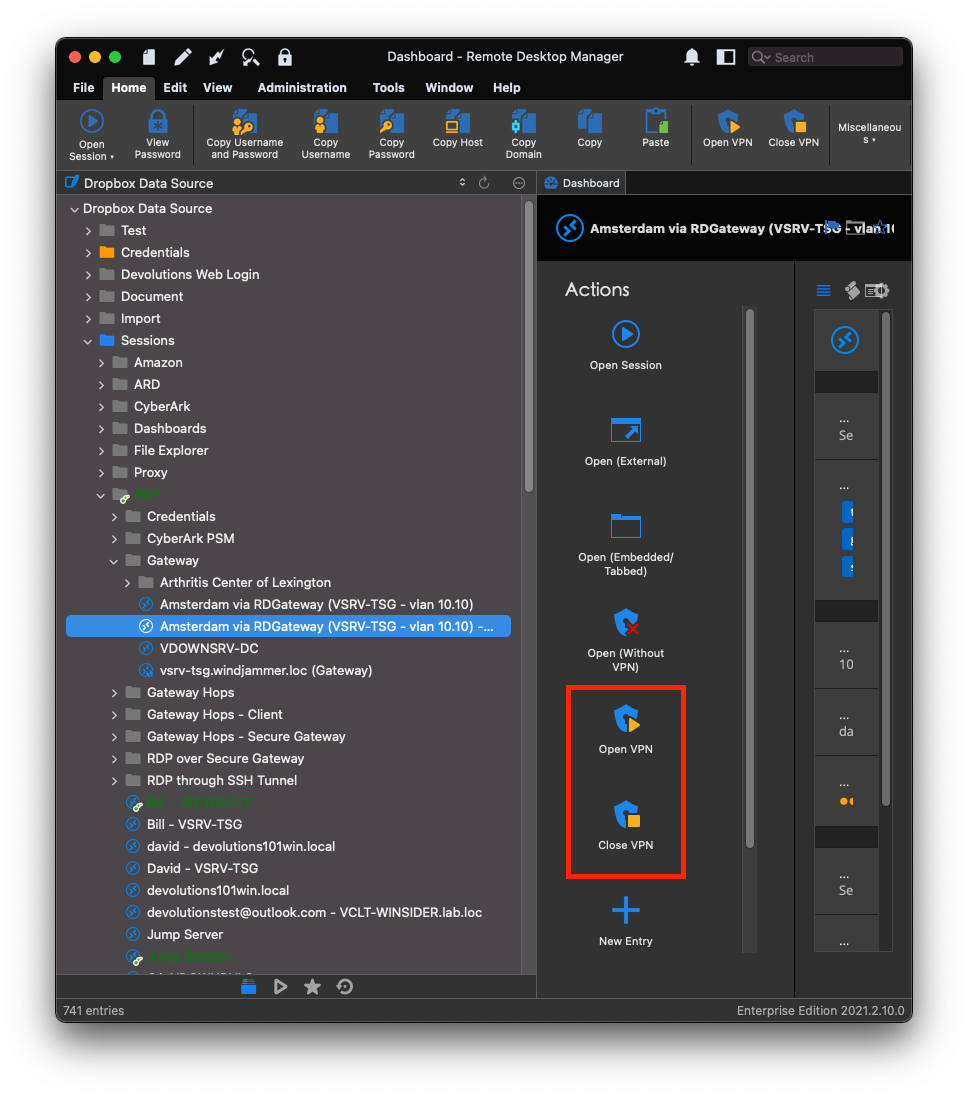
Best regards,
Xavier Fortin
OpenCloseVPN.png
Hi Xavier,
So it's not possuble to have a RDP session use an existing active SSH Tunnel, without having it do a 'Connect if unable to ping/port scan'?
Kind Regards
Jimmi Larsen
If the RDP is configured to connect through the tunnel, it should not matter that the tunnel be launched manually or automatically, it should still connect through it.
If you are using the "Use over secure gateway" feature than, no, you can't connect through an already launched tunnel. The tunnel and the session must be launched in the same action, so that they can be configured accordingly.
Best regards,
Xavier Fortin
Hi Xavier,
That's a shame, we are using 'Use over secure gateway' unfortunately.
Kind Regards
Jimmi Larsen