2021.2.1.2: RDP in external viewer no longer working

I can successfully run an RDP session with the 'Embedded' display.
Change the 'Display' property to 'External', and the session no longer starts.
Version: 2021.2.1.2
OS: Ubuntu 18.04
All Comments (9)
Hello,
Thank you for contacting us on that matter!
Do you experience the same issue if you initiate to RDP connection using a different application outside of RDM?
Best regards,
James Lafleur
Hi,
External requires xfreerdp to successfully run.
You will need the freerdp2-x11 package installed if it's not already.
Regards
Jonathan Lafontaine
I do not experience the issue when initiating the RDP connection with xfreerdp, remmina, or rdesktop.
xfreerdp version: freerdp2-x11 2.2.0+dfsg1-0ubuntu0.18.04.2 amd64
It has worked in a previous version: https://forum.devolutions.net/topics/36524/rdp-local-drive-folder-redirection-not-working
Thank you for the information.
We'll look into it.
Jonathan Lafontaine
Hello David,
I can't reproduce the issue internally with a Ubuntu 18.04 with freerdp2-x11 version 2.2.0+dfsg1-0ubuntu0.18.04.2. Maybe we are testing with different settings in the RDP entry.
Please, can you try to open your RDP session in RDM and stop at the "Installation Path" window: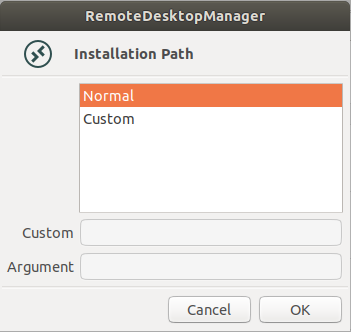
At this point go to your temp files (/tmp) and make sure that there is a .rdp file with the name of your entry. Open a terminal in this folder and try to open it with the xfreerdp command like this:
xfreerdp 'EntryName.rdp' (you will probably need to add the ' for some reason) and let me know what error you get from xfreerdp.
Regards,
Gabriel Dubois
Screenshot from 2021-12-14 14-51-55.png
I couldn't find a .rdp file in /tmp, but there is one in /tmp/user/1000 (as specified in $TMP).
But the issue no longer occurs?
Does the session open correctly in external with RDM?
Regards,
Gabriel Dubois
It does.
Ok, I will close the ticket. If you get this issue again, please feel free to update this topic so we can re open the ticket.
Regards,
Gabriel Dubois