Curious about "Connect if unable to ping / port scan" usability.
Curious about "Connect if unable to ping / port scan" usability.

Hello,
I am sure this is documented somewhere, but apparently my normally acceptable google-fu is letting me down. I would like to rebuild some of my RDM connections to check if a host is available before connecting to SSH port forwarding. Basically the goal is:
If I am on the local network ( eg 10.0.0.0/24 ) I will access the webpage directly and not connect to SSH. Resulting URL - http://10.0.0.26:5000/somerandompage
If I am not on the local network or otherwise fail the ping check, I will connect to the SSH session for port forwarding. Resulting URL: http://127.0.0.1:$DYNAMIC_PORT$/somerandompage
Can you describe how I should build out this connection? I see if I create an SSHpf as a sub-connection I can use the "Override parent $PARENT_HOST$", but the bulk of my connections have SSH settings configured in each individual session instead of having a subconnection for each.
Thanks in advance!
-Alex
All Comments (7)
Hello,
I will check with my colleagues for that, keep you updated!
Best Regards,
Etienne Lord
Hello,
We are not exactly sure we totally understand the question. Do you not want to use the "Connect if unable to ping" feature? 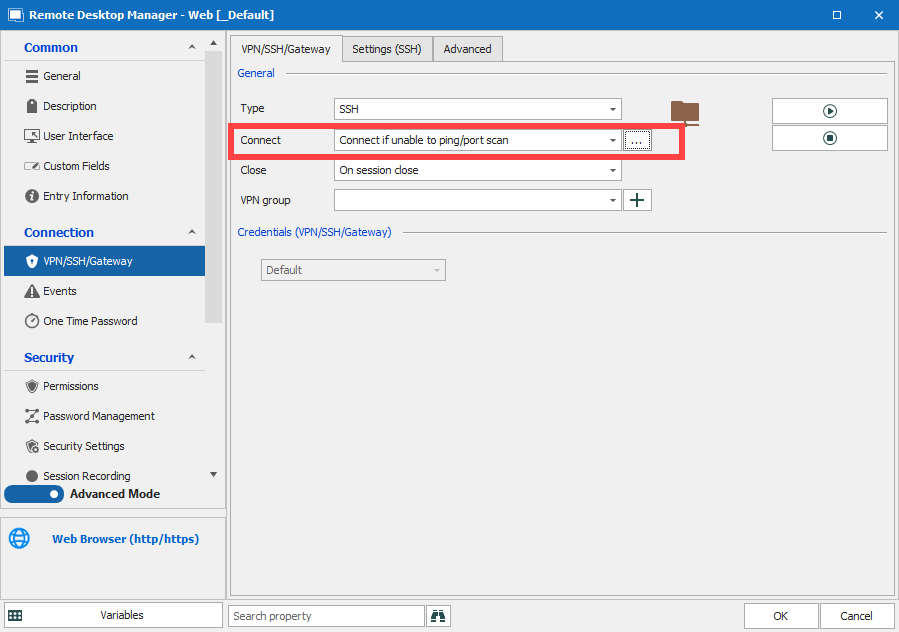
- Create the Web Browser Entry.
- In the VPN/SSH/Gateway tab, you can configure your SSH Tunnel (Directly on the session or link and existing one)
- Set "Connect if unable to ping"
a. If you need to configure a Host + Custom Port to ping, you can use the [...]
Best Regards,
Etienne Lord
ping.png
Hey Etienne,
Thanks for your reply. Unfortunately I missed the notifications from your post, so sorry about the delay.
If I am able to ping, I want RDM to launch a browser session to URL http://10.0.0.26:5000/somerandompage
If I am NOT able to ping the host in question, I need to connect to the SSH portforward THEN launch a browser session to http://127.0.0.1:5000/somerandompage .
That is it!
I get the "Connect if unable to ping" functionality, that does 99% of what I need. Unfortunately the behavior I am getting is:
1) On launch, RDM pings the host. Host isn't available.
2) RDM launches the SSHpf. Awesome, so far so good.
3) RDM launches a Web Browser entry for http://10.0.0.26:5000/somerandompage . Not good. That URL isn't accessible remotely!
Something needs to overwrite that to instead reflect http://127.0.0.1:5000/somerandompage. I have yet to sort out how that can be done.
Hello,
Thank you for the details, I will have to check with the engineering department in order to see if this is possible. Keep you updated on that!
Best Regards,
Etienne Lord
Hello,
We found a potential way to do that.
With your entry with the Host such as https://10.10.222.111/MyPage for example. Then, you would need to set the SSH like such in the VPN/SSH/Gateway tab : 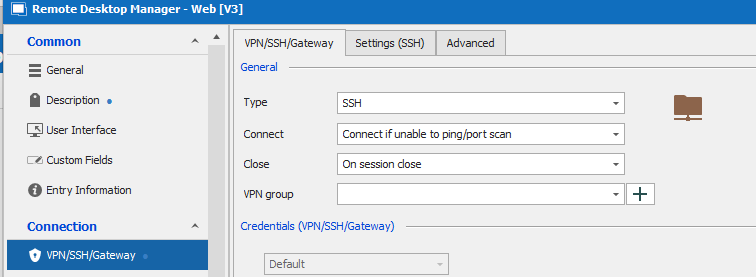
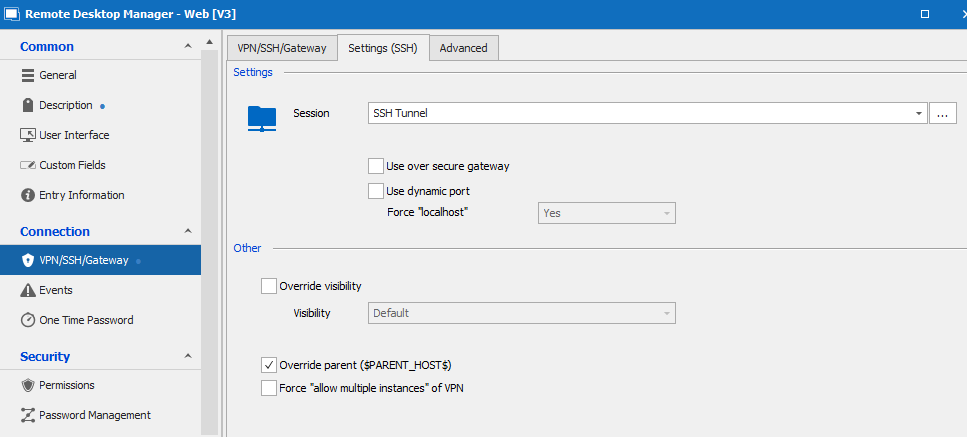
Nothing special per say.
What we believe would need to change is the following :
In the Description tab of your Web Entry, set up an alternate host : 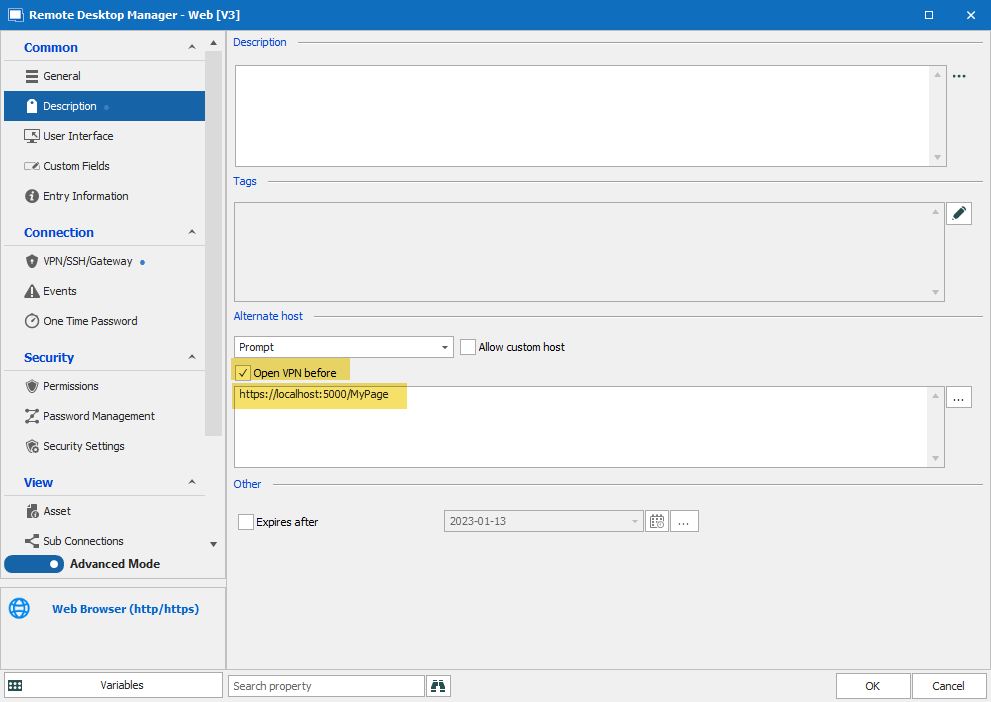
Note that the "Open VPN before" option is important here and then set your alternate host as the same value as the SSH Tunnel will forward.
Tunnel Configuration : 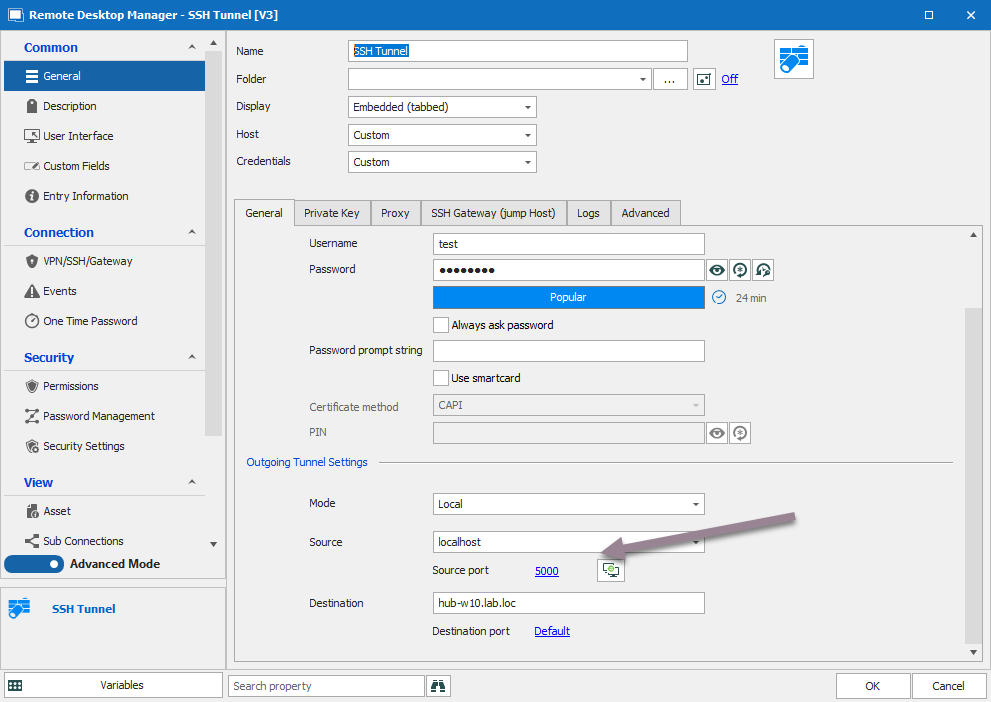
Also note :
- You will get a prompt for the host, it will add one more click
- If set with Ping/Portscan, you will get a second port scan when choosing the alternate host. You will not get a prompt in that case and it should be seamless.
I believe the second option would be a good option for you.
Let us know if you have any further questions!
Best Regards,
Etienne Lord
4.png
3.png
2.png
1.png
This looks like EXACTLY what I was after! Thanks a ton for your efforts here. I will take a stab at this sometime in the next day or two and report back; I think the "Alternate Host" piece on the description tab is what I was missing!
Hello,
Glad to hear it! Let us know if that works for you! :)
Best Regards,
Etienne Lord