The credentials supplied to the package were not recognize remote desktop manager
The credentials supplied to the package were not recognize remote desktop manager

I got a new PC, and backed up my remote desktop manager, then pulled it into the new PC, now on some servers, I get the message:
'An Authentication Error has occurred. the credentials supplied to the package were not recognized remote desktop manager'
I even tried removing and recreating the RDP connection. This only happens on a few servers, others I can get into just fine. The ones I've had issues with so far are NOT on a domain if that matters. The credentials are 100% correct, as I can remote in through our RMM with them. I don't know that this is an RDM issue specifically, but I thought you all might have some ideas?
Thanks in Advance!
Darrell 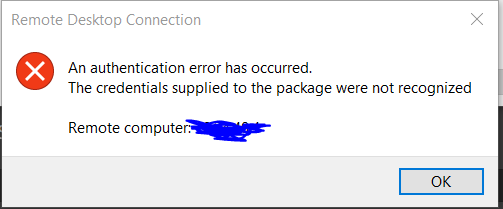
error.PNG
All Comments (9)
Also, Side note, when I got into the server from my RMM, I was able to set remote connection from 'Allow only form desktops with Network Level Authentication' to 'any version of Remote Desktop' and that seemed to fix it.
I checked my remote manager, and that connection is set for NLA...So it should work. Any ideas?
Hello dcarr
I would like to confirm a few things:
- Which version of RDM are you using?
- Which type of data source are you using?
I'm also wondering if you're able to connect to this remote host outside RDM currently? Could you give it a try?
Let me know,
Best regards,
Samuel Dery
Version 2021.2.23.0
I'm using data type of 'RDP'
I can NOT RDP from windows RDP either, which is why I said in the original post I don't think this is really an RDM issue, but I thought maybe someone had seen it before. It seems like Network Level Authentication isn't passing from my new PC to the server (this worked fine on my old PC with the same version of RDM), my boss has the same issue w/ him new PC.
I can do some digging, its just weird that NLA for whatever reason isn't working on these new pc's... but its fine on older ones.
Any ideas you have would be awesome.
Hello dcarr,
I see! Indeed, I suspect this issue is not related to RDM.
I'm afraid, I have unfortunately not seen this before. That being said, from doing some research with the resulting error message I've found the following which may be of interest in your case: https://docs.microsoft.com/en-us/answers/questions/53514/credentials-supplied-to-the-package-were-not-recog.html
Best regards,
Samuel Dery
Hello Samuel,
I have the same issue. Using Windows remote desktop works fine, but i cannot RDP from Remote Desktop Manager.
Our version is 2022.2.17.0 64-bit.
Data source is MS SQL.
Can you please help?
Regards
Clayton
Hello Samuel,
Just a small update, i managed to make it work by changing the application for RDP, from RDP to FREERDP.
Can you please advise?
Regards
Clayton
Hello,
Thank you for your reply,
I see, I'm glad to hear that changing the "RDP Version" seems to resolve your issue!
Alternatively, you can change this option for only the affected entry by going to the entry "Properties" under the "Advanced" tab.
Let me know if this helps,
Best regards,
Samuel Dery
In case this helps anyone else. I had the same problem and changing the RDP Version didn't help me.
What I discovered was that in my use case the credentials for the host I was connecting to were local (ie. no domain). My credential list had the user account, but the domain field was blank. I just added "localhost" to the domain for each of my credentials. This solved it for me.
Hello,
Thank you for sharing your solution with our community.
Best regards,
James Lafleur
