Request for Temporary access in Remote Desktop Manager

Referencing to https://blog.devolutions.net/2020/11/temporary-access-now-available-in-remote-desktop-manager-2020-3
Is it restricted/designed to only trigger for certain permissions? Like for instance only users who does not have Connect (Execute) permission to a specific entry will receive such a prompt?
In our organization, we would like to use temporary access for handing out passwords temporary to users who sometimes need it. When a user attempts to view a password for an entry, but does not have the "view password" permission, the request temporary access prompt appears. However when we test it in our environment, no such prompts show up. There's also no "copy passord" button appearing (which is probably intended). It appears that there are no clear way (as far as I know) for a user to trigger the request temporary access prompt when attempting to view a password the user does not have permission to view.
We have tested that a user receives the Request temporary permission prompt when attempting to Connect (Execute) an entry the user does not have permission for.
Cheers =)
All Comments (7)
Hello,
From what I see, I would indeed be led to believe the Temporary access was meant exclusively for Remote connections and not credentials. I will have to confirm this with the engineering department!
Best Regards,
Etienne Lord
Hello,
A ticket is open for that and was linked to this forum topic, we will keep you updated on that!
Best Regards,
Etienne Lord
Hi Etienne,
In our organization we're also very interested in this request , temp access to credential/passwords.
Is there already a ticket-update available/possible for this?
Regards, Marcel
Hello,
It is still on the engineering's To-Do list. Note that we want to add the feature on every platform so it will take a little longer.
Best Regards,
Etienne Lord
Hi Etienne,
Is there progress in the Temp Access for credential entries?
Regards, Marcel
Hello,
Our goal would be to have this implemented in version 2022.2!
Best Regards,
Etienne Lord
Hi Marcel,
It took longer than expected but it is now possible to request temporary access to credential entries. Note that requests can be made from the "Request Temporary Access" button in the home ribbon.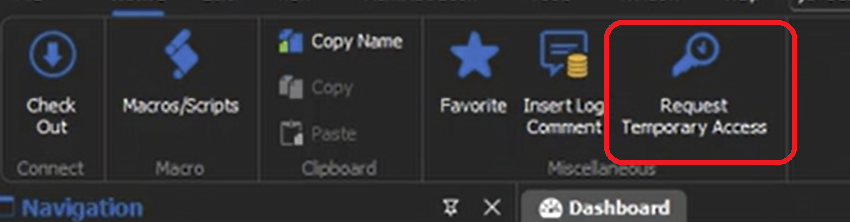
Sébastien Duquette
c3672ced-3411-4680-bb17-e28933332c78.png