Cannot use keyboard shortcut to open multiple RDP entries

MacOS Big Sur — version 11.4
RDM Free for Mac — version 2021.2.9.0
I've been using RDM Free for Mac for a few years now. Up until several months to a year ago, I was always able to highlight 2 or more entries and then press Shift + Return, which allowed me open all the entries at once. But at some point, that ability for me to be able to open multiple entries at once via a keyboard shortcut stopped working, even though the Open Selection right click item still shows the Return symbol.
What can be done to resolve this?
All Comments (6)
Hello,
I just moved your thread into the RDM Mac Support section.
Best regards,
Jeff Dagenais
Hi Blake,
Why Shift + Return? A simple Return on a multi selection seems to launch all the selected entries properly for me (as of the latest version, 2021.2.9.0).
Best regards,
Xavier Fortin
Hi Blake,
Why Shift + Return? A simple Return on a multi selection seems to launch all the selected entries properly for me (as of the latest version, 2021.2.9.0).
Best regards,
A Return doesn't do anything either.
Hi Blake,
Do you use the overlapping navigation (Preferences -> User Interface -> User Interface -> General -> "Use overlapping navigation")?
Best regards,
Xavier Fortin
Hi Blake,
Do you use the overlapping navigation (Preferences -> User Interface -> User Interface -> General -> "Use overlapping navigation")?
Best regards,
No, I don't. What does that setting do?
It makes the entry tree hide itself automatically when it loses focus. While testing, I noticed that the Enter shortcut did not work with the option enabled. But if you do not have it enabled, this is most definitely not your issue.
In Preferences -> User Interface -> Shortcuts, what shortcut is set to the Open Session item? See: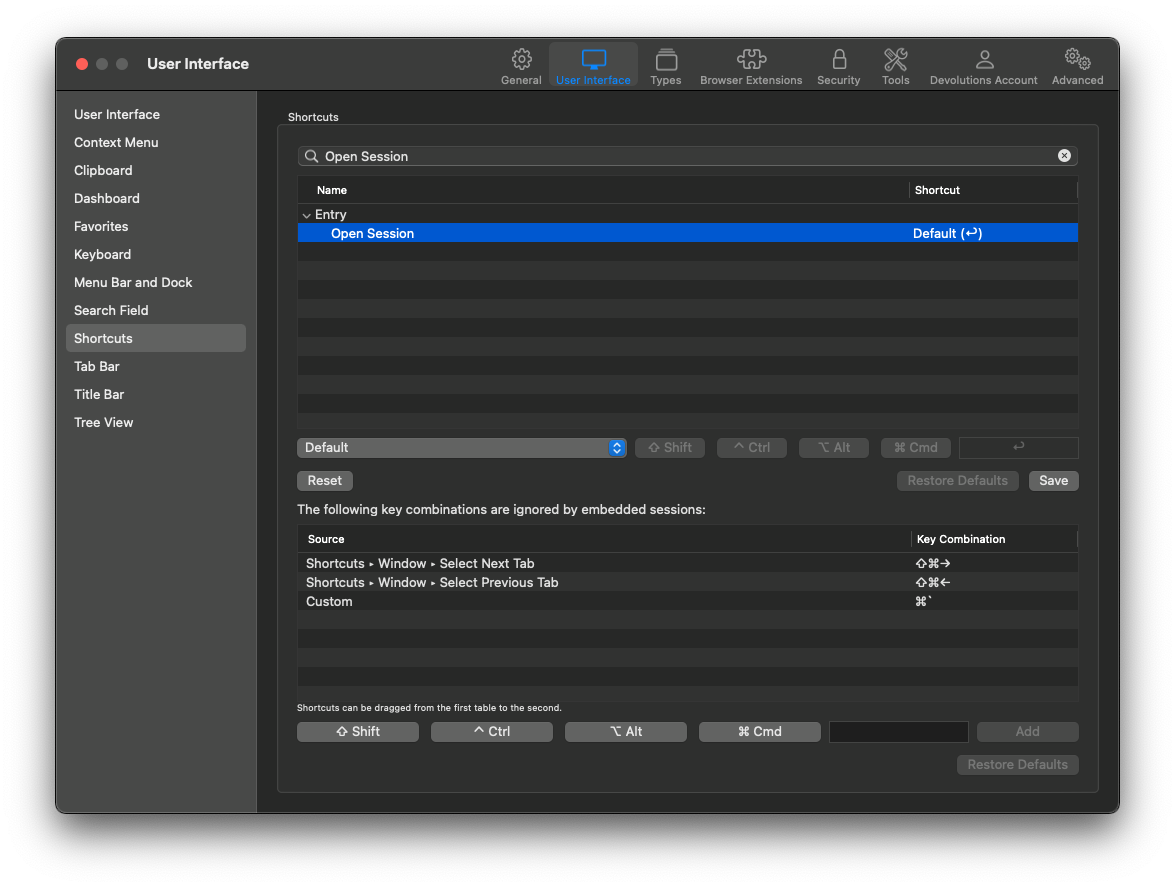 Best regards,
Xavier Fortin
Shortcuts.png