Additional protection for My User Vault

Disabled
Hello everyone
We use local accounts (Custon Login) in RDM
The administrator can reset the password for any such account and log in under it
Logging in under someone else's account, he will gain access to someone else's Vault
Can I protect My User Vault with a separate personal password?
The second factor for connecting to the data source is disabled at the settings level, but even if you enable it, it will be the same for everyone and the administrator will know it
All Comments (7)
Hello,
Unfortunately it's not possible. We recommend to save your sensitive information in another data source like Password Hub Personal.
Regards
David Hervieux
Disabled
Is there an option to allow users to create a new data source of a specific type only?
Hello,
Do you mean to restrict some data source type on the machine?
Regards
David Hervieux
Disabled
Hello,
Do you mean to restrict some data source type on the machine?
Regards
Yes it is
Hello,
I know that we have some GPO to disable the cloud based data source. Which type would like to support?
Regards
David Hervieux
Disabled
Hello,
I know that we have some GPO to disable the cloud based data source. Which type would like to support?
Regards
I want to leave the option to use only personal data sources (and not cloud-based)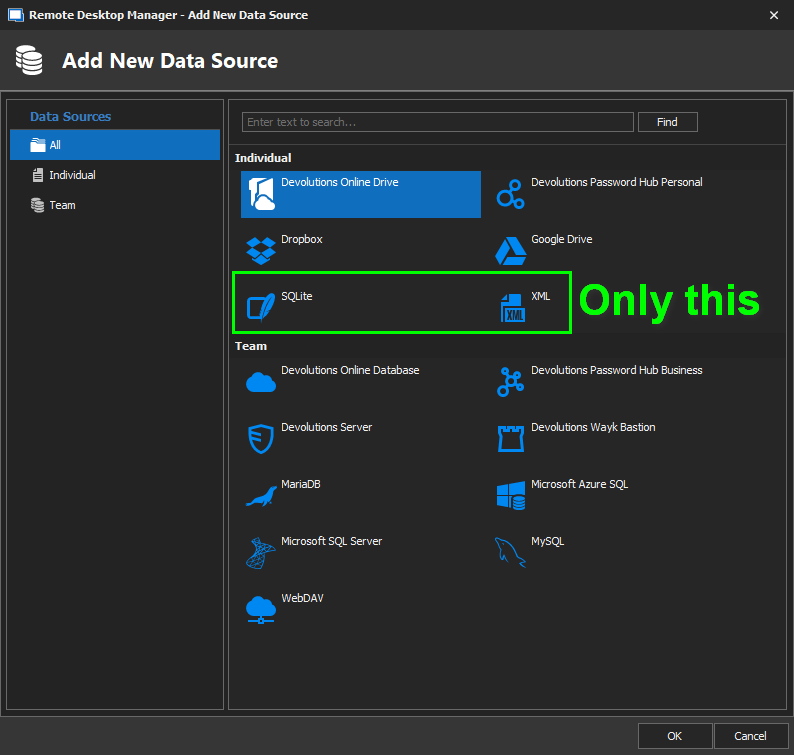
DS.JPG
Hello,
With the help of a GPO, it is possible to disable the File -> Data Sources menu. That being said, we do not have anything at the moment that would allow you to only disable the "Teams".
%Root%\SOFTWARE\Policies\Devolutions\RemoteDesktopManager\DisableFileDataSources
To disable the "Cloud" data sources, you could use a different GPO which will prevent the use of the Devolutions Account in RDM.
%Root%\SOFTWARE\Policies\Devolutions\RemoteDesktopManager\DisableOnlineAccount
If you would like to apply any of these GPOs, please refer to this link: https://kb.devolutions.net/rdm_group_policies.html
Best regards,
James Lafleur