Second / seperate Password to secure the "View Password" Function
Second / seperate Password to secure the "View Password" Function
0 vote

Hello,
It's my first time here and I don't know if it has been posted in the past already.
I would like to propose an additional password protecting the "View Password" option. I know about the password you can enter to open the programm etc. but once the session is open, anyone that can work on my PC or just any PC we setup for a student, etc. could view the confidential Passwords.
Here I like the solution of Firefox where you have to enter the Password once to use a password on a website and once to make changes to passwords or make them readable.
Here is an example of what I mean. Anyone and everyone who has access to the program on my userprofile could potentially read the passwords and then access critical servers or machines or files that are accessible via the tool and steal that information.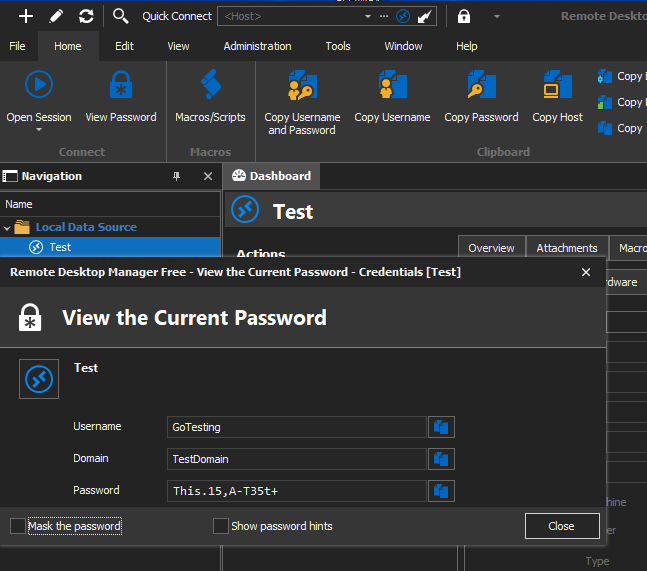
If there is such a function, please tell me and Sam from the Support team ( ;) ) and if not I would love to see this option since it would help to increase the security of the stored credentials.
Example 1.PNG
All Comments (3)
Hello,
if you already set up an application password, I would suggest to configure the Lock Application section in File => Options => Security
Also, you can secure your (Local Data source as I can see in your screenshot) with a Master Key in File => Datasource
This allows you to secure all data in your data source, not only the view Password option.
Regards,
Min
Hey,
Thank you for the info. I think the closest here is that I can "Disable reveal password" for the Datasource and of course to protect the Datasource itself with a password. Even when I enables "Always ask password" it was still possible to view the password afterwards. However now people would need to first know how to enable the view password option and also the password to the Datasource so for me it's much more protected in case someone would get access to the Remote Desktop Manager on my PC. The biggest chance would be that I forget to lock my PC and have it open due to an emergency at work. ^^
Thank you for the help with this. :)
Best regards,
Varmint
Hello,
In addition to what Min said, you should also be able to configure the application lock to trigger after your computer is idle for a specific amount of time (also located in File > Options > Security):
Perhaps this could help solve your remaining issue.
Regards,
Hubert Mireault