WoL / QNAP Timing Questionn

Hi
We have a QNAP NAS device which takes about 7 minutes to start. I am trying to setup a sequence that is simply:
- Send a WoL packet to the device to start it
- Wait 7 minutes
- Open the Web (HTTPS) admin page and login.
The issue I have seems to be with the WoL command and it's associated timeouts. If I set the wait timeout to 10 seconds and set the retries to 60 or 70 the system correctly seems to try on these intervals. If I run a ping to the device in he background I can see the device come up, but shortly after that RDM will tell me it can't connect to the host. I think what *might* be happening in this scenario is that the QNAP starts to respond to ping and then maybe 20 seconds later it opens the HTTPS port but the webpage/webserver running behind it is not actually loaded just yet so RDM detects this change and throws the fail to connect message. It might be the QNAP returns a different type of error when in this state (ie the port is open but there's nothing there) and as its not the same type of timeout as when the port is blocked before boot RDM just throws the failure message. If I run the same item again straight after the error message it waits 10 seconds and then logs in fine.
So my second thought was to just set the timeout value much larger (and lower the retires). For example set 60 seconds between tries and try 10 times, so it should then mean there is a good chance that it will try to do a connect when the website is actually running. For example if it does a try which fails, but then the SSL port starts say 10 seconds later that would then still give it another 50 odd seconds to load the HTML files properly before RDM tried it again. The problem with this is that RDM does not seem to respect the wait timeout when it is large and it seems to still be trying every 20 seconds or so and then randomly bails out.. so sometimes it will give the 'can't connect' error after say 4 minutes with this configuration (although technically it's configured to wait 10 minutes).. I'm assuming here that perhaps 60 seconds is longer than the protocol timeout of the probe, so the underlying probe times out at say 20 seconds, forcing RDM to then issue another retry, or there's something wrong in the code.
Just wondering if there is any other type of solution I can use here?
What would be good rather than having to set it this way would just to be to have 'try after x seconds' option for the WoL feature, so you could time the boot time of your WoL devices and then just have RDM do the first login attempt after that time.
Cheers, Nick.
All Comments (5)
Hello,
Thank you for contacting us on that matter!
In order to see if we are able to replicate the behavior you describe, and see how it could be solved, I would like to start by asking you a few questions about your RDM environment.
- What version of RDM do you currently use?
- What type of data source do you use?
- Would it be possible to send us a screenshot of your current configurations, free of any sensitive information?
Best regards,
Gabriel Degrandpré
Hi Gabriel
Sorry for the late reply.
- Version is 2021.2.20
- The Data Source is XML File
- The Configuration is very basic. I have setup a 'Website' session. The website is a HTTPS URL using the embedded mode and I have set the browser to Edge Chromium. I have entered login credentials into the 'General' section and then in the 'Asset' section I have entered the MAC address of the NAS. I have then gone into the 'Events' section and on the 'After Open' tab I have enabled the 'Execute Automatically' (After Open Macro), set the initial wait to 3 seconds and then in the 'Typing macro' field I have entered ''$USERNAME${TAB}$MACRO_PASSWORD${DELAY}{ENTER}'. I have the NAS password also in the 'Macro Password' field. The 'delay time' and 'command' are default values (300ms/20ms)
Now with the problem part of the config. On the 'Before Open' tab I have 'Power On Mode' set to 'Wake on LAN' and then I enter wait timeout and retry count values.
I think this issue would be easily repeatable on any system as I think it's a bug. I've made a table below with the testing I've done:
So the 'Wait Time' and 'Retries' are the values I enter into RDM in the section above. The 'Should Wait' is my calculation of how long RDM should therefore be waiting before giving up. The 'Actual RDM wait' is how long RDM spends trying to connect before giving the can't connect error. The 'QNAP Ping Responds' is when the NAS responds to ping and finally the 'QNAP WEB Responds' is how long it takes before the WEB login page is viewable in a browser (both Ping and WEB Browser running from same machine as RDM)
So I think there are two problems. The first is that RDM does not respect the wait time you enter, seemingly if that value is something above 30 seconds.. When you enter values above this it does not wait that long before trying again. In fact it seems when you set the timeout above 60 seconds RDM is only waiting just over 20 seconds and then failing. I am basing that number on how long it actually waits divided by retries. It should be possible to replicate this easily with any WoL device.
The second problem is that if you set the timeout to 30 seconds or less it appears to work correctly from the wait/retry part however if you still specify values that would get you past the overall boot time of the device (eg in my case the WEB page is generally loaded by 8 minutes from WoL packet send, so I set it to retry up to 10 minutes) then it fails as soon as the device is responding to ping but before the webpage is loaded. It does not seem to be able to detect that there is no webpage to login to and it just errors out. What is interesting here is that it gives the exact same error as it gives when the device is not responding at all. When it's set this way it appears to fail on the next retry after the device is pingable, like it now knows it's there but then can't load the webpage so errors. It does not run the macro at any point.
The loading / errors look like this:
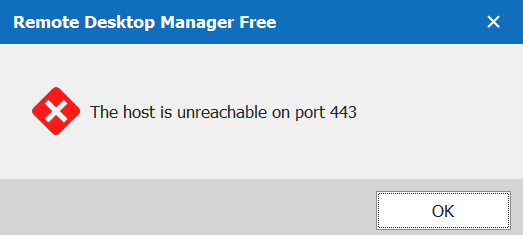
As mentioned previously I think an easy solution to this would be to have the ability to set an 'initial wait after WoL' value in this section. This would run before RDM even tries to start connecting. In this case I could set the initial wait to 8 minutes and then RDM would start this bit of wait/retry code after the initial wait expires.. Because the device would be fully loaded at that time it would then just login...If it was a device that might have a more variable boot time (eg a server that's completing updates etc..) it could still run the retry/wait code to allow for that...
Cheers, Nick.
error.PNG
running.PNG
RDM-WoL-Error.PNG
Hello,
Thank you for your detailed description of the issue!
I will report this issue to our engineering team and see if I am able to replicate it internally.
I will keep you updated as progress is made on this case!
Best regards,
Gabriel Degrandpré
Hello,
Since this thread has not been updated in some time, I wanted to let you know that I have opened a QA ticket so they can attempt to replicate this issue internally.
As soon as progress is made on the case, I will update the thread!
Best regards,
Gabriel Degrandpré
Hello,
In order to help our QA team with their replication tests, we would appreciate if you could provide us a sample Website entry with your typing macro and WoL configurations, free of any sensitive information. You can export the sample entry by right-clicking it in the Navigation tab and going to Export > Export Selection (.rdm).
You can provide us this test entry through our secure ShareFile link. I will privately message you this link shortly.
Best regards,
Gabriel Degrandpré