Edge vs. Chrome in embedded HTTPS session

Hello, I have my Exchange ECP in an embedded session. When I select Chrome as browser, the login works, but I get script errors from the ECP which is quite annoying.
When I select Edge as browser, the login does not work and I get a "User or Password wrong" error message. But with this browser the script errors are gone... I am 1000% sure, that both is correct as it is working with Chrome and when I fill them with the key and click login myself it also works.
I am still on 2021.1.44.
Brgds Andreas
All Comments (18)
Hello, in the meantime I talked to the colleague who takes care about our installations. He confirmed that the latest version is working in our environment and so I did the upgrade to 2021.2.20.0 - but the problem is still the same. It was working the first time after the upgrade, but the second try with Edge gets me back to the username or password wrong error.
Brgds Andreas
Hello Andreas,
I have a few questions which you can hopefully answer.
- Which type of data source are you using?
- Which entry type are you using?
I'm also wondering if you could provide me a screenshot of the error message and of your entry "Properties"?
Is the website you're having this issue with public? Perhaps you could provide me with the URL? If you'd prefer I can send you a private message from which you can provide me the URL.
Let me know,
Best regards,
Samuel Dery
Hello Samuel,
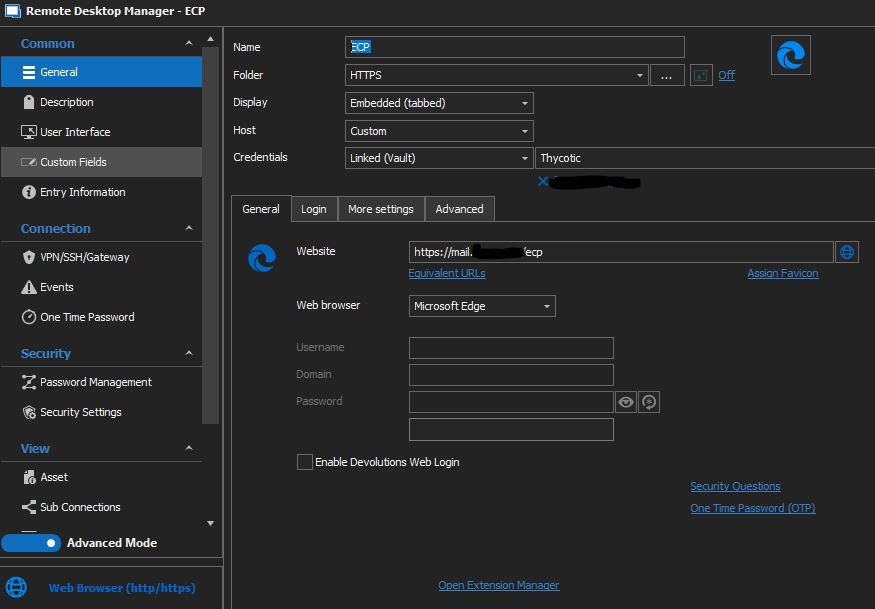
Data Source is local, the entry type ist Web Browser (http/https).
The website is our internal Microsoft Exchange Server where I want to login to the Exchange Control Panel (ECP). It is not reachable via the internet.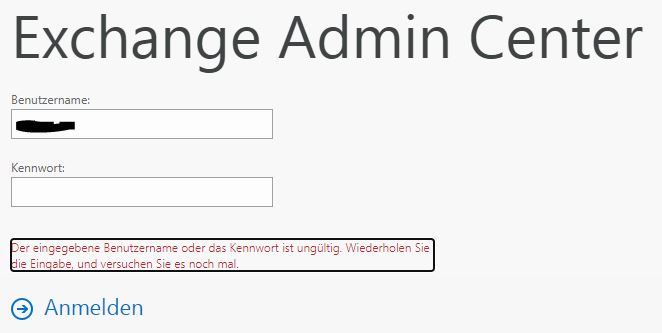
When I click now on the key icon and let RDM fill the auto login information and click then manually on "Anmelden", the login works. So the information from the vault is correct, but something must happen when doing the autofill and submit.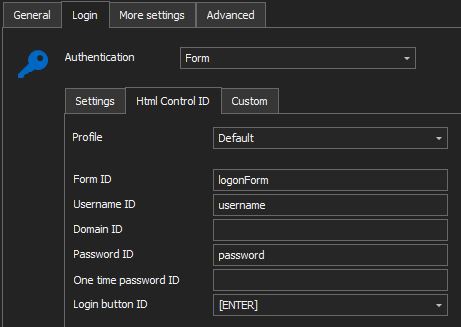
One additional question - I know [ENTER] and [SUBMIT], are there any additional actions I could use? Because I have some websites where those are not working...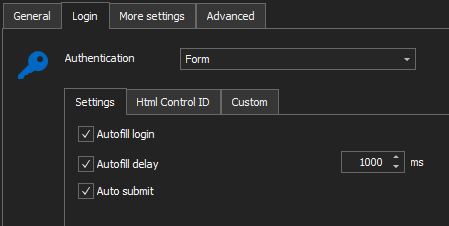
Brgds Andreas
Error.JPG
Edge3.JPG
Edge2.JPG
Edge1.JPG
Hello Andreas,
Thank you for your reply and for the screenshots.
I see, since the "Fill the auto login information in the current page" button is currently working on your side I suspect your "Username" and "Password" IDs are indeed correct, that being said since it is not being done automatically I believe the website may be preventing the autofill on first loading.
The way to confirm this would be to use the manual method described in this knowledge base article: https://kb.devolutions.net/rdm_web_browser_web_authentication.html
Method #2 would be what I'm referring to.
You're looking for the value "Autofill=off" in the HTML, If you can provide me a screenshot of the inspect results I can assist you with this.
That being said, If this line is found I'm afraid the auto-fill will unfortunately not work for this website, the workaround would be to launch the entry in "External" display mode and using our "Devolutions Web Login" browser extension to fill the credentials.
Let me know if this helps,
Best regards,
Samuel Dery
Hello Samuel,
But why is it working with Google Chrome and only with Edge I have this problem? If "Autofill=off" would be present, also Google Chrome would have a problem. Correct?
Anyway I did a inspect on the input fields and the only thing I can see is "autocomplete=off"
<input id="password" onfocus="g_fFcs=0" name="password" value="" type="password" class="signInInputText" aria-labelledby="passwordLabel" autocomplete="off" style="background-image:; background-repeat: no-repeat; background-position: calc(100% - 5px) 50%; background-size: 17px; cursor: auto;">
I played around with the settings a littel bit now. When I use [SUBMIT] as Login button ID the fields are filled and no login happens, but when I click on login or hit return I am logged in. As soon as I replace it with [ENTER] a login is performed, but fails.
When I remove the Login button ID or uncheck Auto submit the fields get filled and I can click on login or press return and I am logged in also.
I also tested now a different website where I use Google Chrome and [ENTER] as Login button ID. As soon as I replace Google Chrome with Edge I get a login failed. When I switch back to Chrome login works again.
I think that with Edge RDM adds a character to te password when using [ENTER] as Login button ID. I think you could verify this internally with RDM 2021.2.20.0.
So back to my question from above I wrote between the pictures. I know [ENTER] and [SUBMIT], are there any other possibilities for the Login button ID, or how can I find out what to enter there?
Brgds Andreas
Hello Andreas,
The login button ID can be found using the manual method described in the following knowledge base article https://kb.devolutions.net/rdm_web_browser_web_authentication.html
The process would be the same as the one used to find the fields' IDs, simply perform a "Right-click" on the button and select "Inspect" you should normally be able to find its ID.
From my understanding of your initial message, the autofill was unsuccessful in both cases (Edge/Chrome) the difference being that you received the error "Wrong username/password" error in Edge when using the "Fill the auto login information in the current page" button, did I misunderstand?
I'm wondering if there is a specific reason why you'd like to use "Edge" instead of "Chrome"?
That being said, since the "Autocomplete" is set to "Off" the autofill will unfortunately not work in "Embedded" mode, my recommendation would be to change the display to "External" and use our "Devolutions Web Login" extension to autofill the credentials in your browser.
Let me know if this works for you,
Best regards,
Samuel Dery
Andreas, does your webpage have javascript to prepend your domain name on submit?
Hello Samuel,
From my understanding of your initial message, the autofill was unsuccessful in both cases (Edge/Chrome) the difference being that you received the error "Wrong username/password" error in Edge when using the "Fill the auto login information in the current page" button, did I misunderstand?
Yes, your understanding is unfortunately not correct!
Autofill and submit is working with Google Chrome.
When I just change the Browser to Microsoft Edge it is not working and I get the error message on the webpage. When I just let RDM autofill the fields and emove the submit, and then hit login manually, it is also working. Only when RDM also does the submit I get this error message.
So for my understanding autofill is working on Chrome and Edge. Submit is also working on Chrome. With Edge I suspect, that submit adds a character at the end of the password before the submit and this is the reason why login is not successful. As I said, i have another webpage now where login with Chrome is working and by just switching to Edge it does not. Do I have any chance trace what characters are submitted to the form fields?
I want to use Edge as this is our default browser. As the new Edge is based on Chromium there is no difference to Chrome, but it is better integrated in Windows and easier to manage with group policies.
If you like, we could do a short remote session where I can show you everything.
Brgds Andreas
Hello Andreas,
Thank you for your reply and for the clarification!
I would like to confirm if you were able to find the "Login button ID" using the manual method described here https://kb.devolutions.net/rdm_web_browser_web_authentication.html#method-2
If so, did you encounter the same issue in Edge with the ID you found manually?
Thank you for the offer of a remote session, I will keep note of it. I'm currently discussing your case with our engineering department.
Let me know,
Best regards,
Samuel Dery
Hello Samuel,
sorry for my late reply - I had some other stuff to care about and forgot that I started this thread... :(
To be honest I am not sure if the Login Button ID is correct or not as there is no ID for the login button. As already written in one of my posts above I can find an ID for the username and password field, but not for the area where I can click to login. And RDM is able to fill those two fields - so the autocomplete setting does nothing. When I click login manually or just hit return on my keyboard I am logged in! Only when I use "[ENTER]" in the Login Button ID field, I get this error.
This is how this area looks like when I do a inspect:
<div class="signInEnter">
<div onclick="clkLgn()" class="signinbutton" role="button" tabindex="0">
<img class="imgLnk" src="data:image/png;base64,iVBOR...ggg==" alt="">
<span class="signinTxt">Anmelden</span>
</div>
<input name="isUtf8" value="1" type="hidden">
</div>
That brings up two questions:
Maybe it would be easier if I could just send a return from the keyboard. Is there a way to tell RDM to virtually hit return on the keyboard? This would hopefully solve it as it works when I remove "[ENTER]" from the Login Button ID and hit return on my keyboard.
What exactly does [ENTER] and [SUBMIT] do, when I put them in the Login Button ID field? Is this some kind of variable because of the brackets? Do you maintain somewhere a reference what variables exist?
Brgds Andreas
Hello Samuel,
I did now the following which is working, but not the best solution:
On the Html Control ID page, i just fill the usernamen and password ID and leave the Login button ID empty.
Then I switch to "Events", "After Open" and add "{ENTER}" as typing macro with 4 seconds delay.
With this configuration the page loads and login works as expected! But as the typing macro does not honor loading delays this can be done better I think.
If it is not possible to find out what RDM in combination with Edge does wrong here (but I hope it will be), would it be possible to add a typing macro section to the Html Control ID page? We should be able to switch between "Login Button ID" and typing macro to select the feature we want. Or maybe even better - when we use the typeing macro syntax {ENTER} then it is a typing macro, when we use [ENTER] the current behaviour is executed.
Brgds Andreas
Hello Deas,
After reading your first reply, I was also about to suggest the "Event Macro", I am glad that you have found it yourself!
That said, I will contact our Engineering Department to see if it would be possible to add this feature. In the meantime, I would recommend using this workaround.
Best regards,
James Lafleur
Hello James,
Using the "Event Macro" is possible, but there must be some kind of bug I think. Don´t you think so? Because what is the reason that [ENTER] works with IE and Chrome, but not with Edge?!? And when I use a macro that also sends {ENTER} it is working with Edge also?
Adding a macro instead of using the submit ID is a good idea and would add additional possibilities for us, but to find the root cause of this problem would be better I think.
Brgds Andreas
Hello Andreas,
Thank you for your swift reply!
After having a discussion on that matter with our Engineering Department, they mentioned the following:
1- The [ENTER] option seems to consider the autofill as successful if you have filled in the rest of the IDs.
2- [SUBMIT] only works with IE. It tries to use the button "submit" if possible.
That being said, the feature you suggested is interesting and has been added to the todo list of our Engineering Department. I will be in touch as soon as I will have more details to provide on that matter.
Best regards,
James Lafleur
Hello James,
That are good news, thanks a lot for your help!
Brgds Andreas
Hello,
After investigating our code, we have realized that the code for a typing macro with the value "{ENTER}" and for the "[ENTER]" command in the HTML Control ID tab is the same.
Both execute a typing macro with the value {ENTER}. The only difference to be seen is the fact that in your case you can set a delay to 4 seconds while the delay for the [ENTER] command is fixed to 300ms.
On our end, the [ENTER] command also works in an embedded Edge browser the way it does for Chrome. Ultimately, our guess would be that for some reason the website you are trying to access doesn't respond well with the Edge browser and the 300ms delay isn't enough.
If you try to set your after connect delay to a lower value does it stop working or does it still work?
If as expected it doesn't work with a lower value, we were thinking of adding a "Delay" setting in the "HTML Control ID" tab when the "[ENTER]" command is selected.
Regards,
Michaël Beaudin
Dear Michael,
I think you are right. With Chrome I get a "Loading web page" windows before the page loads. Timings are not so critical with Chrome I think.
With Edge I had to set Events, After Open to 5 seconds now to get the {ENTER} working. When I set it to 1 Second i get a "Username or password wrong" as the typing macro is executed before the fields got filled.
So it seems that with Edge after I click "Open Session" the timer starts immediately. With Chrome I think that there is some mechanism that detects when the page is loaded and then the timing starts. This would also explain that sometimes when the page loads with Edge the fields dont get filled. Maybe if the page takes too long to load.
Would it be possible to detect page loading with Edge and start timing when the page has fully loaded? This way RDM would start typing after the page has loaded successfully.
Or would it be possible to detect if the HTML Control IDs are available and start typing after they are loaded? This would be the best way as we don´t need to set fixed values.
Brgds Andreas
Hello Andreas,
I have investigated our code and we already check if our page is loaded before executing the autofill. The issue lies with some webpages that seem to do additional steps after they are loaded which might interfere with our auto login process. This would explain why the autofill works properly on some pages but not on others.
I have been able to find other people with a similar issue on this thread : https://stackoverflow.com/questions/66052640/winforms-microsoft-web-webview2-navigate-page-fully-loaded
After searching for a while it seems that the only safe way to avoid this issue is to add a timer to the autofill when encountering the issue. However, instead of a macro, you could try the setting in the image below.
If you do not wish to add this by hand on each new entry, you should be able to create a template (File -> Templates -> Entry Templates) and activate this setting. In this way, every time you create a new web browser entry, you will be prompted to choose between a "Blank" template (regular add action) or one of your own templates which will have this setting activated by default.
There will always be some differences between the Chrome and the Edge integrations because they use a different "WebView" for the embedded integration. Since this is not our own code, we have a limited control on some of the behaviors.
Best Regards,
Michaël Beaudin