How to automate Sub Connection creation & update (WAC) ?

Dear RDM guru,
With a wealth of 200+ Windows servers registered, I was wondering if a script or other automation would help creating a Sub Connection for each of those?
We would have for selected servers a new Website Sub Connection with
Name : WAC $PARENT_NAME$
Website : https://wac.servers.local/servermanager/connections/server/$PARENT_NAME$.servers.local/tools/overview
Yes, this is a Windows Admin Center (WAC) URL.
Other settings such as credentials would need to be applied as well.
A way to apply mass updates would be the Holy Grail!
Thanks for any hint.
Patrice
All Comments (4)
Hello,
Usually, we use PowerShell to create sessions in batch in RDM or we can import them from a .csv file, but in your case, you would like to create sub-connections.
Sub-connections is something that it's hard to handle via Powershell in the past, but we updated our Powershell module recently, so maybe something has changed regarding this.
I would need to verify this with my team and get back to you.
Best regards,
Jeff Dagenais
Hello,
As my colleague Jeff specified, Sub Connections always has been challenging to deal with using PowerShell.
I have an alternate method the you might like however.
I suggest you create a Template (RDP) with a SubConnection configured to your liking.
You can then Edit all your affected RDP my multi selecting them, than right click -> Edit -> Edit (Special Action)...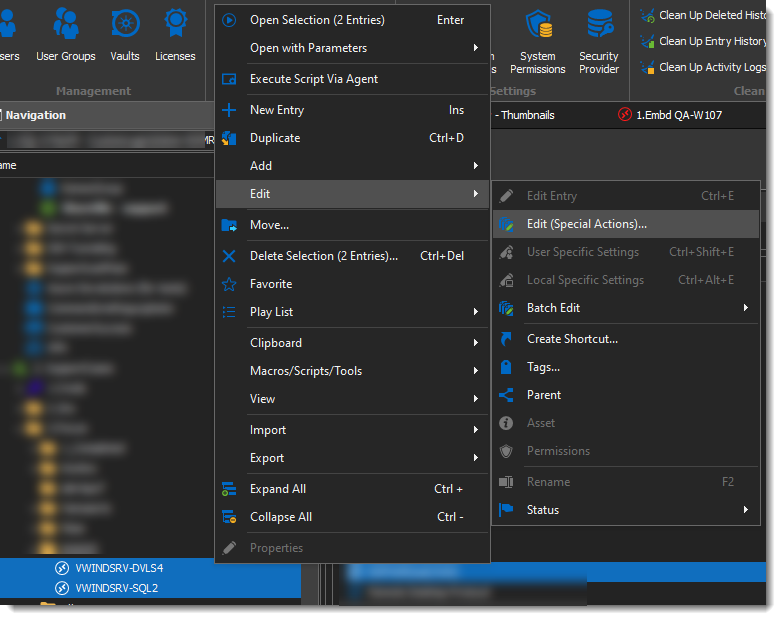
On the Edit - Special Action Selection, go to the Template Section, and select Convert with Template.
You will then be prompted for the template to use, select the template created beforehand an make sure the Add Template Sub Connections is ticked in the options above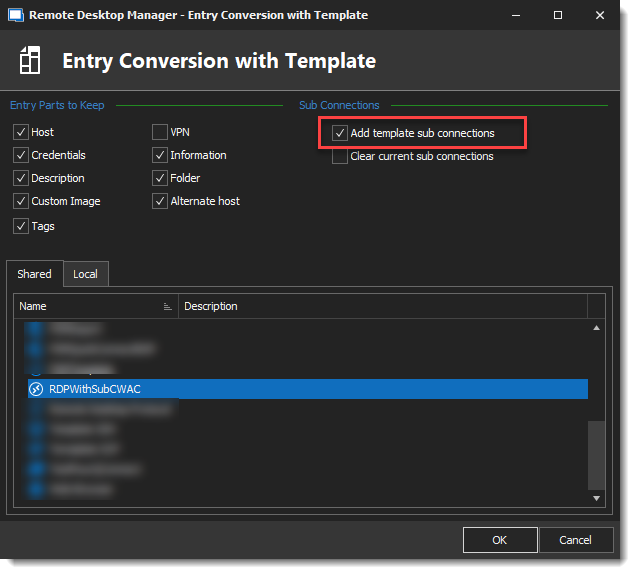
You should then see the subconnections with your connections.
I hope this helps, thanks for letting us know.
Best regards,
Alex Belisle
2021-10-25_8-43-48.png
2021-10-25_8-42-20.png
2021-10-25_8-41-32.png
Hello,
Many Thanks Alex, that's all what was needed, and without scripting!
Best regards,
Patrice
Hello Patrice,
Sincerely glad I could help!
Have a great one.
Best regards,
Alex Belisle