Open Connection via Context Menu fails if Credentials needs to be chosen
Open Connection via Context Menu fails if Credentials needs to be chosen

Good Morning everyone,
unfortunately after the last Update (now on Version 2021.2.16.0 64-BIT) I cannot open a connection if I open it via the RDM Context Menu.
This only happens if the credentials for this connections are configured as "Ask on connection" so that I can choose which credentials should be used this time.
So, the Credentials choosing screen comes up. If i click somewhere in this window it disappears including the RDM context menu.
When i start the connection from the RDM Main Window everything is ok.
Someone got a clue?
With best regards.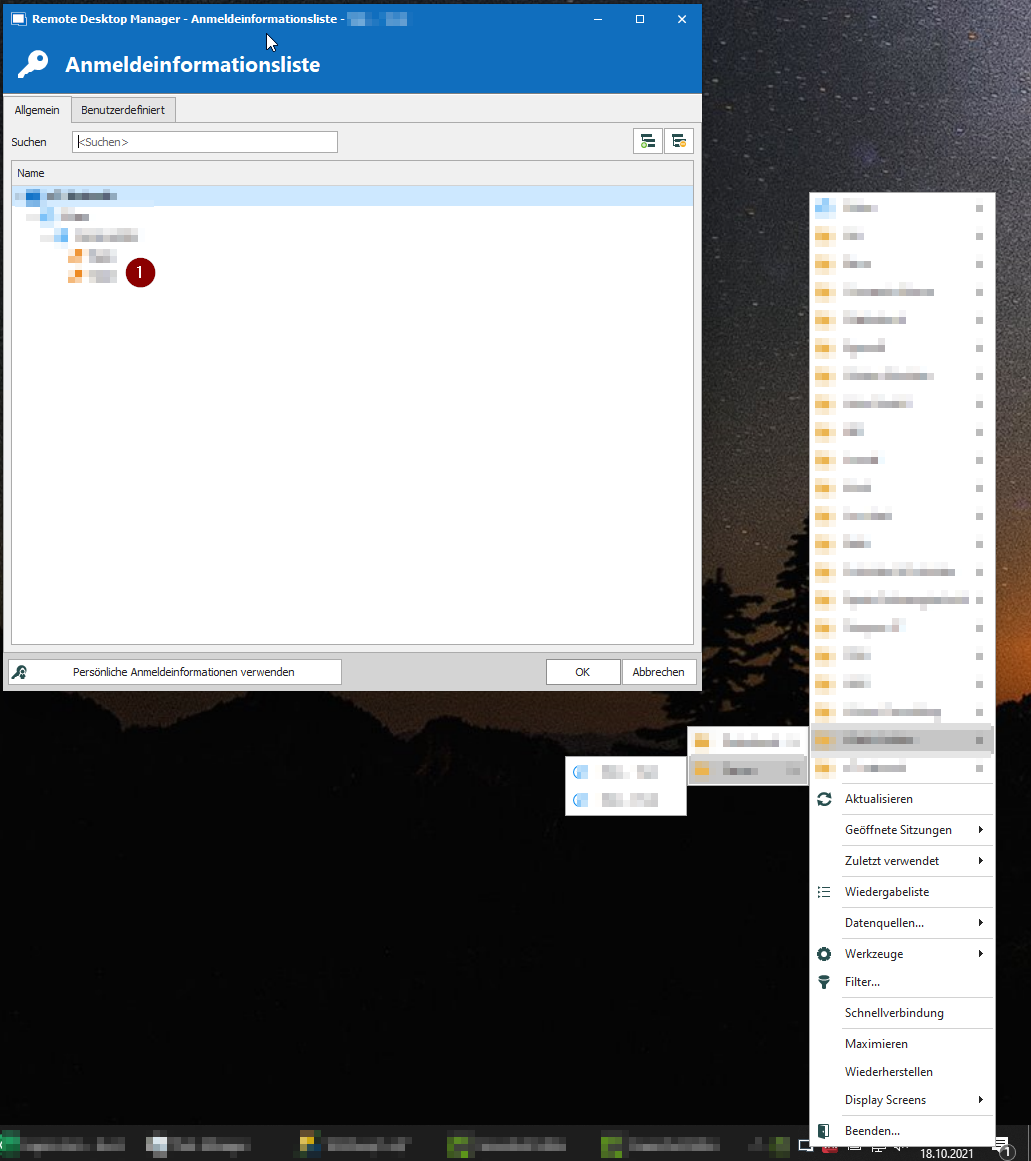
20211018_RDM_Connection.png
All Comments (13)
Hello,
I have created a ticket for that. Could you give more details on how your credential is configured when it DOES not work? Is it embedded, linked or custom?
Regards
David Hervieux
Hey David,
I have attached a screenshot with a sample connection.
All credentials are plain Username, Domain, Password Types.
The Connection credentials are set to Linked (Ask on Connection)
Regards,
Daniel.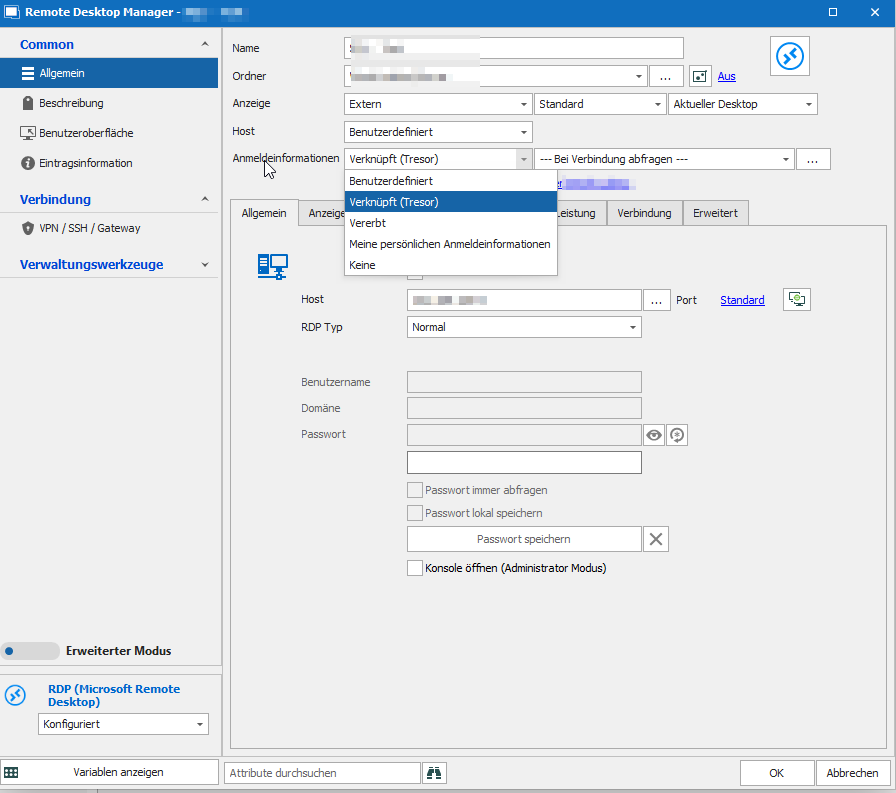
20211018_RDM_Connection_Settings.png
Hi,
We are having difficulty to replicate the bug you have reported. Would you mind trying to create a new RDP session and trying to open it. This would help us confirm if the problem come from the entry. Also we were wondering if you were using windows 11 or if another application was opened forcing the focus on it. (For the second case if the application is minimized it should not be an issue)
Regards
Jean-Francois Duchesne
Dear Jean-Francois,
The behavior remains even when a new RDP session is started.
I did some more tests and was able to reproduce the problem in the following way.
As you can see in the attachment, I have the option "Show in taskbar when not minimized" active.
The problem only occurs when the main window is minimized and therefore the window is no longer displayed (including the taskbar icon).
As soon as I change the function e.g. to "Always visible" and put the program in the taskbar, the credential call still works.
Funnily enough, the problem only applies to mouse interaction. I can operate the Credential window with the arrow keys on my keyboard.
About my operating system:
Windows 10 Pro 20H2
Build 19042.1288
Feature Experience Pack 120.2212.3920.0
Antivirus: Kaspersky Internet Security 2021
Monitor: 1x 27" BenQ GW2765 - resolution (2560x1440 pixels)
At the time of testing (after system startup), the following applications are running:
- Anydesk
- Teamviewer
- NCP client
- Intel graphics settings
- Nextcloud client
- Acronis TrueImage Monitor
- Adobe Updater Startup Utility
I hope with this information you could reproduce the problem and it does not occur only with me ;-)
Regards,
Daniel.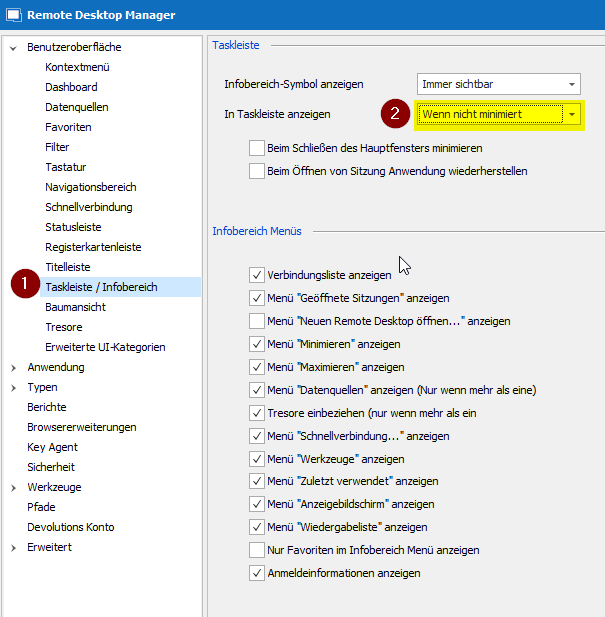
20211021_RDM_Connection_Options.png
Hello,
We have completed a fix for this issue which should be available in the currently released version of RDM (2021.2.22.0).
If you update and still experience issues regarding the trayicon's context menu and the prompt for credential selection window, please do let us know on this thread.
Best Regards,
Michaël Beaudin
Hi Michael,
I have checked out the current Version 2021.2.22.0 (64-Bit).
The Situation seems unchanged. As soon as the "Show in Taskbar" option is set to "if not minimized" and the window is minimized the behaviour is the same.
Regards,
Daniel.
Hello Daniel,
Thank you for testing and letting me know. I will try to reproduce the issue again and see if we can come up with another fix that will help in your scenario.
Regards,
Michaël Beaudin
Hello Daniel,
I have received your configuration file and I still cannot reproduce the issue on my side. However, I have noticed that in my case when I select the entry in the trayicon's contextual menu, the form is prompted in the following order :
- Select RDP entry that has "Prompt for credential" from the trayicon
- RDM is brought back into focus from it's minimized state
- The credential selection window is prompted
Could you confirm if in your case RDM opens or if RDM stays minimized when the credential selection window appears?
Regards,
Michaël Beaudin
Hi Michael,
I have checked this behaviour on my site and cannot confirm the second point.
When the RDP Entry from the trayicon is selected RDM does not leave the minimized state.
Only the credential windows is coming up.
That might be the Problem because the credential selection list might need the focus of the main RDM Window.
Regards,
Daniel.
Very weird how the behavior is different here. We'll investigate with this new information and see if we can come up with a fix that would work for you.
Regards,
Michaël Beaudin
Hello,
We have found a use case where we could reproduce your issue and have come up with a fix which will hopefully resolve the problem on your side as well.
The fix should be available in the version 2022.1 of RDM which we plan to release sometime later this month.
Best Regards,
Michaël Beaudin
Hi Michael,
I have tried the new release 2022.1.11.0.
You have fixed the Problem. The Main Window ist now de-minimized and given focus so the problem does not occur anymore.
The Incident can now be closed.
Thank you for your great help :-)
Regards,
Daniel.
Hello Daniel,
That's great news! Thank you for letting us know :)
Best Regards,
Michaël Beaudin