Improvements in the password settings for launching the application
Improvements in the password settings for launching the application
0 vote

Hey
If you set the "Force the user to always be prompted for his credentials when opening the application" parameter in the group policy settings, 
then in the application settings you still have a choice of several options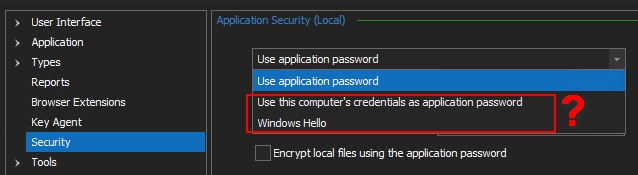
but, only the "Use application password" option will work, even if you choose any other option, it will let you configure it, but the next time you start it will require you to return to the "Use application password" option
This is not very logical. Why offer the user a choice when only one option works
If the "Force the user to always be prompted for his credentials when opening the application" parameter is set in the GPO, then remove all other options from the application settings (Windows Login and Windows Hello), they still do not work
Second problem. Without the "Encrypt local files using the application password" checkbox, it will not allow the configuration to continue. Why do you then offer a choice if it works ONLY when this checkbox is selected.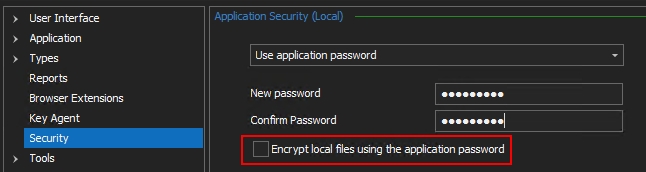
Make it unavailable for user modification in this case
Third problem. When specifying a password from the application, it is not checked for complexity in any way. You can simply specify "1" and the program will accept this password. I ask you to check the complexity of the password from the application, or the ability to customize the password complexity template
RDM-5.jpg
RDM-4.jpg
RDM-3.jpg
All Comments (2)
Hello,
Thank you for bringing up these issues. I've opened a ticket so we can take a look at these issues and see what we can do to make the UI more logical.
Regards,
Hubert Mireault
Hello,
Fixes for the UI issues you mentioned have been deployed in version 2022.2.17.0.
We've also implemented a new system setting to force an application password template. This new feature will be included in our 2022.3 release later this year.
Regards
Jonathan Del Signore