Add a second option for forced password protection to the system settings
Add a second option for forced password protection to the system settings
0 vote

Hey
Please consider adding the item "Force Application security with Use application password" to Administration -> System Settings -> Applications -> Security
Now there is only the "Force Application security with Windows credentials" setting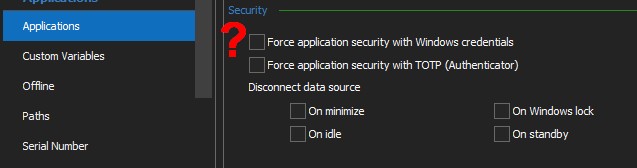
But if I want to set exactly the application password, there is no such possibility in this place
Group policies can do this, BUT, there are just a few seconds to bypass the settings and remove the password to launch the application (if the user is a domain administrator)
But when the setting is made exactly at the Administration -> System Settings level, it is already more difficult to disable it, since it is not related to group policies and the registry
Why in Administration -> System Settings -> Applications -> Security do you offer only one option for password protection, and in File -> Options -> Security do you offer several options?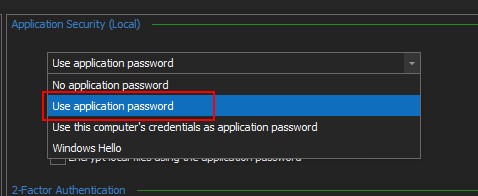
RDM-2.jpg
RDM-1.jpg
All Comments (1)
Hello,
Thank you for your request. We will open a ticket to add this option as well as take a look at the UI inconsistencies.
Regards,
Hubert Mireault