RDM no longer working on Surface X (ARM)

We upgraded our database version so now I need RDM 2021.2.0.0 or later. If I try to upgrade, however, I get the message 'Remote Desktop Manager cannot be installed on 32-bit Windows versions.'.
As you don't have an arm64 build for RDM, I need to use the 32-bit version, but apparently you discontinued support for 32-bit with 2021.2.x.
I am currently running 2021.1.44.0 which is working fine on my Surface X (ARM) in 32-bit mode but can no longer connect to my database :(.
Any ideas how to fix this?
RDM-no-32bit-support.PNG
All Comments (34)
Just tried a clean install but that doesn't work either.
Hi,
We have recently dropped support for 32-bit Intel in Remote Desktop Manager, which means that Windows 10 on ARM is no longer supported through 32-bit Intel emulation. We are working hard on getting Remote Desktop Manager ported natively to Windows ARM64, but this is going to take some time as this implies a migration to .NET 6, since Microsoft will never port the .NET Framework natively to Windows ARM64.
This being said, the best way to keep using Remote Desktop Manager on your Surface Pro X is to upgrade to Windows 11, since it now supports Intel 64-bit emulation. This was a preview feature in Windows 10 Insider builds, but Microsoft apparently does not intent to backport it to Windows 10. I know that recommending to upgrade the OS sounds a bit extreme, but trust me, you'll be very happy: Microsoft made HUGE performance improvements specifically for ARM64 in Windows 11, your Surface Pro X will feel very different from what it used to be with Windows 10. Also, Intel 64-bit emulation is a whole lot faster than Intel 32-bit emulation on average, and even comes relatively close to native ARM64 performance in a lot of cases.
I have upgraded my own Surface Pro X to Windows 11 and tested the latest version of Remote Desktop Manager 64-bit on it, it is much better than it used to be.
Best regards,
Marc-André Moreau
It's not offering a Windows 11 (Pro) upgrade to me. Is that a preview you're running?
Can't use the Installation Assistant or the Media Creation Tool either because those don't support ARM64 :(
ISO image is also only x64. Download on MSDN also only x64. I don't think there's a way to get Windows 11 RTM for arm64 yet?
I upgraded to Windows 11 using the Insider Preview channel builds, but if you're looking for the Windows 11 ARM64 ISO, Microsoft doesn't provide one, but you can use uupdump.net to create your own using the files available from the Microsoft CDN.
Are you saying that the Windows 11 Update Assistant does not support Windows on ARM?
Marc-André Moreau
Are you saying that the Windows 11 Update Assistant does not support Windows on ARM?
Yes, x64 only :(
I upgraded to Windows 11 using the Insider Preview channel builds, but if you're looking for the Windows 11 ARM64 ISO, Microsoft doesn't provide one, but you can use uupdump.net to create your own using the files available from the Microsoft CDN.
This the one I want?
Upgrade to Windows 11 (22000.258) arm64 arm64 2021-10-12 17:05:19 UTC 24b475a3-b2b0-4464-82d1-2dd0d4a9eed8
I think that's the one. Can you tell me how exactly the Windows 11 Update Assistant fails? My understanding is it won't run at all because it's a 64-bit intel binary, is that correct?
Marc-André Moreau
I think that's the one. Can you tell me how exactly the Windows 11 Update Assistant fails? My understanding is it won't run at all because it's a 64-bit intel binary, is that correct?
Yes. See attached (sorry for the Dutch but it should be clear enough).
UpgradeAssistant.PNG
Pfff. Windows 11 is not playing nice. Already wasted most of my day on this :(
Was it really, really necessary to drop x86 support a few months before Microsoft would offer a normal upgrade to Windows 11 for Surface X (and other ARM PC's)?
I mean, you don't support my iPhone (because of 2 factor Azure SQL) and now you don't support my laptop either...
Not happy.
Win11Failed.PNG
Hi,
I understand your frustration, and I've asked for guidance from some of the people I know in the Windows on ARM community. Let's just say that Microsoft dropped the ball on this one, especially since they've made significant performance improvements for Windows 11 on ARM.
We intended to drop Intel 32-bit support for a while, and the fact that it worked on Windows on ARM was never meant to be the final solution. Assuming that one can upgrade to Windows 11 (it turns out not be straightforward, that's something we didn't foresee), then Intel 64-bit is the way to go. In the meantime, you can keep using the previous RDM builds.
I will follow up with you once I have more information on how to force the Windows 11 upgrade check on a Surface Pro X without going through the Insider Preview program.
Best regards,
Marc-André Moreau
Hi,
Someone suggested to me using the PC Health Check app to trigger the upgrade to Windows 11. This is the tool you normally use to check if your PC can be upgraded to Windows 11, but apparently there's a way to use it to initiate the Windows 11 upgrade.
Best regards,
Marc-André Moreau
Someone suggested to me using the PC Health Check app to trigger the upgrade to Windows 11. This is the tool you normally use to check if your PC can be upgraded to Windows 11, but apparently there's a way to use it to initiate the Windows 11 upgrade.
Yes, I used that before. I gives the green light but doesn't offer to initiate the upgrade for arm64 machines, only x64.
I've managed to upgrade to Window 11. After some research on the error code it seemed to be related to connected hardware and, lo and behold, by removing my Logitech USB mouse I was able to upgrade.
Running Windows 11 on Surface Pro X now. I'll try and get RDM to run next.
Let's just say that Microsoft dropped the ball on this one
I see this differently. The different scale on which Microsoft operates means you will have to follow them, not the other way around. You didn't need to drop 32-bit support right now but you chose to do so. In my opinion prematurely. You could have waited for Windows 11 to become mainstream available to arm64.
In the meantime, you can keep using the previous RDM builds.
As I explained earlier, that's no use. The database is upgraded and previous builds no longer have access.
The decision to drop 32-bit was taken years ago without direct concern for Windows ARM64, the fact that it worked through emulation only delayed the decision to drop it, and even then, we did so after Microsoft finally made 64-bit Intel emulation available in a stable Windows release, Windows 11. The number of WoA users was not enough to justify keeping the 32-bit build any longer, and the recommended solution is to upgrade to Windows 11.
The part I didn't expect was that it would be difficult to upgrade without going through the insider preview program, and that is where I think Microsoft dropped the ball. As a fellow Surface Pro X myself, we both know that Microsoft has a relatively weird strategy with WoA, and very little resources are given to facilitate application porting. We're currently in the process of porting RDM to ARM64 on macOS (done), Linux (in progress) and Windows (blocked on .NET Framework migration).
Anyway, now that you have successfully upgraded to Windows 11, you can use the x64 build of RDM with better emulation performance. The native ARM64 build is coming, but it'll take longer because even though all native libraries are already ported, we still need to migrate away from the .NET Framework, and that's a big task given the amount of integrations available in RDM.
Best regards,
Marc-André Moreau
... even then, we did so after Microsoft finally made 64-bit Intel emulation available in a stable Windows release, Windows 11
Except that Microsoft didn't release Windows 11 to ARM pc's yet (and apparently for good reason, given my installation troubles).
From my perspective this has been a stapling of different choices where only the combination is really problematic:
- A new RDM version dropping 32-bit support
- A database upgrade preventing the use of previous versions
- Microsoft not yet offering x64 emulation for arm64
The first two were made by Devolutions. Apparently you missed the third one, thinking Windows 11 was available for arm64 and would make the first two decisions ok.
Combining dropping 32-bit support with a database upgrade locking out previous builds, you took a risk. You blocked off a 'way out', apparently not even realizing that as you suggested me to use 'a previous build'.
If you would have not dropped 32-bit support, I would have been fine. If you would not have compounded that with a database upgrade preventing earlier builds from connecting, I would have been fine. And if you would have known that Windows 11 was not yet available for arm64, you would probably not have made the first two decisions.
I don't have any problems with mistakes being made. No mistakes means no progress. The only thing I have a problem with is framing it as 'microsoft has dropped the ball'. If you don't own up to the consequences of your own decisions, how are you ever going to improve?
I understand your point, but that is still not going to change the fact that we did drop 32-bit support, and will not revert the decision.
Did you get a chance to launch Remote Desktop Manager x64 on your Surface Pro X running Windows 11 yet? That is what truly matters here: fixing your issue.
Best regards,
Marc-André Moreau
I understand your point, but that is still not going to change the fact that we did drop 32-bit support, and will not revert the decision.
I never asked for that.
Did you get a chance to launch Remote Desktop Manager x64 on your Surface Pro X running Windows 11 yet? That is what truly matters here: fixing your issue.
I have it running. Dashboard looks horrible (due to scaling issues) but it works.
Start-up time hasn't improved either (still 44s of freezing my entire laptop just starting up the application, followed by 15s to get the data source up).
I'm glad that is is working now. As for the startup time, RDM is a fairly large application that loads a lot of .NET DLLs, so it takes some time even without emulation. In the case of Windows on ARM, the problem is further amplified: the .NET assembly is JIT compiled with the .NET emulated .NET framework, and the resulting cached native assembly is emulated a second time as it is for x64, not ARM64. Add on top of that AVs that lock DLLs as they are being loaded (Windows Defender adds 6 seconds on my SPX), and it gives the slow startup time you currently experience.
Switching to .NET 6 and providing a native Windows ARM64 build of RDM is unfortunately the only way to reduce the startup time. We're working on it but it should take a while to complete, unfortunately, as we have a lot of integrations that don't rely on .NET Framework APIs not found in .NET 6.
Best regards,
Marc-André Moreau
The Windows 11 I have is pretty much useless. It didn't install a lot of necessary apps, including the Windows store. And if I try to add the AppX package manually, it says:
Attempting to register package: Microsoft.WindowsStore_12104.1001.113.0_neutral_~_8wekyb3d8bbwe Add-AppxPackage : Deployment failed with HRESULT: 0x80073CF3, Validatie van updates, afhankelijkheid of conflict voor h et pakket is mislukt. In Windows kan pakket Microsoft.WindowsStore_12104.1001.1.0_arm__8wekyb3d8bbwe niet worden geïnstalleerd omdat dit pakk et afhankelijk is van een framework dat niet kan worden gevonden. Geef het framework 'Microsoft.NET.Native.Framework.2. 2' dat is gepubliceerd door 'CN=Microsoft Corporation, O=Microsoft Corporation, L=Redmond, S=Washington, C=US', met neu trale of ARM-processorarchitectuur en minimale versie 2.2.29512.0, samen met dit pakket dat moet worden geïnstalleerd.
(sorry for the Dutch).
Apparently I cannot install the Windows Store because some .NET framework version is missing. Sweet. Back to square one. Two days wasted and I probably need to revert to Windows 10 in the end.
Did you ever release a version of RDM that works well on Win 11 ARM? Uses ARM64EC?
Can we have an update on the status of RDM on Win11 ARM?
Thanks.
Hi,
Remote Desktop Manager 2022.3 now supports Windows on ARM *natively*. If you use the .zip file instead of the installer, you'll have to manually run the OptimizeRDM.ps1 script in the installation folder as admin to enable ARM64 native execution, but if you use the regular installer, it is done automatically: 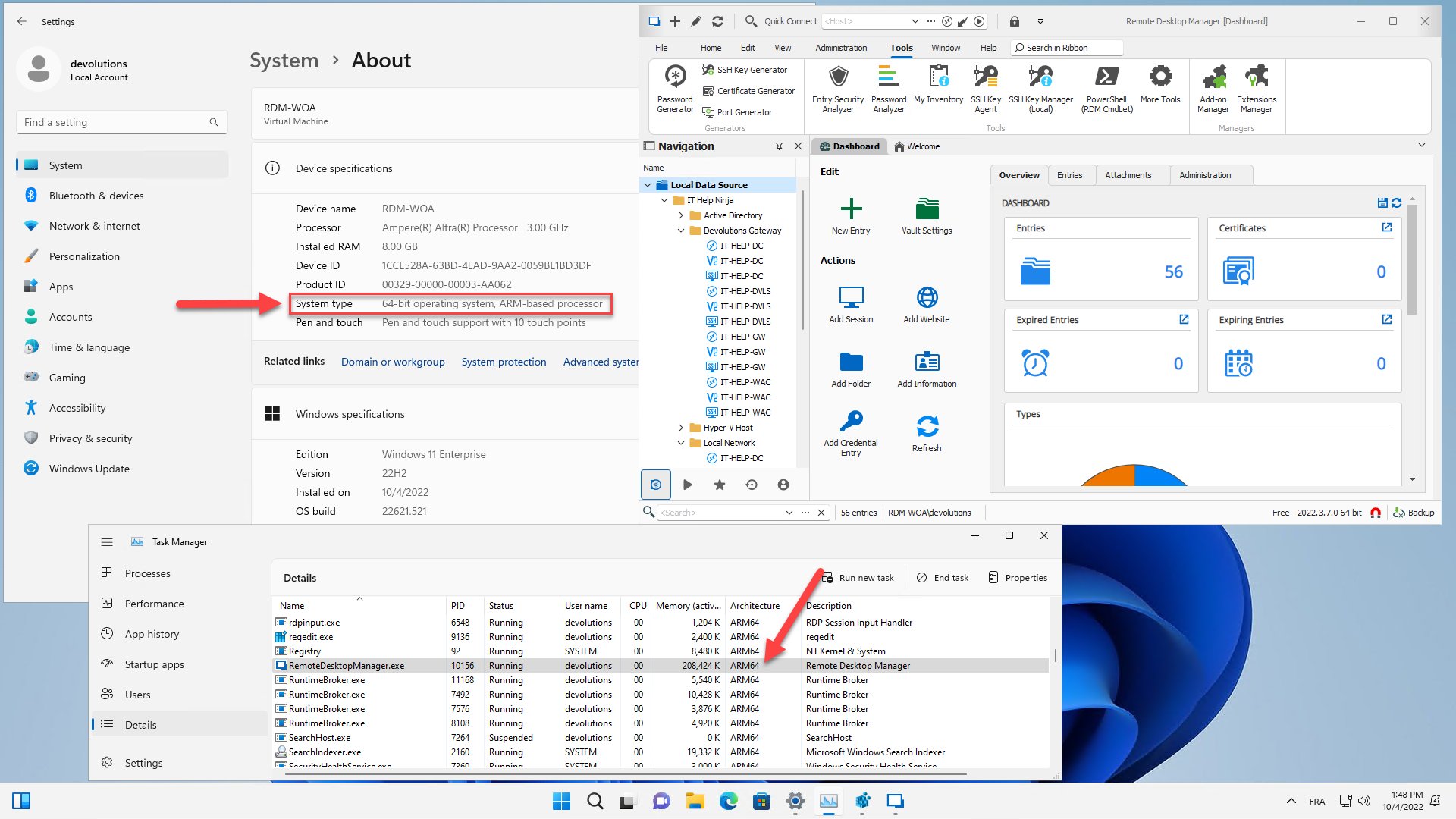
Marc-André Moreau
RDM_WOA.jpg
Thanks.
But I downloaded the current installer...and got x64. User error?
Hi,
Please make sure you have .NET Framework 4.8.1, which is the one that added Windows ARM64 support:
https://devblogs.microsoft.com/dotnet/announcing-dotnet-framework-481/
If it doesn't work, please run the OptimizeRDM.ps1 script manually as admin just to be sure (it's alongside RemoteDesktopManager.exe), and then try launching Remote Desktop Manager again. It's required to set the registry keys that the latest .NET Framework will use to enable ARM64 native execution, otherwise it will still run it with x64 emulation (default).
Best regards,
Marc-André Moreau

This is odd. Can you open PowerShell as admin and manually run the following:
$RdmIfeoRegPath = "HKLM:\SOFTWARE\Microsoft\Windows NT\CurrentVersion\Image File Execution Options\RemoteDesktopManager.exe" New-Item -Path $RdmIfeoRegPath -Force New-ItemProperty -Path $RdmIfeoRegPath -Name 'PreferredMachine' -Value 0xAA64 -Force
Without this registry key, the .NET Framework 4.8.1 won't enable native ARM64 execution for Remote Desktop Manager. It's important that the name of the executable matches (RemoteDesktopManager.exe). If this still fails, can you try doing a full uninstallation of RDM, to install it again with the latest installer?
Marc-André Moreau
Setting the registry key works. See below.
The result below is from a second machine. It had the same failure as the first machine before adding the registry key.
My guess would be that your installer has problems detecting the environment -- and I'd understand why. These Win11 ARM machines are actually virtual machines running on an M1 Mac under Parallels.
Can you run the following PowerShell code snippet on your WoA VM? It's indeed possible that the platform detection check fails in your case:
Get-ChildItem Env:PROCESSOR_* [System.Environment]::Is64BitOperatingSystem

Best regards,
Marc-André Moreau

Can you enter the following in PowerShell:
[System.Environment]::Is64BitOperatingSystem
It should return True or False, and it's currently used in the detection code. I wouldn't assume it to be the same as the output from Get-ComputerInfo - trying to accurately detect Windows ARM64 is quite tricky
Marc-André Moreau

Hi Alex
There is an issue with how the OptimizeRDM.ps1 script is called by our installer. While we've been shipping the script for a couple of versions, having the installer actually run the script is new in 2022.3. I'm going to work on addressing this and will post back with an update.
In the meantime, I'd recommend invoking the script manually (it's alongside RemoteDesktopManager.exe in the installed program files). As well as configuring this registry key, it will invoke ngen to pre-JIT some of our managed assemblies, which should improve startup time further.
I hope this helps, please let me know if you have further questions or comments!
Richard Markievicz
Hello
RDM 2022.3.18 is available and contains fixes for the installer. Please don't hesitate to post back if this doesn't correct the issue.
Thanks and kind regards,
Richard Markievicz