run script on SSH Session - wait to finished command

Hello,
if we oben a SSH Session und run Scripts under "Actions" how the scripts needs to be look that this command coud be done:
- run command like cd ..
- whait if that one is finish and look for Prompt
- start next command
- whait if that one is finished.
I have test that one:
ls -la{ENTER}
{PROMPT:$ }
but RDM sends this:
ls -la
{PROMPT:$ }total 34672
every solution are welcome!
Many thank's
R,
All Comments (7)
Hello,
Thank you for contacting us on this matter!
I would like to verify a few things to give me a better idea of what you are working with, and how this could be configured.
- What version of RDM do you currently use?
- What is the type of data source you use in RDM?
- Could you please provide us a screenshot of your current script's configuration, free of sensitive information?
Best regards,
Gabriel Degrandpré
Hello,
Version: 2021.1.44.0 64-Bit Enterprise
DataS: MariaDB and Local
Script: that one in my previous post
Send:
ls -la{ENTER}
{PROMPT:$ }Answer:
ls -la
{PROMPT:$ }total 34672
It looks like the Syntax {PROMPT:$ } are not working.
If you open a Session with post login commands action like
sudo apt update
you can set a Expected Prompt like:
$
or if you have a Shell script like this one:
send "$Password\r"
expect "$ "
Exactly that one is what we looking for if we run "Execute Script in Terminal"
Many thank's for helping!
R.
Hello,
Thank you for your response!
One of my colleagues has brought to my attention that we have a ticket open to implement support for the {PROMPT:$ } feature. This means that, for the time being, it will not be possible to configure this. However, the feature will eventually be implemented. I will notify you when the feature is made available.
Best regards,
Gabriel Degrandpré
Hello,
the {PROMPT: } funktion is already implementet but didn't work!
My customer needs the funktion so "eventually be implemented" is not realy helpful in that case.
PLs. tell in what Realse the problem are solved.
Many thanks
R.
Hello,
I will consult our engineering team regarding this ticket, and inform them of your interest in this feature. I will get back to you when I have new information to share.
Best regards,
Gabriel Degrandpré
Hello,
Our engineering team has let me know that while the feature to include " PROMPT:??? " in a script is still in the works, they have an alternative to suggest outside of scripts that might be helpful to you.
In the properties of your SSH Shell sessions, you should see a "Post Login" tab. In this tab, you can configure commands with an "Expected prompt". This works like the " Prompt:??? " feature, allowing you to specify what RDM should look for before sending the corresponding command. 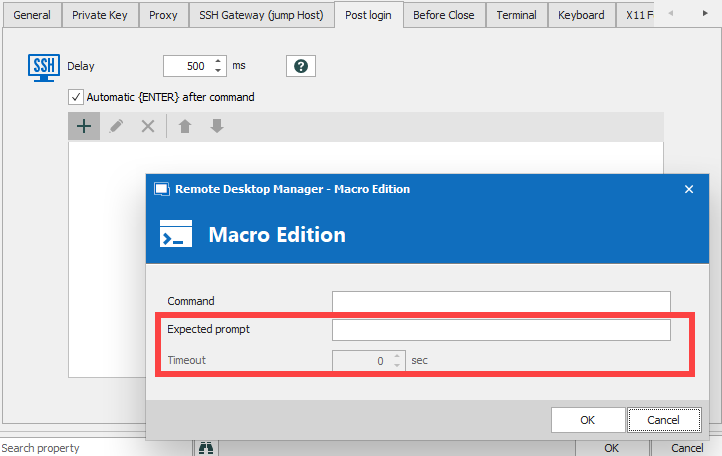
Best regards,
Gabriel Degrandpré
ed2549c7-a277-40e2-a265-85aef81fcef0.png
Hello Gabriel,
many thank's for the update! Indeed we use this variant for smaller tasks.
But we have some cases where our scripts send about 100-150 commands one after the other and for this the post login variant is too cumbersome.
Thanks for the info and thanks that the "prompt" function is still in progress.
Have a nice day
R.