Unable to access Secret Server for use with RDM after upgrade
Unable to access Secret Server for use with RDM after upgrade

Upgraded to version
All Comments (8)
Do you get an error message or anything in the application logs? You can find them in Help-> View Application Logs
Regards
David Hervieux
Sorry initial post was incomplete. Didn't mean to actually post. We rolled back the DB & are going to look at it a bit later. Originally updated to version 2021.2.13.0 64 bit client. I noticed there is a 14.0 now available, we will give that a whirl, and review application logs. Thanks for the response.
Hello Michael,
Please wait until version 2021.1.15 is released, planned for the end of the day (Oct. 5). It will contain several fixes for Secret Server.
After the update is completed, make sure your URL is https://servername/SecretServer; if it does not work, try with https://servername
Best regards,
Richard Boisvert
Thanks will see what that brings. I've tried to update the URL for Secret server & that made no difference on ver 13.0 & 14.0 Still can't access the SS functionality. will let you know if 15.0 is any different.
Respectfully,
Mike Matyasic
RemoteDesktopManager64.log.db
So version 15.0 seems to have the same issue. It appears as if it isn't passing credentials, that being said if I I click "View Password" on the Root I can see the SS vault & the password for any entry within, BUT per below when try to assign a specific secret or try to change a specific secret I put in my password (same that worked above) it throws an unexpected error.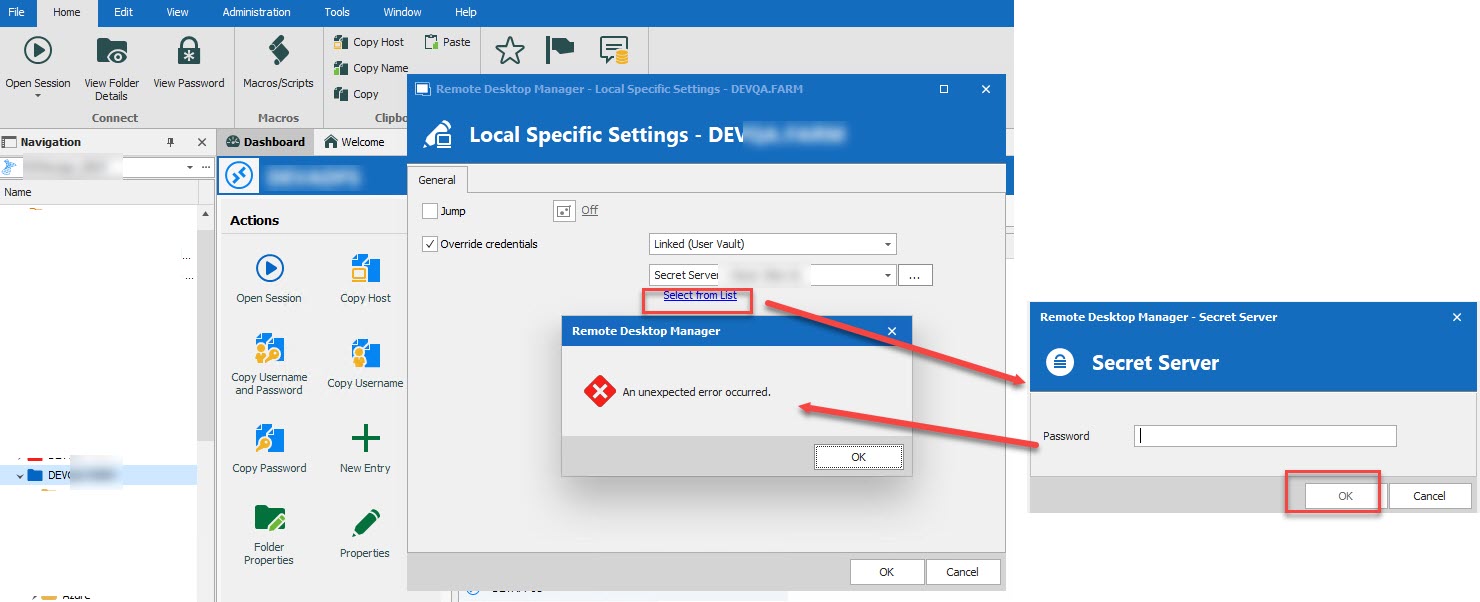
IF however I right click on the target, and choose Open with Parameters & select Open (Select Credentials) it works to the RDP resource with the SS authentication every time.
2021-10-06_9-14-43.jpg
Hello Michael,
Just to make sure I understand your situation correctly : If you do a "View password" on the exact same credential entry that's giving you an issue in the Local Specific Settings, it works fine ?
Also, do you use any sort of inheritance, or is the credential applied directly on the session ?
Thanks
Jonathan Del Signore
Afternoon (2:50 PM EST 23021-10-12)
UPDATE:
Got it working, the URL had webservices at the end & once removed it worked
------------------------------
Former issue
The version I am using that works with inheritance set at the root is 2021.1.44.0 64-BIT. Credentials are set at the rook with inheritance & then all I needed to do is 2x click on the object (VM) & it passed creds from Secret Server to the endpoint, without prompting for password.
When I upgraded to version 2021.2.14.0 64-BIT and this no longer worked.
We restored the data base, made a copy and have been using that to test the new versions, but as of yet have been unsuccessful in configuring it to work as before.
I just loaded ver 2021.2.16.0 64-BIT & the results are the same for the screen shot above, doesn't matter if I use either "User Specific Settings" OR "Local Specific settings".
I can see the Secret server box, select it, then when I try to change the actual secret I'm prompted for my password and I receive the error above. Password is the same password I use below here when selecting open with parameter.
Behavior is the same whether I try at the root or any of the branches, with or w/o inheritance.
Likewise if I go to View > My user Vault > View Password > Input Password > it results in the "unexpected error occurred" message per above screenshot
IT works IF I right click and choose Open with Parameters > Open (Select Credentials) I choose Secret server - cloud > input my password & it open Secret server & I'm able to choose the credentials I want to use. & I am able to log in correctly
I'd be happy to set aside some time & take a call or remote session for you to observe & see if it is a PEBKAC problem ;)
Respectfully,
Mike Matyasic
Hello Michael,
Glad to see it's now working properly for you. We indeed had an issue with the URL migration where it kept an unwanted argument in some cases. It's now solved, but since the migration had already been done on your side it had to be changed manually.
Regards
Jonathan Del Signore
