Example for Post Login with expected Prompt

Hallo @all,
can some one show me some examples how "Expected Prompt" are working for SSH Sessions?
Many thank's
R
All Comments (15)
Hello,
The example I have is not that useful, but it should get your creativity going.
My SSH server is an OpenSSH on Windows. I have set it to simply go up one folder and then call DIR...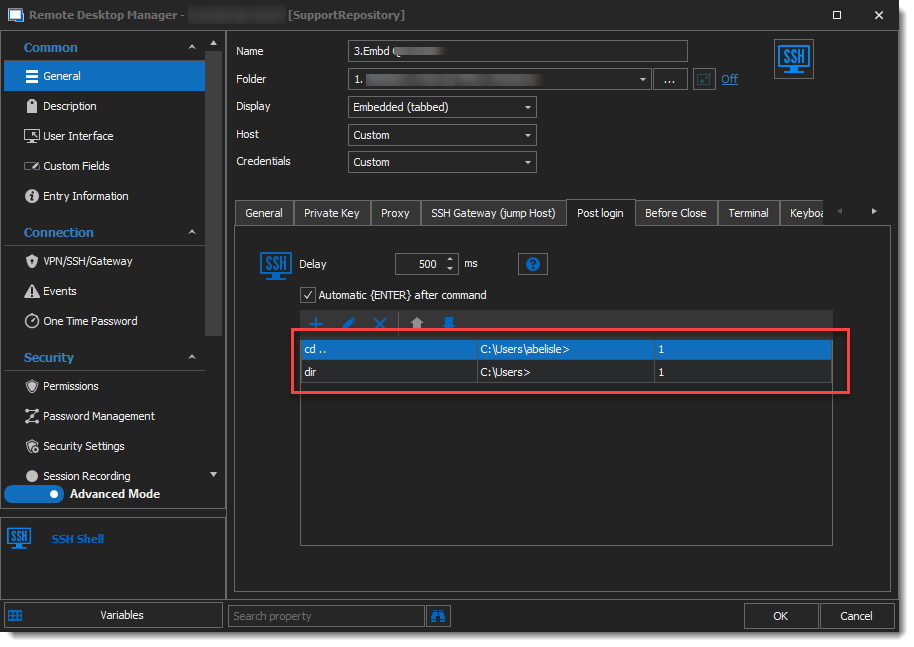
The results looks like this on my side : 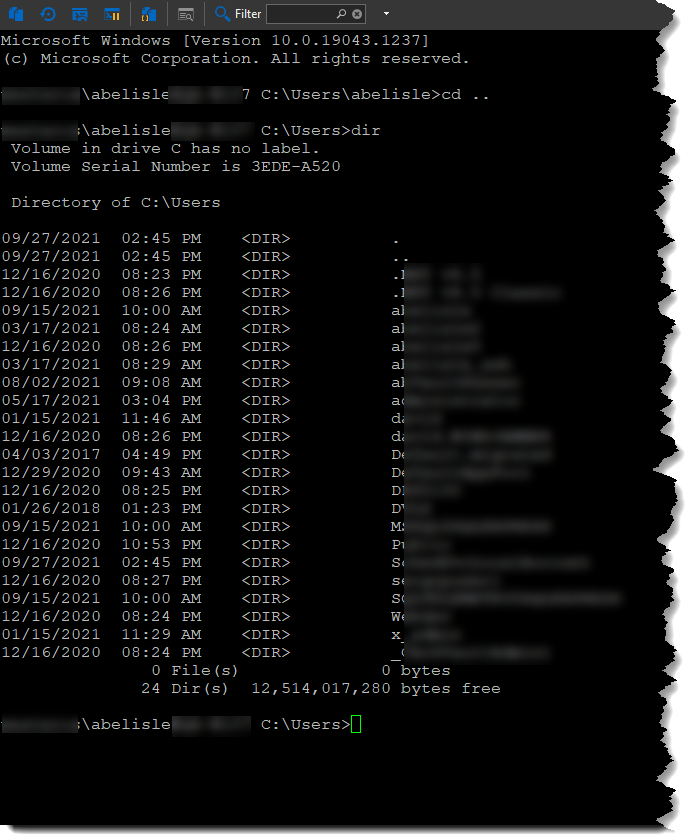
I hope this helps.
Best regards,
Alex Belisle
2021-10-04_15-36-20.png
2021-10-04_15-33-35.png
Hello Alex,
many thank's, that exactly what i'm looking for!
Did you now if the timeout are working and how that one works?
Many thank's
R.
Edit: add how timeout works.
Hello,
Glad I could help. The timeout value is to prevent the system from "scanning" for ever your input / output of ther terminal.
In other words, let's say you'd be expecting a string, and it comes up after several minutes, it could trigger unwanted commands...
I hope this helps!
Best regards,
Alex Belisle
Hello Alex,
Thanks for the info.
Do I understand this correctly, so it is rather not a timeout but a timer for the refresh "Refresh Cycle"?
greetings
R,
Hello,
Well, not quite...
When the Timeout is reached, RDM will stop waiting for the "expected prompt".
I'm not sure what would me the implication or involvement of the Refresh Cycle in that context.
Thanks!
Best regards,
Alex Belisle
This is great info! I'd like to go a step further. Can it be set to wait for user input, say the "enter" key? I have a script that runs a few mount commands, then does a df -h. I'd like it to display that, let me read it, then when I hit enter it'll exit the session. I can't imagine this is not possible, I just can't find the command.
Brad
Hello thanks for reaching out,
Would leaving the "Automatic {ENTER} after command" unticked help?
Thanks for letting me know.
Best regards,
Alex Belisle
Well, yes and no. I have several command that I want to run automatically. I only want it to stop before the last command so I can see the output before it automatically types "exit". That "automatic enter" is for ALL the commands. Is there a way to have it stop and wait only once? Is there a "Pause" command that I can set a duration on?
Hello,
Thanks for your patience. I had to perform a few tests on my side.
I came to the conclusion that RDM does not provide an universal pause.
Would adding a sleep 60 seconds work?
You can can cancel a sleep by typing ctrl+c.
Thanks for letting me know if this helps.
Best regards,
Alex Belisle
Hello again,
following this article, https://docs.devolutions.net/kb/remote-desktop-manager/how-to-articles/entry-types-events-settings/event-auto-typing-macro/ I found out that {DELAY} would do the "universal pause"...
But this leads me to other questions, I think you're attempting to run a script, but you're doing it using a SSH entry. Have you looked into other options like using Typing macros or Macro/Script/tools script entries?
Thanks for letting me know.
Best regards,
Alex Belisle
I haven't looked into macros at all. My "script" is very simple, In most cases I need to log in, run an unmount command, then a mount command, do a df -h to make sure it worked and then exit. I need it to pause after the df so I can see the result. Would that be scriptable? If so is there a tutorial somewhere? Or - would the {DELAY} work with that?
Thanks for your help!
Brad
Hello,
The {DELAY} would give you time, by default duration of the delay command is 300ms, you can stack them up if needed.
But I'm still wondering why can't you just disable the Exit command you you'll have all the time needed...
Thoughts?
Best regards,
Alex Belisle
You mentioned using scripts and macros. I love this idea. I don't see a way to save a macro into a session so that it'll run automatically when I launch the session. Is there a way to do that?
But I'm still wondering why can't you just disable the Exit command you you'll have all the time needed...
I have tried this - but that leaves me with having to type "exit" each time to end the session. Trying if possible to make this all point and click with very few key strokes. I know - it's only 4 letters.... :)
Hello!
There is a way to show all or predefined macros created beforehand directly in SSH Sessions.
I think this video will demonstrate quite well what we have in mind: https://youtu.be/paw_cyY8BoQ?t=1754
Let me know if this helps!
Best regards,
Alex Belisle