Import from Windows 10's Remote Desktop app (.rdb)
1 vote
Windows has a store client for Remote Desktop, which backs up the entire group of connections as an rdb file. The individual machines and groups are saved as .model files, which are just renamed xml files.
Are there plans to allow for import of those? Or at least, does anyone know of a way to convert between something to something else so that I can pull them across? I've got about 150 machines. I'd rather not go one by one typing everything in if I can help it!
All Comments (23)
Hello,
I was not aware of this file format. Do you have the link to the store for the exact Remote Desktop App you use?
Regards
David Hervieux
https://www.microsoft.com/en-us/p/microsoft-remote-desktop/9wzdncrfj3ps?activetab=pivot:overviewtab
It's the Microsoft Store Windows 10 Remote Desktop app/client. It allows for backing up the whole set of machines as a remote desktop backup (rdb) file.
I can send samples if needed.
Hello,
That would be so much easier if you have a sample. Thank you very much
Regards
David Hervieux
I've attached a sample rdb files based on my current backup file. It gives you a sense of what is in it. There can be countless credentials, groups, and connections. The files are basically xml files, that can be opened in any text editor.
RemoteDesktopWorkspace_sample.rdb
If it's something you can add to the devolutions remote desktop manager, I can beta test the code to make sure it works!
😁
Hello,
That would be so much easier if you have a sample. Thank you very much
Regards
David, is that something your team has been able to look at, at all? Just curious, because it's still my pain point, being unable to move hundreds of connections over into Devolutions RDM.
Thanks!
Hello,
Unfortunately it's not done yet but I will raise the priority.
Regards
David Hervieux

Hello,
Unfortunately it's not done yet but I will raise the priority.
Regards
Hello,
Has there been any update with this issue? I too would like to import from an .rdb file.
Hello,
Nothing new for now.
Regards,
Hubert Mireault
Has there been any update on this?
I have about 30 different systems across 4 different Windows Store Remote Desktop apps and I would like to be able to bring them all over in one go. The Devolutions RD manager was recommended to me specifically for it's ability to bulk import systems!
If not, I can just do it manually. It would be a great feature to have though 🙂
Hello,
Unfortunately this has not made it as a feature yet as it hadn't gained much traction and we had other priorities. I will reopen the ticket on our end and we'll see if it's something we can squeeze into our next roadmap.
Regards,
Hubert Mireault
Hello,
Unfortunately this has not made it as a feature yet as it hadn't gained much traction and we had other priorities. I will reopen the ticket on our end and we'll see if it's something we can squeeze into our next roadmap.
Regards,
Thank you for the fast reply @Hubert!
A few of my coworkers have used Microsoft Remote Desktop from the Microsoft Store ( https://apps.microsoft.com/detail/9WZDNCRFJ3PS?hl=en-us&gl=US&ocid=pdpshare ) as at least a UI if not exactly a feature update to the RDCMan app. There are some drawbacks to it (or else I wouldn't be switching to a new app!) but I am trying to push the shared features of RDM to some coworkers and this would make it even easier.
Have a great day,
Ben Merryman, Control System Developer https://www.interstates.com/
e8a6e7a7-3af1-4ea1-ae5f-b7d0efa6a957.png
Hello,
I have moved this thread into the feature request section.
Regards
David Hervieux
Hello,
I'm implementing this feature, and it will be in the next major update. Unfortunately, I'm unable to read the saved password. This will be a limitation until I find a way to extract it. It's stored in the Windows Credential Manager, but I can't find a way to access it even with the target name.
Regards
David Hervieux
Hi David,
No worries from me on the credential carry over. It would be nice to at least get the user name but I understand if that is a bit out of scope for now.
Thanks!
Hello,
Thank you for your answer. The good news is that I'm able to import the username:
I know where it's saved but I can't find a way to read it (Sorry my Windows is in French):
Regards
David Hervieux
576c7208-50c4-4b79-a516-4590b48fbf8f.png
ae2e6608-1a28-4eb0-a542-33b93599cbe4.png
Came here to say thanks!
just a heads up no way to import from main import have to go deep into import settings to find rdb option
Hello @bandit8623
Not sure to understand why it's deep: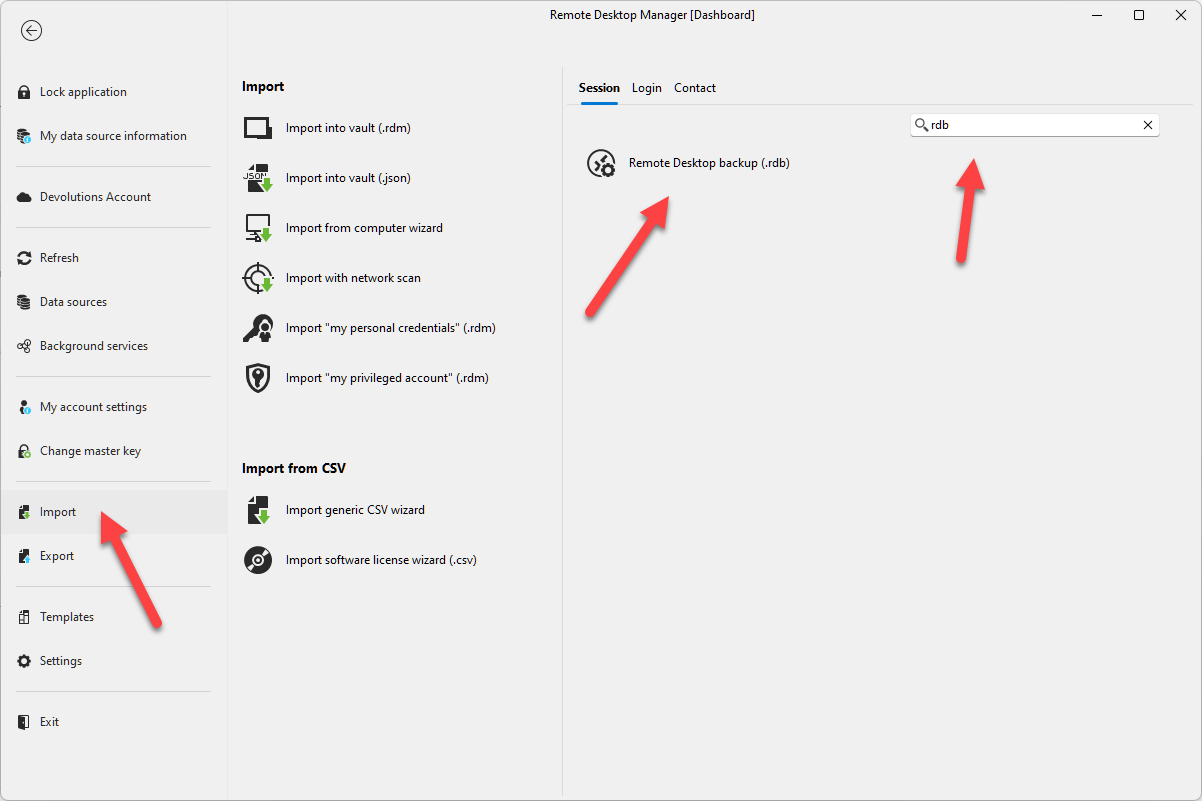
Regards
David Hervieux
6c5e158f-fa5c-4a07-bbd7-ac45a5ec4fbb.png
Hello @bandit8623
Not sure to understand why it's deep:
Regards
@David Hervieux
When you first open the app the import rdb isn't an option on the main setup. So i almost gave up on using this as a replacement. But after doing what you mentioned above it is an option.
Thx
Oh, I see.
Thank you for the clarification. I'm sure we can improve the onboarding wizard.
Regards
David Hervieux
Oh, I see.
Thank you for the clarification. I'm sure we can improve the onboarding wizard.
Regards
@David Hervieux
Thanks for making this even possible!
App works great and saved me a ton of time recreating all my RDP sessions from scratch.
Cheers
Hello,
I have the same problem, would like to import from an .RDB backup file. But I don't see the option available in my import menu.
Below I send the print when I try to find the rdb import option
53311653-cbec-4d22-8df0-53153feae190.png
Hello,
Is it possible that you are not using the latest version? Perhaps look for RDCMan instead.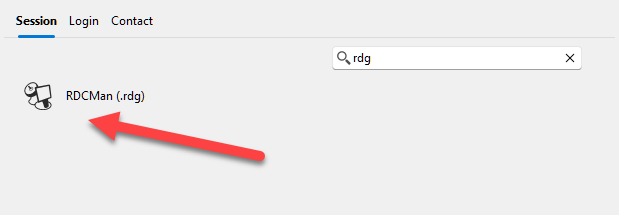
David Hervieux
043cbcf5-7d03-4ed2-a4e8-1cd017df80f8.png